Pioneer S-DV585 manual 請使用附贈的視頻連接線。, 將另一端連接至接收器的視頻輸出插孔。, 連接電源線。1, 連接電源線至接收器上的 Ac 插座。連接電 源線至牆壁插座。

Page 72

02接線

注意

這些揚聲器端子均帶有危險電壓。為避免在 連接或脫離揚聲器線時發生電擊危險,在觸 摸任何未絕緣部分之前,請先將電源線插頭 拔離。

請勿將隨機附贈以外的揚聲器連接至本系 統上。

請勿將隨附的揚聲器連接至不是隨本系統 一起附上的擴大器。連接至其他的擴大器上 可能會導致故障或起火。

連接插頭後,輕拉連接線以確定連接線端牢 牢連接至端子。連接不良可能造成雜訊和聲 音中斷。

如果連接線的線路正好退出端子外,讓線路 互相接觸,造成擴大器過大的額外負載。這 樣可能導致擴大器停止作用,甚至可能損壞 擴大器。

4將其中一端連接至您的電視機的視頻輸入 插孔。

請使用附贈的視頻連接線。

5將另一端連接至接收器的視頻輸出插孔。

本機配備防拷技術。請勿使用影音連接線透 過錄放影機將本機連接至您的電視機,否則 本機的影像無法在您的電視機上正常顯示。

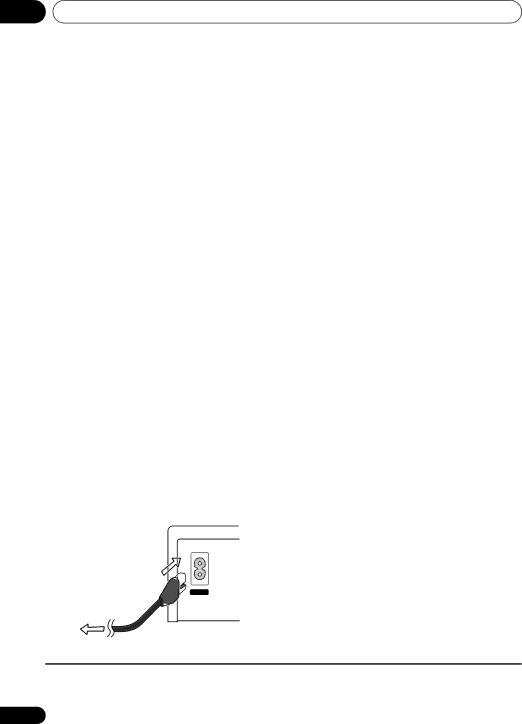
6連接電源線。1

連接電源線至接收器上的 AC 插座。連接電 源線至牆壁插座。

AC IN

AC

附註

1 請勿使用非隨本系統所附贈的其他電源線。

隨機附贈的電源線除了連接本系統外,請勿做其他用途。

12

Zhtw

Image 72
Contents HTZ180DVD  Class Laser Product Operating EnvironmentContents Audio Settings and Video Adjust menus Initial Settings menuUSB playback and Recording Singing karaokeSpeaker Setup Guide Speaker Setup Guide ChapterHome theater sound setup Preparing the speakersSpeaker Setup Guide Wall mounting the speakersPreparation only for the HTZ181DVD Before mountingAdditional notes on speaker placement PrecautionsAttaching the brackets only for the HTZ180/181DVD Connecting up Connecting up ChapterBasic connections Assemble the AM loop antennaConnecting up Black Red + Color-coded wireConnect the AM and FM antennas.1 Connect each speakerSecure the speaker wire When connecting the center speakersWhen connections are completed, secure CableConnect the power cord.1 Connect the other end to the video output of the receiverThese speaker terminals carry Connect one end to a video input on yourControls and displays Controls and displays ChapterFront panel DisplayRemote control Controls and displaysKHz/MHz Character displayPutting the batteries in the remote control Tune page 20 PresetThese control Pioneer flat screen TVs.1 Tuner controls Class page 21 SHIFT+T.EDITUsing the remote control Setting Speaker Layout Setting the channel levelsPress SHIFT+SETUP Getting startedUsing the on-screen displays Getting startedPlaying discs Adjust the volume Basic playback controlsResume and Last Memory DVD-Video disc menusListening to the radio Improving poor FM receptionReducing AM reception noise Memorizing stationsSetting the sleep timer Listening to station presetsListening to other sources Auto listening mode Selecting Listening modeListening to your system Listening to your system ChapterUsing Front Surround Listening with headphonesAdjusting the bass and treble Using the SFC modesUsing the MP3 Expander Using the Voice Enhancer modeListening to your system Boosting the bass level Effective Sound for optimum soundDisc playback features Disc playback features ChapterFrame advance/frame reverse Scanning discsDisc playback features While the slideshow is running Pauses the slideshow or audio press again to restart Select a view optionUsing Playlists Programming playlistsUse /// and Enter to navigate Press Playlist 1, 2 orUsing repeat play Using random playLooping a section of a disc Listening to playlistsCreating a program list Searching a discOther functions available from the program menu Switching subtitles Switching camera anglesSwitching language/audio channels Zooming the screenUsing the USB interface USB playback and RecordingUSB playback and Recording Chapter Recording all the tracksUSB playback and Recording Recording specific tracksSinging karaoke Chapter Singing karaokeChanging the vocal mix Changing the backing trackAudio Settings and Video Adjust menus Audio Settings and Video Adjust menus ChapterAudio Settings menu Video Adjust menuInitial Settings menu Initial Settings menu ChapterUsing the Initial Settings menu Video Output settingsInitial Settings menu Language settingsInitial Settings menu Display settings Options settingsSpeakers settings Parental LockAbout DivX VOD content Setting/changing the Parental LockSetting/changing the Country/Area code Playing DivX VOD contentPress Home Menu and select ‘Initial Settings’ Speaker DistanceUse / to select a speaker Connecting auxiliary audio components For the connection diagram, see 1 aboveConnect using RCA pin-plug stereo cables Other connectionsConnecting using Hdmi Switching the Hdmi audio settingOther connections About progressive scan videoConnecting external antennas Resetting the Hdmi connectionWireless music play About HdmiRemote control operation Connecting Optional BluetoothOther operations.1 Clearing Pairing5 Press Adapter Port and to switch to BT Audio input modeWhen CLR OK appears, press Enter Nodevice appears in the system displayKuro Link Setup Setting the Kuro Link modePower cords to the wall socket Making the Kuro Link connectionsBefore using synchronization Synchronized amp modeSynchronized amp mode operations Canceling synchronized amp modeDisc/content format playback compatibility Additional informationAdditional information Chapter Disc compatibility tableAdditional information About DVD+R/DVD+RW compatibilityAbout DivX DivX video compatibilityUsing and taking care of discs About WMVAbout MPEG-4 AAC About WMAInstallation and maintenance TV system setting Additional information Screen sizes and disc formatsWidescreen TV users Standard TV usersSetting the Key Lock Frequency step settingDimming the Display Additional information Troubleshooting GeneralProblem Remedy DVD/CD/Video CD playerTuner USB connectionHdmi connection Bluetooth connection Error MessagesResetting the system Using the language code listUse / to select ALL Init then press Init OK is displayedAdditional information Language code list Country/Area code listLanguage Language code letter, Language code Country/Area, Country/Area code, Country/Area code letterAdditional information Specifications DV180 Speaker systemDV585 Speaker system DV280T Speaker systemDV282T Speaker system Front/surround speakersDV5SW Speaker system ĬĶġ ġ ġĬĴĶġ ĬĵIJġ ġ ġĬĺĶġ ĹĶġĦœʼn Page 將揚聲器安裝在牆上 基本接線方式設定揚聲器擺設 USB 播放與錄製 08 卡拉 OK 伴唱「音頻設置」選單 碟片/內容格式播放相容性揚聲器安裝指南 01 揚聲器安裝指南家庭劇院音效設置 準備揚聲器揚聲器安裝指南 將揚聲器安裝在牆上僅適用於 HTZ181DVD 機型的準備工作 安裝前揚聲器擺設之其他注意事項 僅適用於安裝 HTZ180/181DVD 機型 的托架HTZ280DVD 機型)。 基本接線方式 M 至 2.7 m。02 接線 固定揚聲器線。 連接中置揚聲器時,以相同方法將 Y 接線 兩端連接至兩個中置揚聲器。選擇用托架組裝的 4 點、3 點或 2 點擺設時, 請依照下列的步驟 b。 2連接接收器上的每一個揚聲器端子。請使用附贈的視頻連接線。 將另一端連接至接收器的視頻輸出插孔。連接電源線。1 連接電源線至接收器上的 AC 插座。連接電 源線至牆壁插座。控制與顯示 控制與顯示前面板 顯示幕03 控制與顯示 遙控器下圖顯示 HTZ280/282DVD-AP。 安裝遙控器電池 運用遙控器 遙控器的使用範圍為距離前面板感應器的 7 m 內,而且在 30 內。開始操作 開始操作設定揚聲器擺設 設置聲道音量04 開始操作 使用在屏顯示畫面 (OSD)碟片播放 ±10 dB。基本播放控制 恢復播放及最終記憶播放DVD-Video 碟片選單 VCD/ 超級 VCD PBC 選單聆聽收音機 改善 FM 接收不良抑制 AM 接收雜訊 記憶電台聆聽其他來源 設置睡眠定時器收聽預設電台 按下 ENTER。聆聽您的系統 05 聆聽您的系統選取聆聽模式 自動聆聽模式聆聽您的系統 使用前置環繞聲以立體聲聆聽 以耳機聆聽05 聆聽您的系統 加重低音音量 使用 MP3 擴展器使用聲音強化器模式 有效聲音 (用於取得最佳聲音)碟片播放功能 06 碟片播放功能 使用 「碟片導向」瀏覽 DVD 或 VCD/ 超級 VCD 碟片DVD-R/-RW 碟片中的原始標題。 Original Title (標題)- 指 VR 模式碟片播放功能 可利用 「碟片導向」功能瀏覽 使用播放清單製作播放清單 在聆聽 WMA/MP3/MPEG-4 AAC 的播放聆聽播放清單使用重複播放功能 循環播放碟片某個片段使用隨機播放功能 清除播放清單上的檔案按下 Home Menu 並選取 「Play Mode 建立程序編輯清單搜索碟片 程序編輯選單中其他可用的功能切換字幕 放大畫面切換拍攝角度 顯示碟片資訊USB 播放與錄製 USB 播放與錄製使用 USB 介面 錄製所有曲目錄製特定曲目 卡拉 OK 伴唱 卡拉 OK 伴唱變更混聲效果 變更背景音樂音頻設置及視頻調整選單 09 音頻設置及視頻調整選單「音頻設置」選單 「視頻調整」選單「Initial Settings (初始設置)」。 「初始設置」選單按下 DVD/CD。 停止播放時,按下 Home Menu 並選取10 「初始設置」選單 選取 「Password (密碼)」。 成人鎖定預設等級:Off (關);預設密碼:無; 預設國家/地區代碼:us 使用數字鍵輸入四位數字密碼,然後按下10 「初始設置」選單 關於 DivX VOD 內容播放 DivX VOD 內容 「初始設置」選單 揚聲器距離其他接線 11 其他接線 11 章連接輔助音頻設備 連接LINE 1 Audio in 插孔至外部播放設其他接線 使用色差視頻輸出連接 使用 Hdmi 連接Hdmi 連接端子。 ENTER。11 其他接線 連接外部天線用於無線享受音樂的 關於 Hdmi其他接線 遙控器操作您可以使用任一個 0000/1234/8888 PIN 請按 SHIFT+SETUP,選取 BT SETUP,然 後按 ENTER。 顯示 CLR OK 時,請按 ENTER。12 章 連接 Kuro Link設定 Kuro Link 模式 使用同步化之前 同步化擴大模式同步化擴大模式操作 取消同步化擴大模式其他資訊 碟片相容性參照表關於 DualDisc 的播放 13 其他資訊 關於 DVD+R/DVD+RW 相容性關於 DivX DivX 視頻相容性其他資訊 碟片的使用及維護關於 WMV 關於 MPEG-4 AAC安裝及保養 DVD Video 適用地區其他資訊 畫面大小及碟片格式 電視系統設置寬螢幕電視使用者 標準電視使用者設定按鍵鎖 (Key Lock) 頻率間距設置調暗顯示幕亮度 Change 閃爍時,請按 ENTER。其他資訊 故障排除 一般問題DVD/CD/VCD 播放器 DVD 與 CD 音量有明顯CD-ROM 碟片無法辨 無法辨識 DVD-ROM 碟調諧器 USB 連接Hdmi 連接 錯誤訊息 Kuro Link 不作用。在未選取 DVD/CD 和按下 SHIFT+USB REC 時顯示。 重新設置系統 使用語言代碼清單選取 「Other Language (其他語言)」。 使用/ 以選取字母代碼或是數字代碼。 使用 / 以選取字母代碼或是數字代碼。13 其他資訊 語言代碼清單 國家/地區代碼清單Esperanto eo 語言 (語言字母代碼)、語言代碼DV180 揚聲器系統 DV585 揚聲器系統 揚聲器連接線 托架 固定托架DV280T 揚聲器系統 前置/環繞揚聲器DV282T 揚聲器系統 DV5SW 揚聲器系統最大輸入功率 100 W 大型防滑墊Pioneer Corporation

S-DV5SW, XV-DV180, S-DV180, XV-DV181, S-DV280T specifications

Pioneer has long been recognized for its commitment to delivering high-quality audio and video solutions, and its lineup of DVD players, including the S-DV282T, XV-DV282, S-DV585, XV-DV282AP, and S-DV280T, is no exception. Each of these models boasts impressive features and technologies aimed at providing an enhanced multimedia experience for users.

The S-DV282T and XV-DV282 are both versatile DVD players capable of playing a variety of disc formats, including DVD, VCD, and CD, making them a perfect addition to any home entertainment system. They support multiple playback modes and formats, allowing users to enjoy their favorite movies and music without limitations. With their user-friendly interfaces and intuitive remote controls, navigating through menus and selecting media is convenient and straightforward.

One standout feature across these models is their ability to upscale standard DVDs to near HD quality. This upscaling technology enhances the viewing experience by producing sharper images and richer colors, ideal for viewers with larger screens. The S-DV585, among these models, takes it a step further with its built-in progressive scan feature, which minimizes flicker and enhances detail in video playback.

Moreover, the XV-DV282AP and S-DV280T introduce advanced audio decoding capabilities, supporting formats like Dolby Digital and DTS. This ensures that users experience high-quality sound alongside their visuals, immersing them in a comprehensive entertainment experience. Additionally, these models come with multiple audio outputs, including digital coaxial outputs, allowing users to connect to external audio systems for an enriched auditory experience.

Designed with user convenience in mind, these players often feature various connectivity options, such as USB ports and compatibility with external hard drives. This allows users to enjoy their digital media collections effortlessly. The sleek, modern designs of these DVD players also complement contemporary home decor while retaining functionality.

In summary, Pioneer’s S-DV282T, XV-DV282, S-DV585, XV-DV282AP, and S-DV280T DVD players provide an array of features suited for any multimedia enthusiast. Their commitment to picture and sound quality, user-friendly interfaces, and versatility in playback formats make them a valuable addition to any home entertainment system.