175
w
: HDR (High Dynamic Range) Shooting
N
5
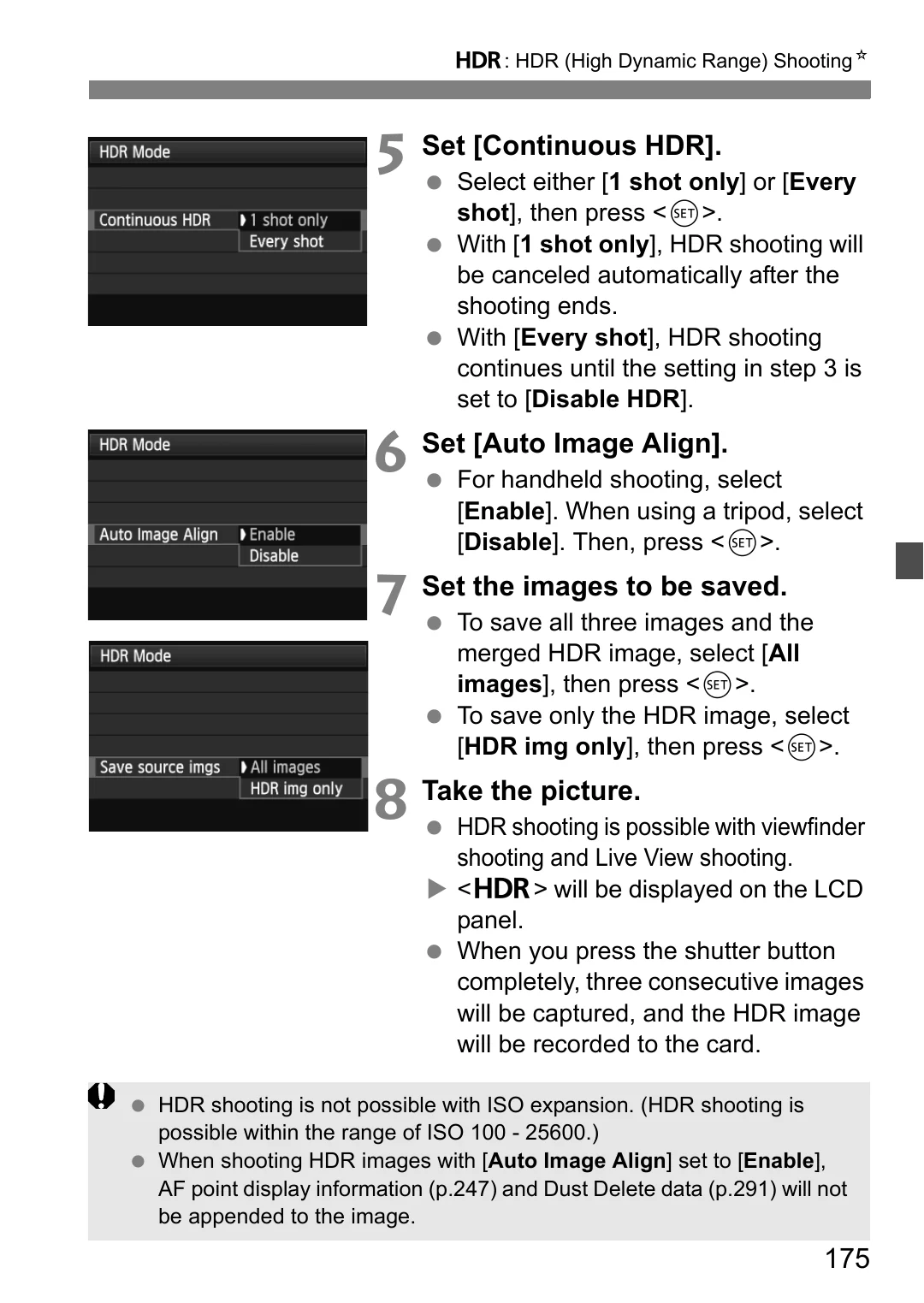
Set [Continuous HDR].
Select either [
1 shot only
] or [
Every
shot
], then press <
0
>.
With [
1 shot only
], HDR shooting will
be canceled automatically after the
shooting ends.
With [
Every shot
], HDR shooting
continues until the setting in step 3 is
set to [
Disable HDR
].
6
Set [Auto Image Align].
For handheld shooting, select
[
Enable
]. When using a tripod, select
[
Disable
]. Then, press <
0
>.
7
Set the images to be saved.
To save all three images and the
merged HDR image, select [
All
images
], then press <
0
>.
To save only the HDR image, select
[
HDR img only
], then press <
0
>.
8
Take the picture.
HDR shooting is possible with viewfinder
shooting and Live View shooting.
X
<
w
> will be displayed on the LCD
panel.
When you press the shutter button
completely, three consecutive images
will be captured, and the HDR image
will be recorded to the card.
HDR shooting is not possible with ISO expansion. (HDR shooting is
possible within the range of ISO 100 - 25600.)
When shooting HDR images with [
Auto Image Align
] set to [
Enable
],
AF point display information (p.247) and Dust Delete data (p.291) will not
be appended to the image.