331
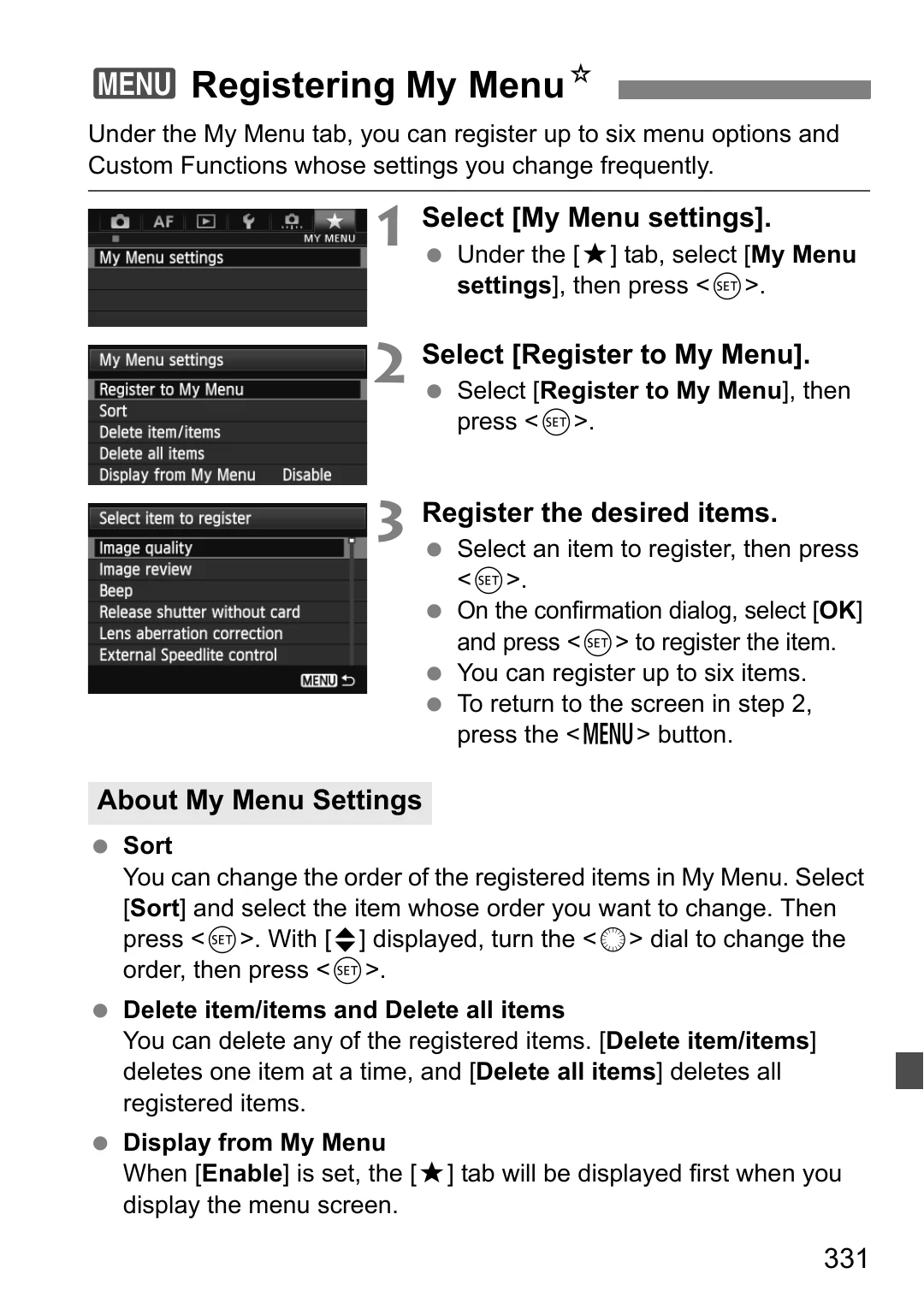
Under the My Menu tab, you can register up to six menu options and
Custom Functions whose settings you change frequently.
1
Select [My Menu settings].
Under the [
9
] tab, select [
My Menu
settings
], then press <
0
>.
2
Select [Register to My Menu].
Select [
Register to My Menu
], then
press <
0
>.
3
Register the desired items.
Select an item to register, then press
<
0
>.
On the confirmation dialog, select [
OK
]
and press <
0
> to register the item.
You can register up to six items.
To return to the screen in step 2,
press the <
M
> button.
Sort
You can change the order of the registered items in My Menu. Select
[
Sort
] and select the item whose order you want to change. Then
press <
0
>. With [
z
] displayed, turn the <
5
> dial to change the
order, then press <
0
>.
Delete item/items and Delete all items
You can delete any of the registered items. [
Delete item/items
]
deletes one item at a time, and [
Delete all items
] deletes all
registered items.
Display from My Menu
When [
Enable
] is set, the [
9
] tab will be displayed first when you
display the menu screen.
3
Registering My Menu
N