2H769am0.qxd 9/13/2001 11:41 AM Page 2

D e l l ™ I n s p i r o n ™

1

2

3

4

1

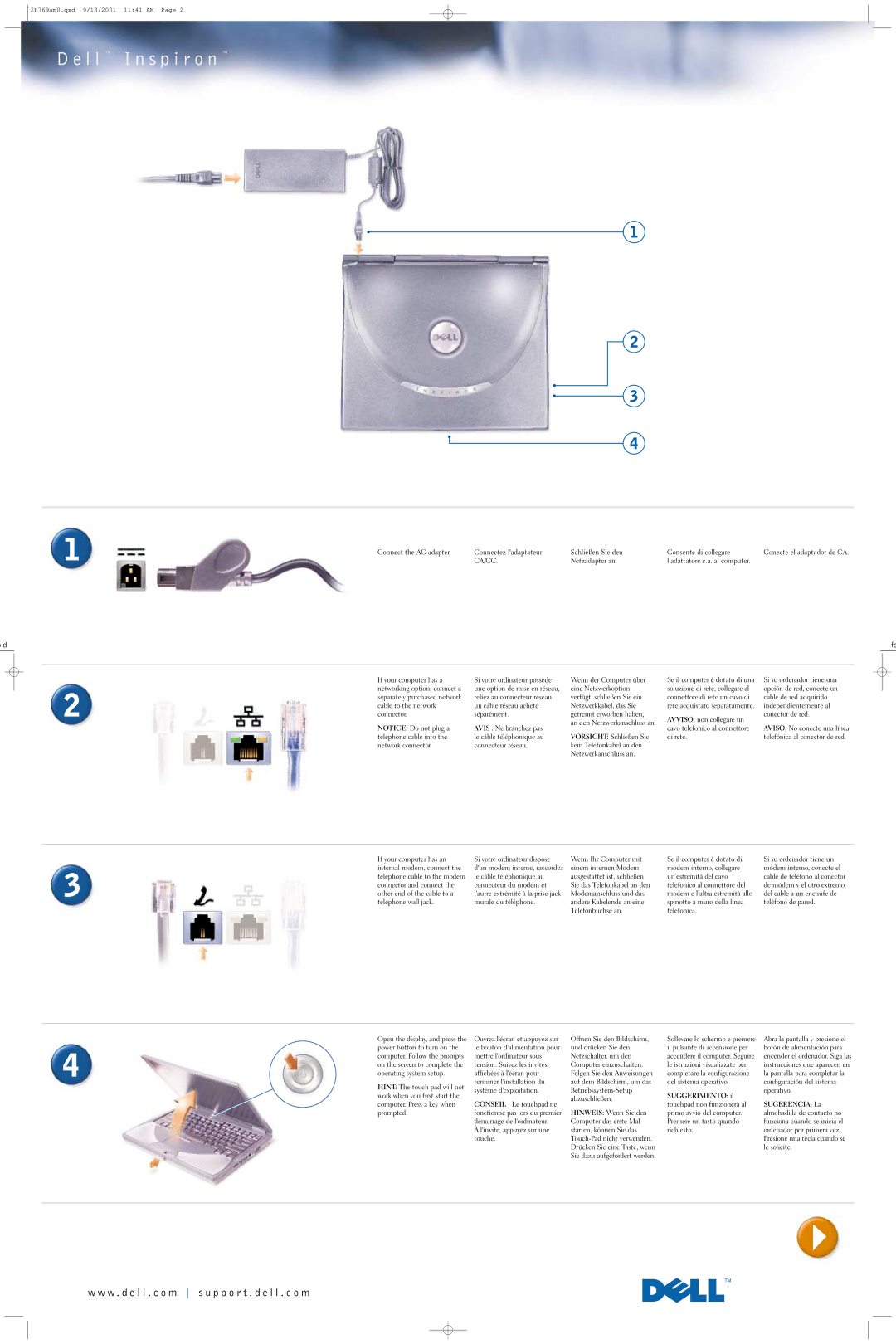
Connect the AC adapter.

Connectez l'adaptateur

Schließen Sie den

Consente di collegare

Conecte el adaptador de CA.


CA/CC.

Netzadapter an.

l’adattatore c.a. al computer.


old

fo

If your computer has a networking option, connect a

2separately purchased network cable to the network connector.

NOTICE: Do not plug a telephone cable into the network connector.

Si votre ordinateur possède une option de mise en réseau, reliez au connecteur réseau un câble réseau acheté séparément.

AVIS : Ne branchez pas le câble téléphonique au connecteur réseau.

Wenn der Computer über eine Netzwerkoption verfügt, schließen Sie ein Netzwerkkabel, das Sie getrennt erworben haben, an den Netzwerkanschluss an.

VORSICHT: Schließen Sie kein Telefonkabel an den Netzwerkanschluss an.

Se il computer è dotato di una soluzione di rete, collegare al connettore di rete un cavo di rete acquistato separatamente.

AVVISO: non collegare un cavo telefonico al connettore di rete.

Si su ordenador tiene una opción de red, conecte un cable de red adquirido independientemente al conector de red.

AVISO: No conecte una línea telefónica al conector de red.

If your computer has an internal modem, connect the

3telephone cable to the modem connector and connect the other end of the cable to a telephone wall jack.

Si votre ordinateur dispose d'un modem interne, raccordez le câble téléphonique au connecteur du modem et l'autre extrémité à la prise jack murale du téléphone.

Wenn Ihr Computer mit einem internen Modem ausgestattet ist, schließen Sie das Telefonkabel an den Modemanschluss und das andere Kabelende an eine Telefonbuchse an.

Se il computer è dotato di modem interno, collegare un’estremità del cavo telefonico al connettore del modem e l’altra estremità allo spinotto a muro della linea telefonica.

Si su ordenador tiene un módem interno, conecte el cable de teléfono al conector de módem y el otro extremo del cable a un enchufe de teléfono de pared.

Open the display, and press the power button to turn on the

4computer. Follow the prompts on the screen to complete the operating system setup.

HINT: The touch pad will not work when you first start the computer. Press a key when prompted.

Ouvrez l'écran et appuyez sur le bouton d'alimentation pour mettre l'ordinateur sous tension. Suivez les invites affichées à l'écran pour terminer l'installation du système d'exploitation.

CONSEIL : Le touchpad ne fonctionne pas lors du premier démarrage de l'ordinateur.

Àl'invite, appuyez sur une touche.

Öffnen Sie den Bildschirm, und drücken Sie den Netzschalter, um den Computer einzuschalten. Folgen Sie den Anweisungen auf dem Bildschirm, um das Betriebssystem-Setup abzuschließen.

HINWEIS: Wenn Sie den Computer das erste Mal starten, können Sie das Touch-Pad nicht verwenden. Drücken Sie eine Taste, wenn Sie dazu aufgefordert werden.

Sollevare lo schermo e premere il pulsante di accensione per accendere il computer. Seguire le istruzioni visualizzate per completare la configurazione del sistema operativo.

SUGGERIMENTO: il touchpad non funzionerà al primo avvio del computer. Premere un tasto quando richiesto.

Abra la pantalla y presione el botón de alimentación para encender el ordenador. Siga las instrucciones que aparecen en la pantalla para completar la configuración del sistema operativo.

SUGERENCIA: La almohadilla de contacto no funciona cuando se inicia el ordenador por primera vez. Presione una tecla cuando se le solicite.

w w w . d e l l . c o m s u p p o r t . d e l l . c o m

Page 2
Image 2
Dell 2H769 manual L l I n s p i r o n, Old

2H769 specifications

The Dell 2H769 is a versatile and robust laptop designed to meet the needs of both business professionals and casual users. Known for its reliability and performance, this model incorporates several advanced technologies and characteristics that enhance the user experience.

At the heart of the Dell 2H769 is its powerful processor options, which typically include Intel's latest generations, ensuring smooth multitasking and processing capabilities. The laptop is equipped with ample RAM, often starting at 8GB and expandable, allowing users to run resource-intensive applications seamlessly. This combination of processor and memory makes the 2H769 suitable for a wide range of tasks, from everyday computing to more demanding applications like graphic design or video editing.

One of the standout features of the Dell 2H769 is its impressive display. The laptop often comes with a Full HD (1920 x 1080) resolution, providing vibrant colors and sharp images. Whether users are working on detailed spreadsheets or enjoying multimedia content, the clarity and quality of the screen enhance productivity and entertainment experiences. Additionally, many configurations support touch-enabled displays, adding an interactive element that is beneficial for presentations and creative work.

In terms of storage, the 2H769 typically offers a variety of options, including SSDs for faster boot and load times, which lead to a more efficient work process. With storage capacities ranging from 256GB to 1TB, users can choose the configuration that best suits their data needs. The inclusion of USB-C and Thunderbolt ports enhances connectivity options, making it easy to connect peripherals and external displays.

Security features are also a significant consideration in the Dell 2H769. Equipped with biometric fingerprint readers and privacy shutters for cameras, the laptop ensures that user data remains secure. This is particularly important for professionals who handle sensitive information.

Moreover, the Dell 2H769 boasts a long-lasting battery life, making it ideal for professionals who need to work on the go. With efficient power management technologies, users can rely on this laptop to keep functioning throughout their busy day without the constant need for recharging.

In conclusion, the Dell 2H769 is a feature-rich laptop that combines performance, portability, and security, making it an excellent choice for a diverse range of users. Whether in a corporate environment or for personal use, the 2H769 holds its ground as a reliable tool for productivity and entertainment.