1
1
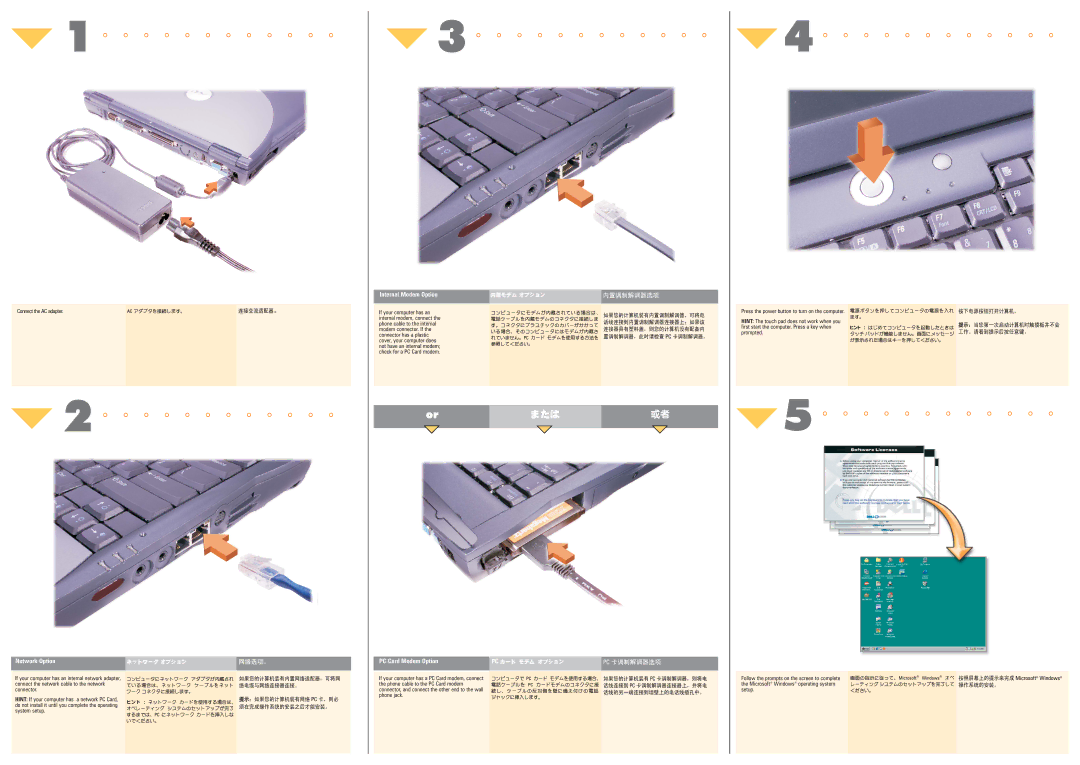
Connect the AC adapter.
 2
2
Network Option
If your computer has an internal network adapter, connect the network cable to the network connector.
HINT: If your computer has a network PC Card, do not install it until you complete the operating system setup.
 3
3
Internal Modem Option
If your computer has an internal modem, connect the phone cable to the internal modem connector. If the connector has a plastic cover, your computer does not have an internal modem; check for a PC Card modem.
or
PC Card Modem Option
If your computer has a PC Card modem, connect the phone cable to the PC Card modem connector, and connect the other end to the wall phone jack.
 4
4
Press the power button to turn on the computer.
HINT: The touch pad does not work when you first start the computer. Press a key when prompted.
 5
5
Follow the prompts on the screen to complete the Microsoft® Windows® operating system setup.