e̼Ì
Quick Tour
1. gbNXeBbN
2. gbNXeBbN{^
3. ^b`pbh
4. ^b`pbh{^
5. fBAxC
6. I[fBIRlN^
7. TVoÍpSrfIRlN^
8. fRlN^
9. foCXANZX^Xe[^X 2
CWP[^
3
10.üÍ^oÍRlN^
11.ACA_v^RlN^
12.ÔOü[g
13.ZL eBP[uXbg
14.PCJ[hXbg
1
4
9 |
8
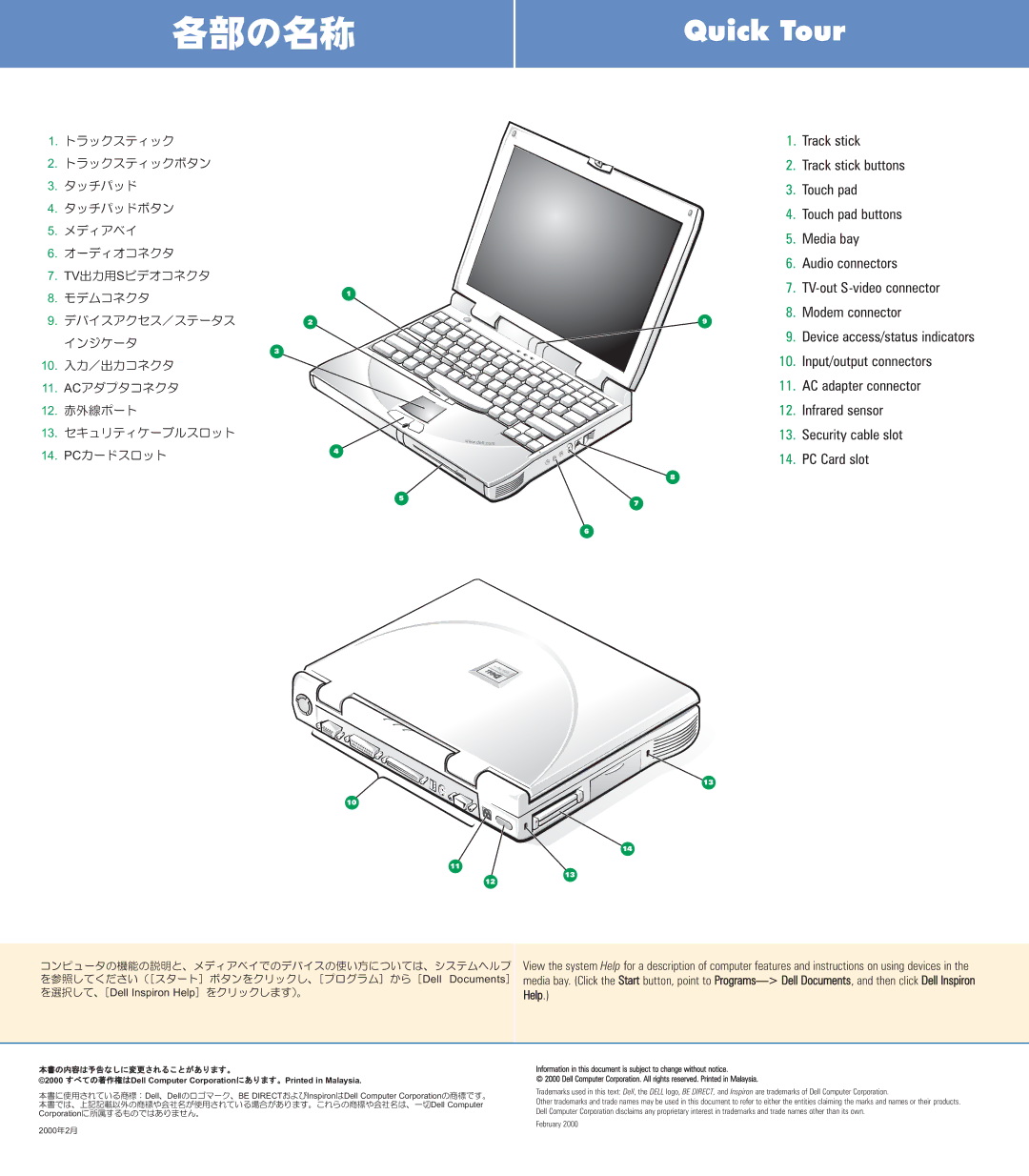
1.Track stick
2.Track stick buttons
3.Touch pad
4.Touch pad buttons
5.Media bay
6.Audio connectors
7.
8.Modem connector
9.Device access/status indicators
10.Input/output connectors
11.AC adapter connector
12.Infrared sensor
13.Security cable slot
14.PC Card slot
5 7
7
6
10
13
14
11
13
12
Rs [^Ì@\Ìà¾ÆAfBAxCÅÌfoCXÌg¢ûÉ¢ÄÍAVXewv
ðQƵľ³¢imX^[gn{^ðNbNµAmvOn©çmDell Documentsn
ðIðµÄAmDell Inspiron HelpnðNbNµÜ·jB
View the system Help for a description of computer features and instructions on using devices in the media bay. (Click the Start button, point to Programs> Dell Documents, and then click Dell Inspiron
Help.)
{ÌàeÍ\ȵÉÏX³êé±Æª èÜ·B
©2000 ·×ÄÌì ÍDell Computer CorporationÉ èÜ·BPrinted in Malaysia.
{Égp³êÄ¢é¤WFDellADellÌS}[NABE DIRECT¨æÑInspironÍDell Computer Corporation̤WÅ·B {ÅÍAãLLÚÈO̤Wâïмªgp³êÄ¢éêª èÜ·B±êç̤WâïмÍAêØDell Computer CorporationÉ®·éàÌÅÍ èܹñB
2000N2
Information in this document is subject to change without notice.
© 2000 Dell Computer Corporation. All rights reserved. Printed in Malaysia.
Trademarks used in this text: Dell, the DELL logo, BE DIRECT, and Inspiron are trademarks of Dell Computer Corporation.
Other trademarks and trade names may be used in this document to refer to either the entities claiming the marks and names or their products. Dell Computer Corporation disclaims any proprietary interest in trademarks and trade names other than its own.
February 2000