St’jms Cokw SawicO ManUd
Product Oesct’iptkm
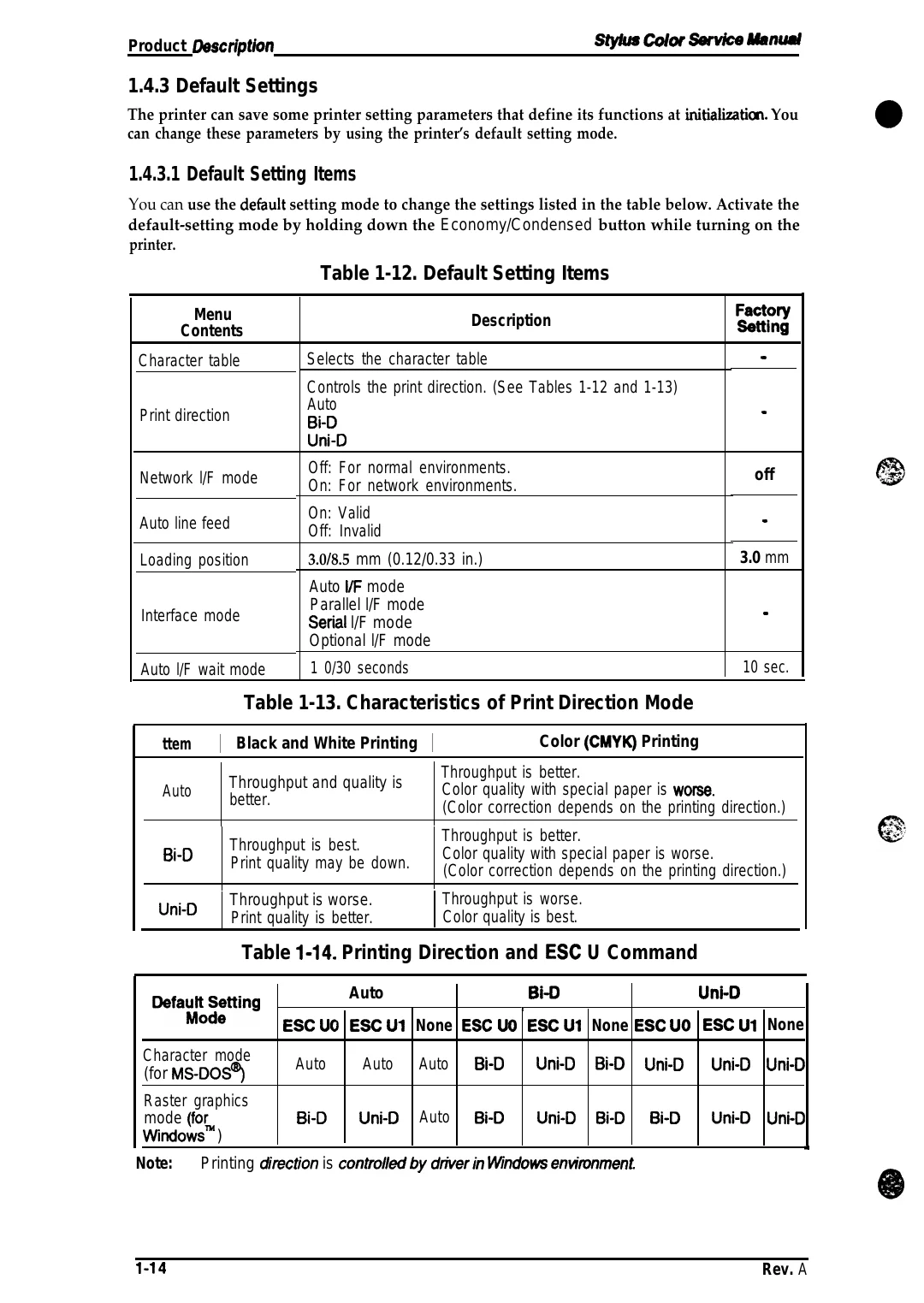
1.4.3 Default Settings
The printer can save some printer setting parameters that define its functions at initializatkn. You
can change these parameters by using the printer’s default setting mode.
e
1.4.3.1 Default Setting Items
You can use the det%ult setting mode to change the settings listed in the table below. Activate the
default-setting mode by holding down the Economy/Condensed button while turning on the
printer.
Table 1-12. Default Setting Items
Menu
Contents
mct31111
Description
Character table
Selects the character table
.
Print direction
Controls the print direction. (See Tables 1-12 and 1-13)
Auto
Bi-D
Uni-D
.
Network l/F mode
Off: For normal environments.
On: For network environments.
off
Auto line feed
On: Valid
Off: Invalid
.
Loading position
3.0/8.5 mm (0.12/0.33 in.)
Interface mode
Auto I/F mode
Parallel l/F mode
Seriil l/F mode
Optional l/F mode
.
Auto l/F wait mode
1 0/30 seconds
10 sec.
3.0 mm
Table 1-13. Characteristics of Print Direction Mode
ttem
I Black and White Printing I
Color (CMYK) Printing
Auto
Throughput and quality is
better.
Throughput is better.
Color quality with special paper is WOW.
(Color correction depends on the printing direction.)
Bi-D
Throughput is best.
Print quality may be down.
Throughput is better.
Color quality with special paper is worse.
(Color correction depends on the printing direction.)
Uni-D
Throughput is worse.
Print quality is better.
Throughput is worse.
Color quality is best.
Table 1-14. Printing Direction and ESC U Command
Auto
l)efaul:~~tting
r
Bi-O
Uni-D
ESC UO ESC U1 None ESC UO ESC UI None ESC UO ESC U1 None
Character mode
(for MS-DOS?
Auto
Auto
Auto
Bi-D
Uni-D
Bi-D
Uni-D
Uni-D
Uni-D
Raster graphics
mode (fo~
Vvindows )
Bi-D
Uni-D
Auto
Bi-D
Uni-D
Bi-D
Bi-D
Uni-D
Uni-D
Note:
1-14
*
Printing ditection is controlkdby dtiverin IMndows entimnment
Rev. A