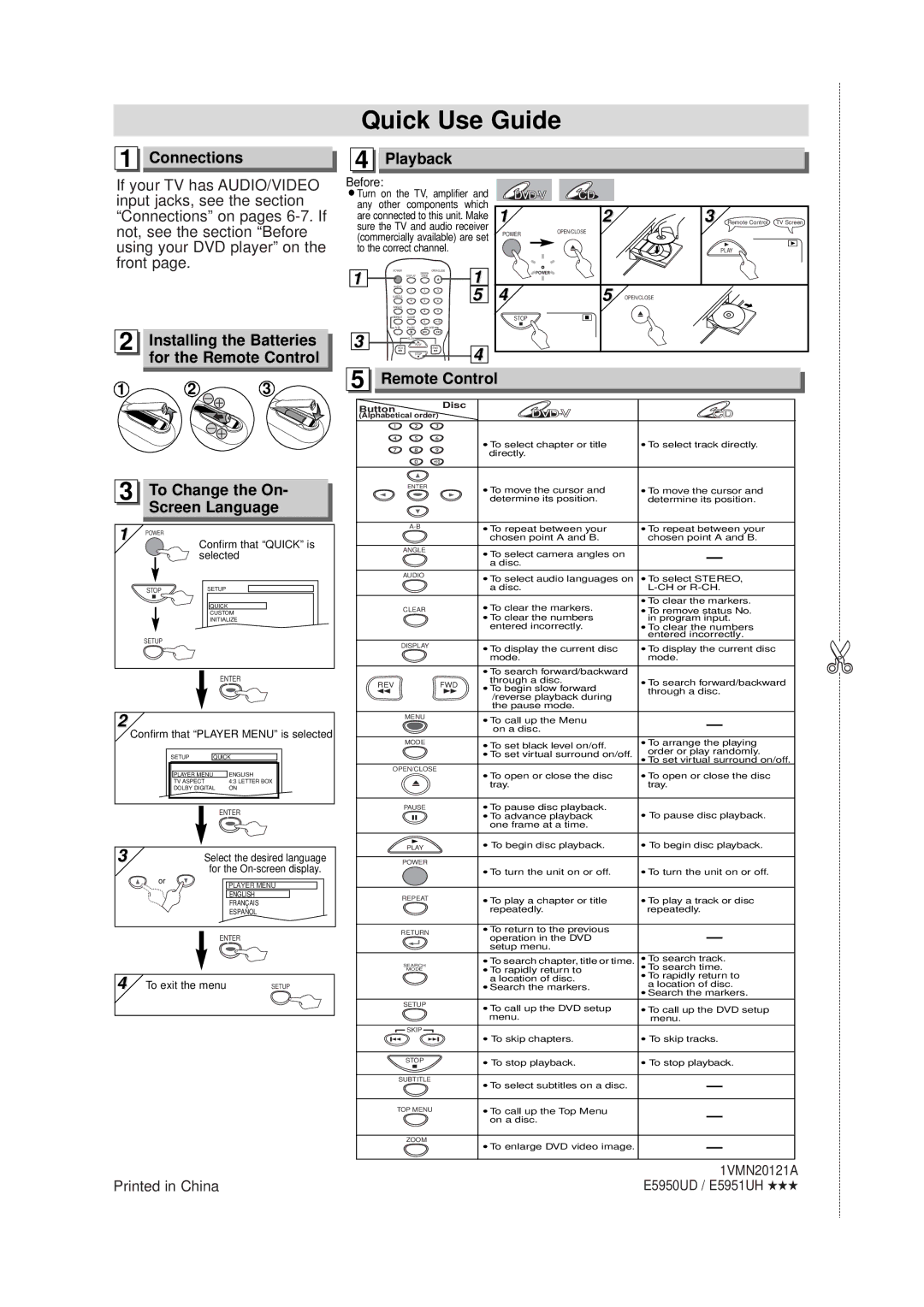
Quick Use Guide
1 Connections | 4 Playback |
If your TV has AUDIO/VIDEO input jacks, see the section “Connections” on pages
2 Installing the Batteries |
for the Remote Control |
Before:
¡Turn on the TV, amplifier and any other components which are connected to this unit. Make sure the TV and audio receiver (commercially available) are set to the correct channel.
1 | POWER |
| SEARCH | OPEN/CLOSE | 1 |
|
|
| |||
| DISPLAY | MODE |
| ||
AUDIO |
|
|
| ||
|
| 1 | 2 | 3 | 5 |
| SUBTITLE |
|
|
| |
|
| 4 | 5 | 6 | |
| ANGLE |
|
|
|
|
|
| 7 | 8 | 9 |
|
| REPEAT | CLEAR |
|
|
|
|
|
| 0 | +10 |
|
| PAUSE |
| SKIP |
| |
3 |
| SLOW |
|
|
|
| PLAY |
| 4 | ||
REV |
|
| FWD | ||
|
| STOP |
| ||
CD |
|
|
| |
1 | 2 | 3 | Remote Control | TV Screen |
POWER | OPEN/CLOSE |
|
|
|
|
|
|
| |
|
|
| PLAY |
|
POWER |
|
|
|
|
4 | 5 | OPEN/CLOSE |
|
|
STOP |
|
|
|
|
1 | 2 | 3 |
3 To Change the On- Screen Language
1 | POWER |
|
| Confirm that “QUICK” is | |
|
| selected |
| STOP | SETUP |
|
| QUICK |
|
| CUSTOM |
|
| INITIALIZE |
| SETUP |
|
|
| ENTER |
2 |
|
|
Confirm that “PLAYER MENU” is selected
SETUP | QUICK | |
PLAYER MENU |
| ENGLISH |
TV ASPECT |
| 4:3 LETTER BOX |
DOLBY DIGITAL | ON | |
ENTER
3 | Select the desired language | |
| for the | |
| or | PLAYER MENU |
|
| |
|
| ENGLISH |
|
| FRANÇAIS |
|
| ESPAÑOL |
| ENTER | |
4 | To exit the menu | SETUP |
5 Remote Control
Button |
|
| Disc |
| |
|
| CD | |||
(Alphabetical order) | |||||
1 | 2 | 3 |
|
| |
4 | 5 | 6 | •To select chapter or title | •To select track directly. | |
7 | 8 | 9 | |||
directly. |
| ||||
|
|
|
| ||
| 0 | +10 |
|
| |
| ENTER |
| •To move the cursor and | •To move the cursor and | |
|
|
| |||
|
|
| determine its position. | determine its position. | |
|
| •To repeat between your | •To repeat between your | ||
|
|
| chosen point A and B. | chosen point A and B. | |
| ANGLE |
| •To select camera angles on |
| |
|
|
|
| ||
|
|
| a disc. |
| |
| AUDIO |
| •To select audio languages on | •To select STEREO, | |
|
|
| |||
|
|
| a disc. | ||
|
|
| •To clear the markers. | •To clear the markers. | |
| CLEAR |
| •To remove status No. | ||
|
|
| •To clear the numbers | in program input. | |
|
|
| entered incorrectly. | •To clear the numbers | |
|
|
|
| entered incorrectly. | |
| DISPLAY |
| •To display the current disc | •To display the current disc | |
|
|
| |||
|
|
| mode. | mode. | |
•To search forward/backward
REV | FWD | through a disc. | •To search forward/backward | |||||||||
|
|
|
|
|
|
|
| •To begin slow forward |
| through a disc. | ||
|
|
|
|
|
|
|
| /reverse playback during |
| |||
|
|
|
|
|
|
|
|
|
|
|
| |
|
|
|
|
|
|
|
| the pause mode. |
|
|
|
|
| MENU |
| •To call up the Menu |
|
|
|
| |||||
|
|
|
|
|
|
|
|
|
|
|
| |
|
|
|
|
|
|
|
| on a disc. |
|
|
|
|
|
|
|
|
|
|
|
|
|
|
| ||
| MODE |
| •To set black level on/off. | • | To arrange the playing | |||||||
|
|
|
|
|
|
|
| •To set virtual surround on/off. |
| order or play randomly. | ||
|
|
|
|
|
|
|
| •To set virtual surround on/off. | ||||
OPEN/CLOSE |
| •To open or close the disc | •To open or close the disc | |||||||||
|
|
|
|
|
|
|
| |||||
|
|
|
|
|
|
|
| tray. |
| tray. | ||
|
|
|
|
|
|
|
|
| ||||
|
|
|
|
|
|
|
|
|
|
|
|
|
| PAUSE |
| •To pause disc playback. | • To pause disc playback. | ||||||||
|
|
|
|
|
|
|
| •To advance playback | ||||
|
|
|
|
|
|
|
| one frame at a time. |
|
|
|
|
|
|
|
|
|
|
|
|
|
| |||
|
| PLAY |
| • To begin disc playback. | • To begin disc playback. | |||||||
|
|
|
|
|
|
|
|
|
|
|
|
|
| POWER |
|
|
|
|
|
| |||||
|
|
|
|
|
|
|
| •To turn the unit on or off. | •To turn the unit on or off. | |||
|
|
|
|
|
|
|
|
|
| |||
| REPEAT |
| •To play a chapter or title | •To play a track or disc | ||||||||
|
|
|
|
|
|
|
| repeatedly. |
| repeatedly. | ||
|
|
|
|
|
|
|
|
|
|
|
|
|
| RETURN |
| •To return to the previous |
|
|
|
| |||||
|
| operation in the DVD |
|
|
|
| ||||||
|
|
|
|
|
|
|
|
|
|
|
| |
|
|
|
|
|
|
|
| setup menu. |
|
|
|
|
|
| MODE |
| •To search chapter, title or time. | •To search track. | |||||||
|
|
| • | •To search time. | ||||||||
| SEARCH |
|
|
|
|
|
| |||||
|
|
|
|
|
|
|
| To rapidly return to | •To rapidly return to | |||
|
|
|
|
|
|
|
| a location of disc. | ||||
|
|
|
|
|
|
|
|
| a location of disc. | |||
|
|
|
|
|
|
|
| •Search the markers. |
| |||
|
|
|
|
|
|
|
|
| •Search the markers. | |||
| SETUP |
| •To call up the DVD setup | •To call up the DVD setup | ||||||||
|
|
|
|
|
|
|
| |||||
|
|
|
|
|
|
|
| menu. |
| menu. | ||
|
| SKIP |
|
|
| • To skip chapters. | • To skip tracks. | |||||
|
|
|
| |||||||||
|
|
|
|
|
|
|
| |||||
|
|
|
|
|
|
|
|
|
| |||
|
| STOP |
| • To stop playback. | • To stop playback. | |||||||
|
|
|
|
|
|
|
|
|
|
|
|
|
| SUBTITLE |
| •To select subtitles on a disc. |
|
|
|
| |||||
|
|
|
|
|
|
|
|
|
|
|
| |
|
|
|
|
|
|
|
|
|
|
|
| |
|
|
|
|
|
|
|
|
|
|
|
|
|
| TOP MENU |
| •To call up the Top Menu |
|
|
|
| |||||
|
|
|
|
|
|
|
| on a disc. |
|
|
|
|
|
|
|
|
|
|
|
|
|
|
|
|
|
|
| ZOOM |
| •To enlarge DVD video image. |
|
|
|
| ||||
|
|
|
|
|
|
|
|
|
|
|
| |
|
|
|
|
|
|
|
|
|
|
|
| |
✄
| 1VMN20121A |
Printed in China | E5950UD / E5951UH ★★★ |