Feature

Function

Default Setting, if


applicable


DriveLock Security

Allows configuration of DriveLock Master and User

N/A


passwords


Power Menu


OS Power Management


∙

Runtime Power Management

Enables Runtime Power Management

Enabled


∙

Idle Power Savings

Increases OS Idle Power Savings

Extended


∙ Unique Sleep State Blink Rates

Assigns a unique LED blink pattern to S3, S4

Disabled


Hardware Power Management


∙

SATA Power Management

Permits the SATA bus to enter low power states when idle

Enabled


∙

S5 Maximum Power Savings

Minimizes power consumption of system while in S5 state.

Disabled


Also disables Wake on LAN functionality from S5 state.


Thermal

Adjusts minimum fan speed in Idle Mode

0


ADVANCED MENU


Power-On Options


∙

POST Mode

Selects between fast startup (QuickBoot) or self testing

QuickBoot


during power-on


∙

POST Messages

Displays messages during Power-On Self Test (POST)

Disabled


∙ Press the ESC key for Startup Menu

Displays the “Press Esc for startup menu” prompt

Enabled


∙

Option ROM Prompt

Displays the Option ROM prompt

Enabled


∙

After Power Loss

Specifies system state after power loss

Off


∙

POST Delay (in seconds)

Specifies the amount of delay to add during POST

None


∙ Remote Wakeup Boot Source

Specifies boot device after a remote wakeup event

Remote Server


∙ Factory Recovery Boot Support

Enables BIOS support for HP Backup and Recovery tools

Disabled


∙ Bypass F1 Prompt on Configuration

Allows system to boot without user input after

Disabled


Changes

configuration change (e.g. memory size change


BIOS Power-On

Specifies date and time when system automatically wakes

Disabled


from off


Onboard Devices

Adjusts settings for integrated IO ports

Serial Port A


IO=3F8h; IRQ=4


Serial Port B


IO=2F8h; IRQ=3


Bus Options


∙

PCE SERR# Generation

Enables PCI Device to Generate SERR#

Enabled


∙ PCI VGA Palette Snooping

Enables VGA Palette Registers Snooping

Disabled


Device Options


∙

Printer Mode

Specifies parallel port mode

EPP+ECP


∙ NumLock State at Power-On

Enables NumLock at boot

Off


∙

Integrated Video

Controls whether or not the integrated video controller is

Disabled


enabled


∙

Internal Speaker

Controls whether or not the internal speaker is enabled

Enabled


NIC Option ROM Download

Controls whether or not NIC option ROM is downloaded

Enabled


and executed. Some systems may need to disable this


feature to save NIC Option ROM address space for use by


other devices.


13

Page 13
Image 13
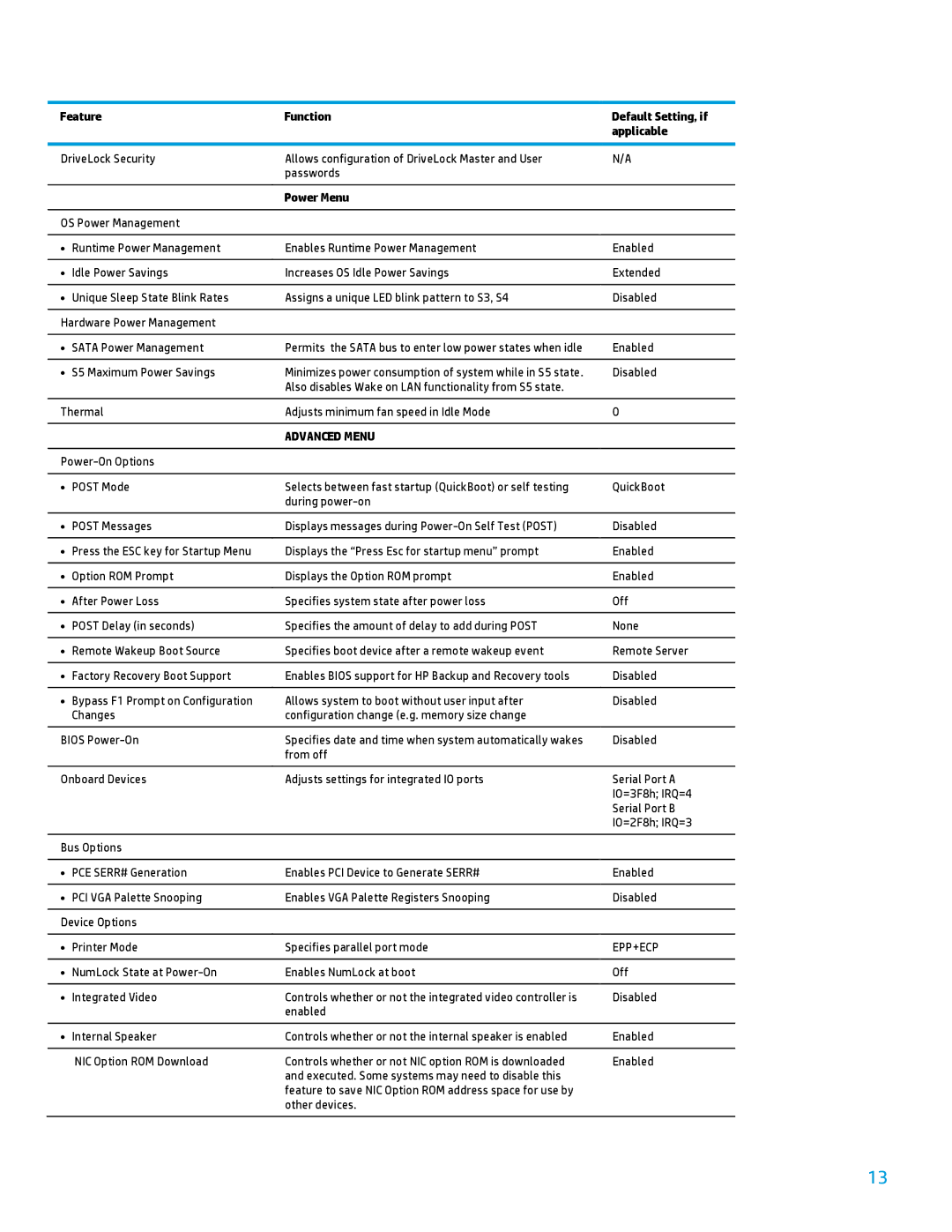
HP 600B manual Power Menu, Epp+Ecp

600B specifications

The HP 600B is a versatile desktop computer designed to meet the demands of both business users and professionals. Recognized for its compact design and robust performance, the HP 600B is particularly suited for a range of applications, from basic office tasks to more complex business processes.

One of the standout features of the HP 600B is its powerful Intel Core processor. Depending on the specific configuration, users can choose from various processor options, including Intel's third and fourth generation Core series. This ensures that the machine can handle multitasking efficiently, enabling users to run multiple applications simultaneously without experiencing slowdowns. Coupled with the processor is the option for ample RAM, which can typically be expanded up to 16GB, ensuring smooth operation even under heavy loads.

Storage is another strong point of the HP 600B. The system offers a range of storage options, including traditional hard disk drives (HDD) and solid-state drives (SSD). The inclusion of SSDs allows for significantly faster boot up times and quicker access to files and applications, enhancing overall productivity. Users can find configurations that accommodate various storage capacities, catering to individual data needs.

The HP 600B also emphasizes connectivity. It comes equipped with multiple USB ports, including USB 3.0 for high-speed data transfer, as well as HDMI and VGA ports for video output. This allows users to connect a variety of peripherals and displays, making it a flexible choice for different work environments. Integrated Ethernet and optional Wi-Fi capabilities ensure that users can maintain reliable internet connectivity.

Energy efficiency is an important characteristic of the HP 600B. The device is designed to meet Energy Star standards, reflecting HP’s commitment to sustainability. This not only reduces the environmental impact but also helps in lowering energy costs for users in the long run.

Furthermore, the HP 600B is built with manageability and security in mind. It includes advanced security features, such as BIOS protection and hardware-based features to safeguard sensitive data. This makes it an ideal choice for enterprises that require secure computing solutions.

In conclusion, the HP 600B is a well-rounded desktop computer that balances performance, efficiency, and security. With its range of configurations and solid build quality, it is an excellent option for businesses and professionals looking for a reliable and capable desktop solution.