
 or the text CRT/LCD.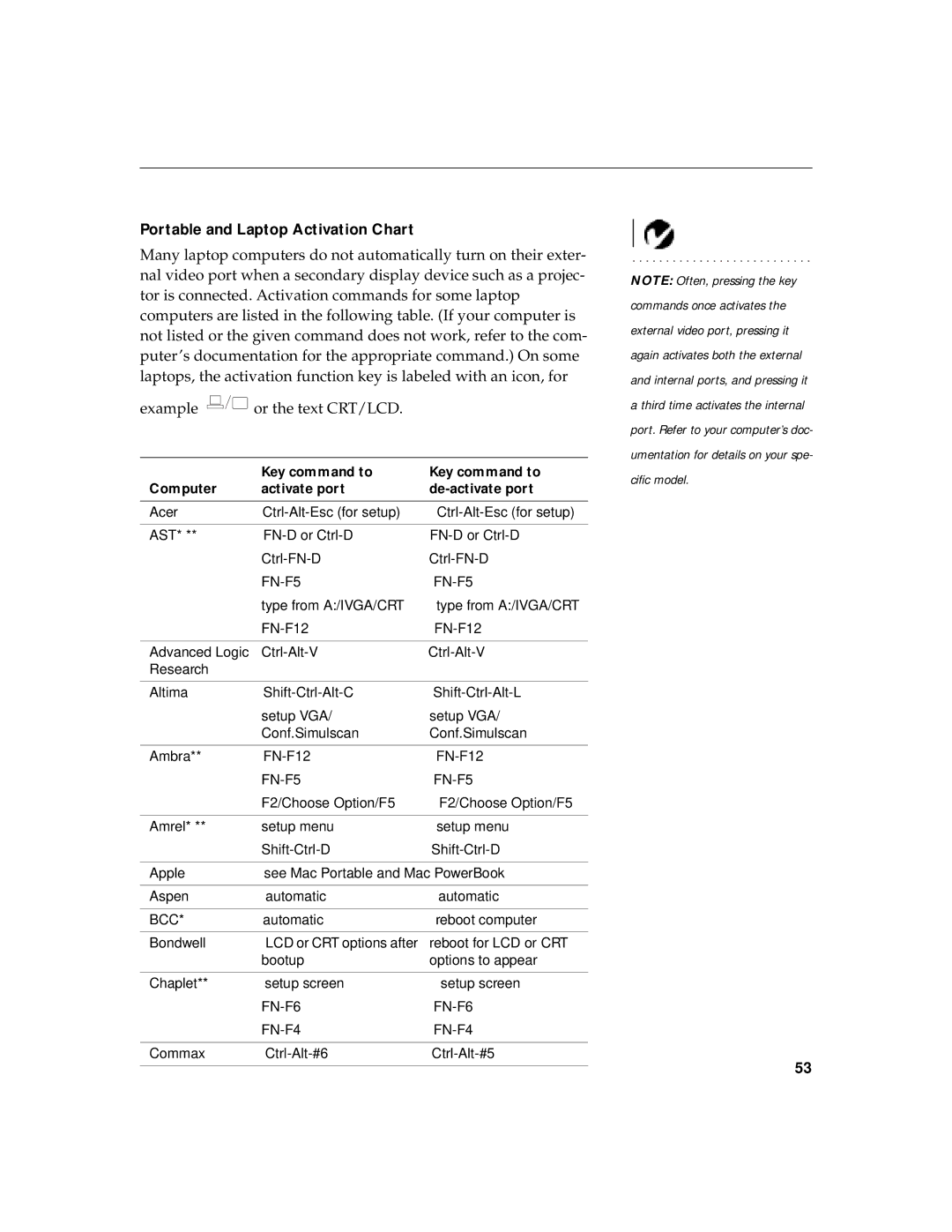
LP 730 specifications
The InFocus LP 730 is a high-performance LCD projector that caters to the needs of both business and educational environments. Known for its reliability and versatility, this projector is designed to deliver exceptional image quality and user-friendly functionality, making it a preferred choice among professionals.One of the main features of the InFocus LP 730 is its impressive brightness, measured at 2,500 ANSI lumens. This high lumen output ensures that images remain vivid and clear, even in well-lit rooms. Coupled with a contrast ratio of 2000:1, the LP 730 is capable of producing deep blacks and vibrant colors, making it suitable for video presentations as well as detailed data projections.
The LP 730 boasts a native resolution of XGA (1024 x 768), which is ideal for displaying text and images with sharp detail. This resolution is particularly beneficial for presentations that include charts, graphs, and intricate visuals. The projector also supports various video formats, including 720p and 1080p, allowing for flexible input options.
In terms of connectivity, the InFocus LP 730 offers a range of ports, including HDMI, VGA, and composite video inputs. This variety enables users to connect multiple devices such as laptops, DVD players, and gaming consoles, making it a versatile choice for different usage scenarios. The presence of a USB port allows for quick and easy presentations directly from a USB drive without the need for a computer.
The LP 730 incorporates advanced DLP technology, which enhances color accuracy and overall image quality. This technology ensures that colors remain true-to-life while minimizing the rainbow effect that some viewers may experience with traditional projectors. Additionally, the projector features a built-in speaker system, which delivers clear audio for presentations and videos, eliminating the need for external speakers in small to medium-sized rooms.
Portability is another strong point of the InFocus LP 730. With its compact and lightweight design, it can easily be transported between locations, making it a practical choice for traveling professionals or educators who need to present in multiple venues.
Finally, the projector is equipped with energy-efficient features, including a power-saving mode that reduces lamp brightness when the projector is idle. This not only prolongs the lifespan of the lamp but also lowers energy consumption costs.
In summary, the InFocus LP 730 is a robust and versatile projector that combines high brightness, excellent resolution, and a variety of connectivity options, making it an excellent choice for business and educational applications.