5 6
Page
Important Safety Precautions
Do not use a hand-held phone while driving
Important Safety Precautions
Do not disassemble the phone
Store the battery out of reach of children
Table of Contents
Memory
Table of Contents
Safety
105
Accessories
Index 109
Configuration
Welcome
Important Information
FCC Part 15 Class B
Compliance
Technical Details
Service
Designator Description Basic Air
Interface
Network
Technical Details
Bodily Contact During Operation
Vehicle-Mounted External Antenna Optional, if available
Phone Overview
Phone Overview
External LCD screen
Menus Overview
Settings
Menu Access
Battery
Installing the Battery
Removing the Battery
Getting Started with Your Phone
Battery Charge Level
Signal Strength
Turning the Phone On Off
Turning the Phone On
Settings Security
Getting Started with Your Phone
Screen Icons
Making Calls
When the phone rings or
Redialing Calls
Receiving Calls
Press twice to end the call
Lock Mode
Volume Quick Adjustment
Mute Function
Call Waiting
Caller ID
Speed Dialing
Text Input
Entering and Editing Information
Key Functions
Phone Numbers With Pauses
Mobile 1/ Home/ Work/ Mobile 2/ Fax
Press Left Soft Key Save
Use to highlight a Label and press
Contacts in Your Phone’s Memory
Press Contacts Press New Contact
Adding a Pause to an Existing Number
Press Menu
Accessing Options
Searching Your Phone’s Memory
Scrolling Through Your Contacts
Press Contacts
Making a Call From Your Phone’s Memory
Use to highlight the phone number Press to place the call
Press Call History
From Recent Calls Press Menu
Using Phone Menus
New Contact
Contact List
Allows you to add a new contact to your Contact List
Groups
Speed Dials
Contacts
My Name Card
Select Recipients Using Options
Messaging
New Text Message
Basics of Sending a Text Message
Using Options
General/ Family/ Friends
Add Templates/ Signature Save As Draft/ Templates
Normal
Message Icon Reference
Image/ Video/ Take Photo/ Record Video
Enhanced/ Normal Remove Image/Video/ Audio Slide
My Audios/ Default
Preview/ Add/ Go to/ Save
Inbox
Viewing Your Inbox
Press to send
Displaying the message icon
Sent
Key Options
Information Shows the messages Type, Priority, and Status
Press Use To highlight an
Drafts
Voicemail
Settings
Templates
Delete/Edit
All Messages
Text Message
Entry Mode
Picture Message
Call History
Delete All
Missed Calls
Edit Voicemail #
Call Timer
Received Calls
Dialed Calls
All Calls
Multimedia
Take Photo
Record Video
Gallery
Picture is stored
Record Time 15 sec/ 1 hour
Record Voice
Images
Save Set As Main Screen/ Front Screen
Set As/ Rename/ Delete
Videos
Audios
Allows you to choose video clips Press
Press Play to play the selected Video
Easyedge Apps
EasyedgeSM
Incoming Calls
Removing Applications
Easyedge Info
Press Managing Your easyedgeSM Applications
Music
Music
Bluetooth
Bluetooth QD ID B013111
Pairing a new Bluetooth
Paired Devices
Power
Press Use to select a setting, then press
My Visibility
On/ Off
Bluetooth Name
Bluetooth Info
Voice Command
Tools
Alarm Clock
Choice by using Then Press
My Menu
Once/ Daily/ Mon Fri/ Weekends
Calendar
Ez Tip Calc
Calculator
Viewing a Notepad Entry
Options Delete Edit
Options and Edit
World Clock
Stopwatch
Unit Converter
Allows you to convert units of measurement Press
Settings
Volume
Sound
Ringer
Service Alerts
Power On/Off Tone
Alert Type
Ring Only/ Vibrate Only/ Ring & Vib
Flip Tone
Display
Wallpaper
Banner
Backlight
Menu Style
Select Main Screen/ Front Screen
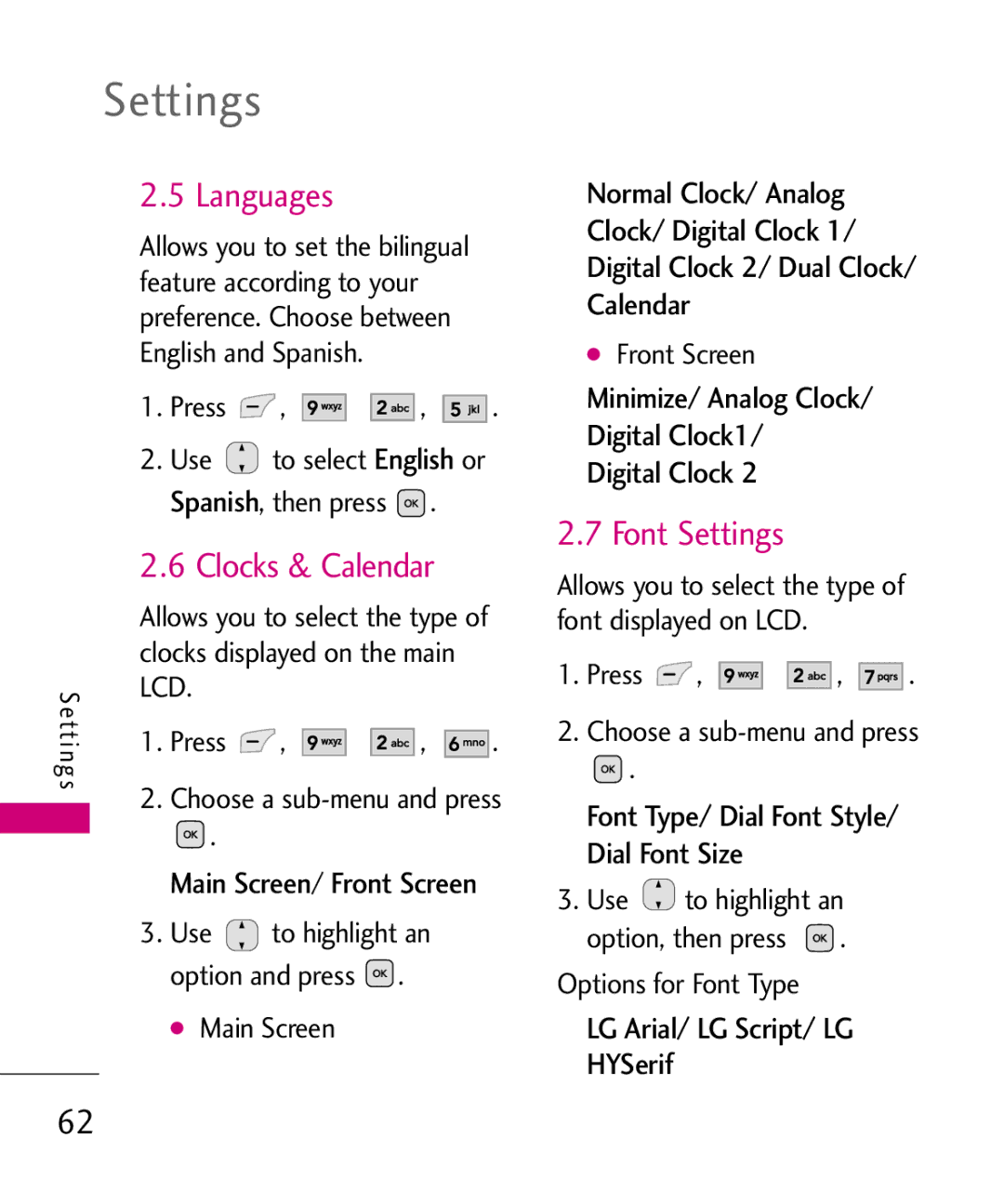
Languages
Font Settings
Clocks & Calendar
Color Schemes
Security
Lock Phone
Restrict Calls
Restrict Applications
Emergency #s
Press Restrict Calls
Reset Default
Change Lock Code
Call Settings
Answer Options
Auto Retry
One-Touch Dial
Auto Volume
Airplane Mode
TTY Mode
Check with your service provider for availability
USB Setting
Using UX565 USB Drive Mode
TTY Full/ TTY + Talk/ TTY + Hear/ TTY Off
USB Modem/ USB Mass Storage
When you open
On the phone, go to Menu
Once you are done transferring files, disconnect
System
Network
System Select
Set NAM
Memory
Touch Key Vibrate
Location
Location On/ E911 Only
Phone Info
My Number/ ESN/MEID Icon Glossary/ Version
Safety
TIA Safety Information
Signal
Antenna Care
Phone Operation
Tips on Efficient Operation
Driving
Electronic Devices
Safety
Persons with pacemakers
Hearing Aids
Other Medical Devices
Vehicles
Posted Facilities
Aircraft
Blasting Areas
Charger and Adapter Safety
Safety Information
Air Bag
Recharge the battery after
Unplug the power cord prior
Explosion, Shock, and Fire Hazards
Cause serious damage to your phone
General Notice
Avoiding hearing damage
Do not paint your phone
Using your phone safely
Using headsets safely
FDA Consumer Update
Do wireless phones pose a health hazard?
What is the FDAs role
Concerning the safety
Wireless phones?
Effects. Some studies have
Steps, including the following
About wireless phones
Power than do the wireless
Not the subject of the safety
Subject of this update?
Page
Combination of laboratory
Studies and epidemiological
Some of the data that are
One exists. Epidemiological
F e ty
Wireless phones is set at a
Consistent with the safety
From the tissues that absorb
Kg. The FCC limit is
Page
Demonstrate that wireless
Wireless phones?
Wireless phones, including
Scientific data do not
Where can I find additional information?
For additional information, please
Driver Safety Tips
F e ty
If necessary, suspend
Are distracting and even
Potential to divert your
Specific Absorption Rate
Consumer Information on SAR
You
Derived from
Organizations, the National
Both cases,
Recommendations were
Page
When worn on the body, as
Positions, they all meet
Exposure
Can be found under
101
Is the best way to evaluate it for your personal needs
Are likely to generate less
Than phones that are not
Two ratings
Http//tap.Gallaudet.edu/DigWireless.KS/DigWireless.htm
Accessories
Battery Charger
Vehicle Power Charger
Headset
Limited Warranty Statement
Transferable to any subsequent purchaser/end user
Limited Warranty Statement
106
Damage resulting from use of non-LG approved accessories
11Consumables such as fuses
HOW to GET Warranty Service
Tel -800-793-8896 or Fax
Calculator Calendar Call History Call Settings Call Timer
Charging the Battery
Index
Data Counter Delete All Dialed Calls Display Drafts
Power On/Off Tones Quick Access to Convenient Features
Making Calls
Messaging
Missed Calls
Battery TIA Safety Information Tools
Turning the Phone On and Off

 ,
, 


 ,
, 


 .
. to select English or Spanish, then press
  .
. .
. to highlight an option and press
  .
. ,
, 


 ,
, 


 .
. .
. to highlight an option, then press
  .
.