Getting to know your camera
Contents
EN-2
EN-3
Identification of features / Contents of camera
Number of images and battery life Using the SLB-1137D
Battery life & Number of shot Recording time
EN-5
Turning on the camera
When Using the Camera for the First Time
Setting up the language
Setting up the date, time and date type
Icons
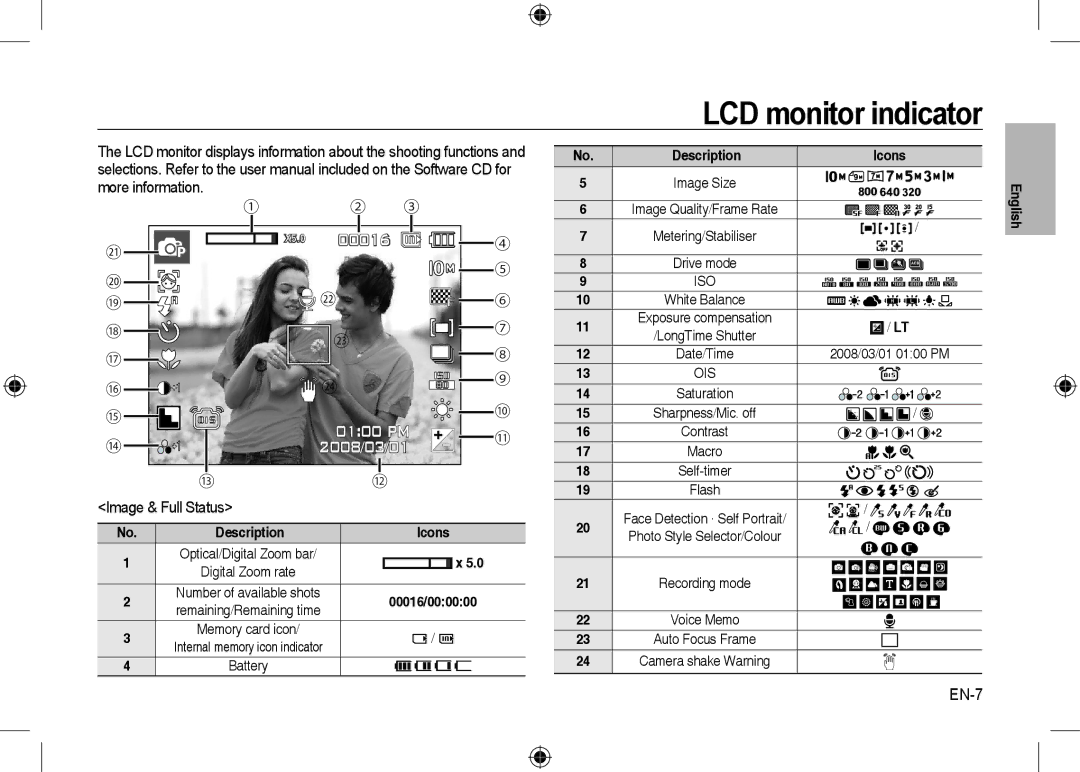
LCD monitor indicator
Image & Full Status
EN-7
EN-8
Mode Button
EN-9
How to take a picture
How to record a movie
Taking a picture
Protecting images
Playingback, Deleting and Protecting Images
Playingback the images
Delete button
Downloading files
Multimedia mode
EN-11
Text Viewer mode
PMP mode
EN-12
EN-13
EN-14
PC connection mode
Downloading images
System Requirements
EN-15
Specifications
EN-16
EN-17
Hungarian, Czech, Turkish
Correct Disposal of This Product
EN-18
Mac ANSI, Unicode UTF-16
EN-19
Correct disposal of batteries in this product
EN-20
Memo
Applicable dans les pays de l’Union Européen et aux
Découvrir votre appareil photo
Élimination de ce produit
Table des matières
Avertissement
Mise EN Garde
Dragonne Câble vidéo
Caractéristiques / Accessoires de l’appareil photo
Contenu de lemballage
Appareil photo
Et Téléobjectif à chaque prise de
Mode Auto, Taille de l’image 8M
Qualité d’image fine, Intervalle
Prise à prise 30Sec.Changer la
Droite
Paramétrage de la date, de l’heure et du type de date
Mettre l’appareil photo sous tension
Paramétrage de la langue
Image et état plein
Indicateur de lécran LCD
Pour la réalisation d’un film
Touche de mode
Assurez vous que le cadrage de l’image vous convient
Prendre une photo
Comment prendre une photo
Comment enregistrer un film
Protection des images
Lecture, Suppression et Protection des images
Lecture des images
Touche Supprimer
Télécharger des fichiers
Mode Multimedia
Enregistrez les fi chiers que vous souhaitez sur votre PC
Mode VISU. TXT
Mode PMP
Sélectionnez le mode multimédia souhaité
Mode PMP
Mode MP3
Télécharger des images
Mode de connexion au PC
Configuration système requise
Caractéristiques
Zoom optique avec enregistrement sonore
Dimension 800x592, 640x480
Clip vidéo
De la mémoire, 2 heures max
Source
Interface
Sortie vidéo NTSC, PAL choix par l’utilisateur
Adaptateur CC 4.2V, Fiche 20 broches
Elimination des batteries de ce produit
Contenido
Familiarización con su cámara fotográfica
Peligro
Familiarización con su cámara fotográfica
Precaución
Cable AV
Identificación de características/Contenido de la cámara
Gráfico del sistema
Por
15 FPS
30 FPS
Confi guración de la fecha, hora y tipo de fecha
Al utilizar la cámara por primera vez
Cómo encender la cámara
Confi guración del idioma
Advertencia de movimiento de La cámara
Indicador del monitor LCD
Imagen y estado completo
Iconos
Sacar una buena foto cuando hay poca luz
Botón de modo
Al pulsar por completo, se captura la imagen
Tomar una fotografía
Cómo tomar una fotografía
Cómo grabar una imagen en movimiento
Protección de imágenes
Reproducción, eliminación y protección de imágenes
Reproducción de las imágenes
Botón eliminar
Descargar archivos
Modo Multimedia
Modo PMP
Modo MP3
Modo Visor DE Texto
Modo Visor DE Texto
Modo MP3
Requisitos del sistema
Descarga de imágenes
Modo de conexión de PC
Especificaciones
Zoom óptico con grabación de sonido
Imagen en movimiento
La memoria, máx horas
Tamaño 800x592, 640x480
Especificación MP3
Texto
Eliminación correcta de las baterías de este producto
Nombre con extensión TXT, hasta 99999 páginas
Formato de