TECHNICAL SPECIFICATIONS
PORTS
•1 x ADSL Line port
•2 x Telephone Handset ports
•4 x LAN port
WAN / LAN INTERFACE |
|
• G.992.5 (ADSL2+) | • G.992.3 (ADSL2) |
• G.992.1 | • G.992.2 |
• ANSI T.413 Issue 2 | • ATM QoS (UBR, CBR, VBR) |
•Multiple PVCs (up to 8 supported)
•F4/F5 OAM
•AAL ATM Attributes - AAL5 • ATM UNI support: UNI3.1/4.0
ENCAPSULATION SUPPORT |
|
|
|
• PPPoE (RFC2516) | • RFC 2684 | (RFC 1483) | Bridge |
• PPPoA (RFC2364) | • RFC 2684 | (RFC 1483) | Route |
•Classical IP over ATM (RFC1577)
NETWORK SUPPORT
•Port forwarding rules for popular games / applications
•Static IP, dynamic RIP v1 / v2 routing support
•ARP
•IP/TCP/UDP/ICMP/ARP protocol support
•Network Address Translation (NAT)
•Port Address Translation (PAT)
• Port Triggering | • DMZ host |
•Transparent bridging & learning (IEEE 802.1d)
• IGMP Proxy | • IGMP Snooping |
•DHCP Server/Client/Relay • DNS
•Authentication protocols: CHAP / PAP
•VPN (IPSec / PPTP / L2TP)
•QoS: Layer 3
APPROVALS
•
VoIP |
|
• 2 x FXS, 1 X FXO | • SIP (RFC3261) |
• RTP (RFC1889) | • Codec: G.711, G.723.1, G.729ab |
•On/Off Hook Caller ID (ETSI based)
• Lifeline | • SDP (RFC2327) |
• Echo cancellation (G.168) | • Silence suppression |
SECURITY
•Stateful Packet Inspection (SPI)
• Packet fiiltering | • Traffiic conditioning |
•Denial of Service (DoS) protection
•
• HTTP proxy | • Parental control |
• Access Control | • IP fiiltering |
• MAC fiiltering |
|
WIRELESS
•IEEE 802.11g/54Mbps, backward compatible with 802.11b
•Encryption: 64,
•802.1x RADIUS Authentication
•Channels: 13 Channels (Australia)
•Data Rate: Up to 11g/54Mbps
•10, 25, 50, 100mW @ 22MHz channel bandwidth output power level adjustments
• MAC Address Filtering | • XPressTM Technology |
• 54gTM Mode | • |
• Wireless Bridge (WDS) | • AP Isolation |
LED
•Power, ADSL, Line, Phone1, Phone2, LAN 4, LAN 3, LAN2, LAN1, WLAN, Internet
DIMENSIONS
•227 mm (W) x 40 mm (H) x 144 mm (D)
MANAGEMENT SUPPORT
•
•‘root’, ‘support’, ‘user’ access rights
• SNMP agent | • SNTP client |
• ILMI 4.0 | • TR069 |
•Confiiguration backup and restoration
•Syslog (remote / local)
•Software upgrade via TFTP, FTP
•Local fiirmware upgrade via HTTP (Web GUI)
• Telnet | • SSH |
•Diagnostics report with troubleshooting help
ENVIRONMENTAL CONDITIONS
•Operating temperature 0 ~ 50°Celsius
•Relative humidity 5 ~ 90%
POWER SUPPLY
•External power adapter 240 VAC (input) ~ 15VDC/1.6A (output)
PACKAGE CONTENTS
•NB9WMAXX ADSL2+ Modem Router
•15VDC 1.6 Amps power supply
•
•
•Driver/Manual & Utility Software CD
•Quick Start Guide
NetComm NB9WMAXX
ADSL2+ Wireless Broadband Modem Router with VoIP Gateway
NB9WMAXX MAXX Modem Router
•Full featured ADSL2+ Broadband Modem
•Integrated VoIP Router and 11g/54Mbps Wireless Access Point
•Choose to call out on either your VoIP or Landline Telephone service
•QoS (Quality of Service) Layer 3 Router to maintain VoIP call quality
•2 FXS Ports, 1 FXO Port (Lifeline) and
•PSTN Lifeline support^
•
•Supports advanced Call services – Caller ID, Call
– service provider dependent†
•Simple Web based setup and confiiguration
•Xpress™ Wireless Booster functionality
^NetComm will not accept responsibility for failed Lifeline support.
†Note: The availability of some listed call features are dependent on the services supported by your VoIP service provider. Please consult them for further information.
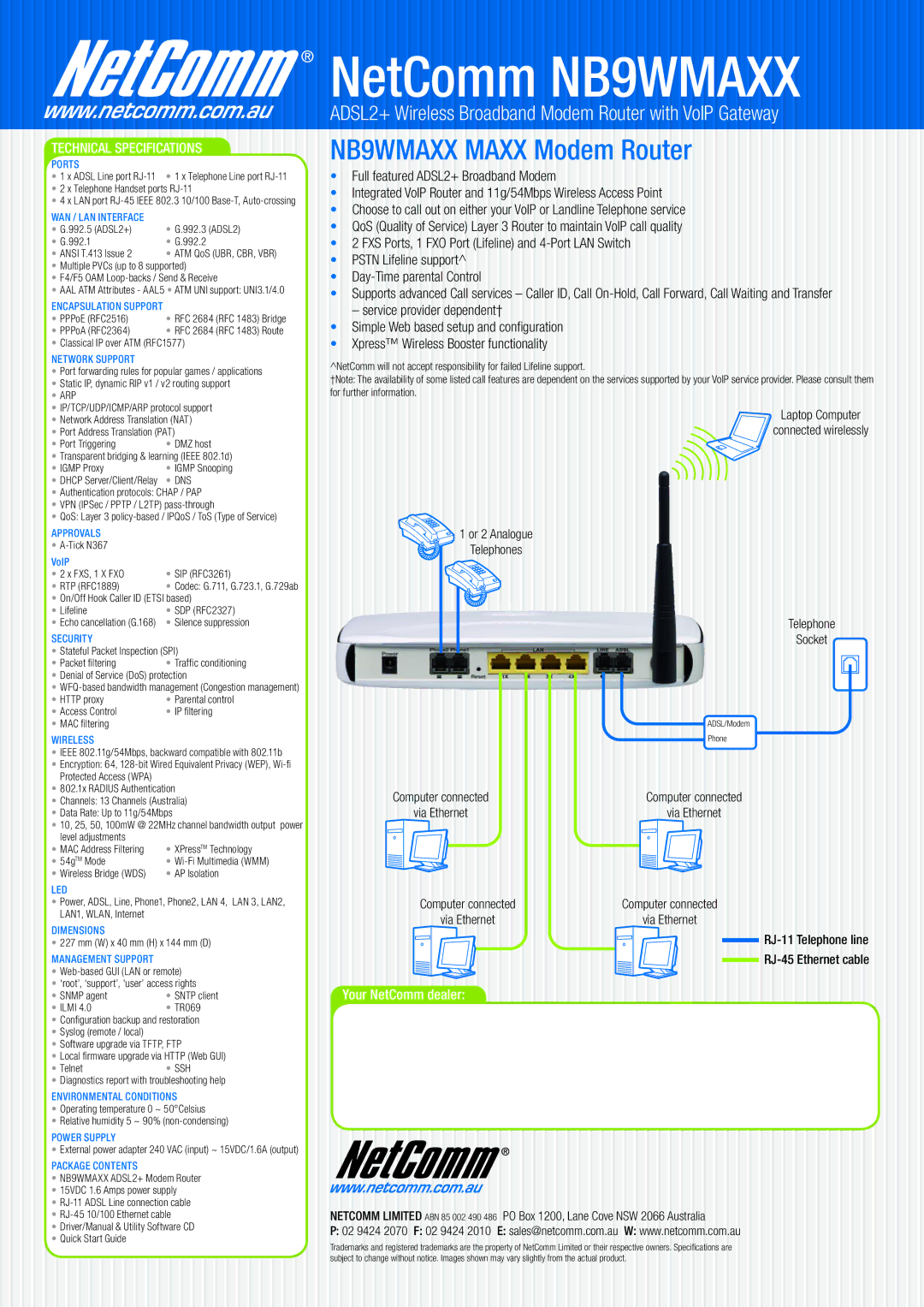
Laptop Computer
connected wirelessly
 1 or 2 Analogue
Telephones
Telephone
Socket
| ADSL/Modem |
| Phone |
Computer connected | Computer connected |
via Ethernet | via Ethernet |
Computer connected | Computer connected |
via Ethernet | via Ethernet |
Your NetComm dealer:
NETCOMM LIMITED ABN 85 002 490 486 PO Box 1200, Lane Cove NSW 2066 Australia
P:02 9424 2070 F: 02 9424 2010 E: sales@netcomm.com.au W: www.netcomm.com.au
Trademarks and registered trademarks are the property of NetComm Limited or their respective owners. Specifications are subject to change without notice. Images shown may vary slightly from the actual product.