2. Setting up the monitor
Description of the On Screen Display
What is
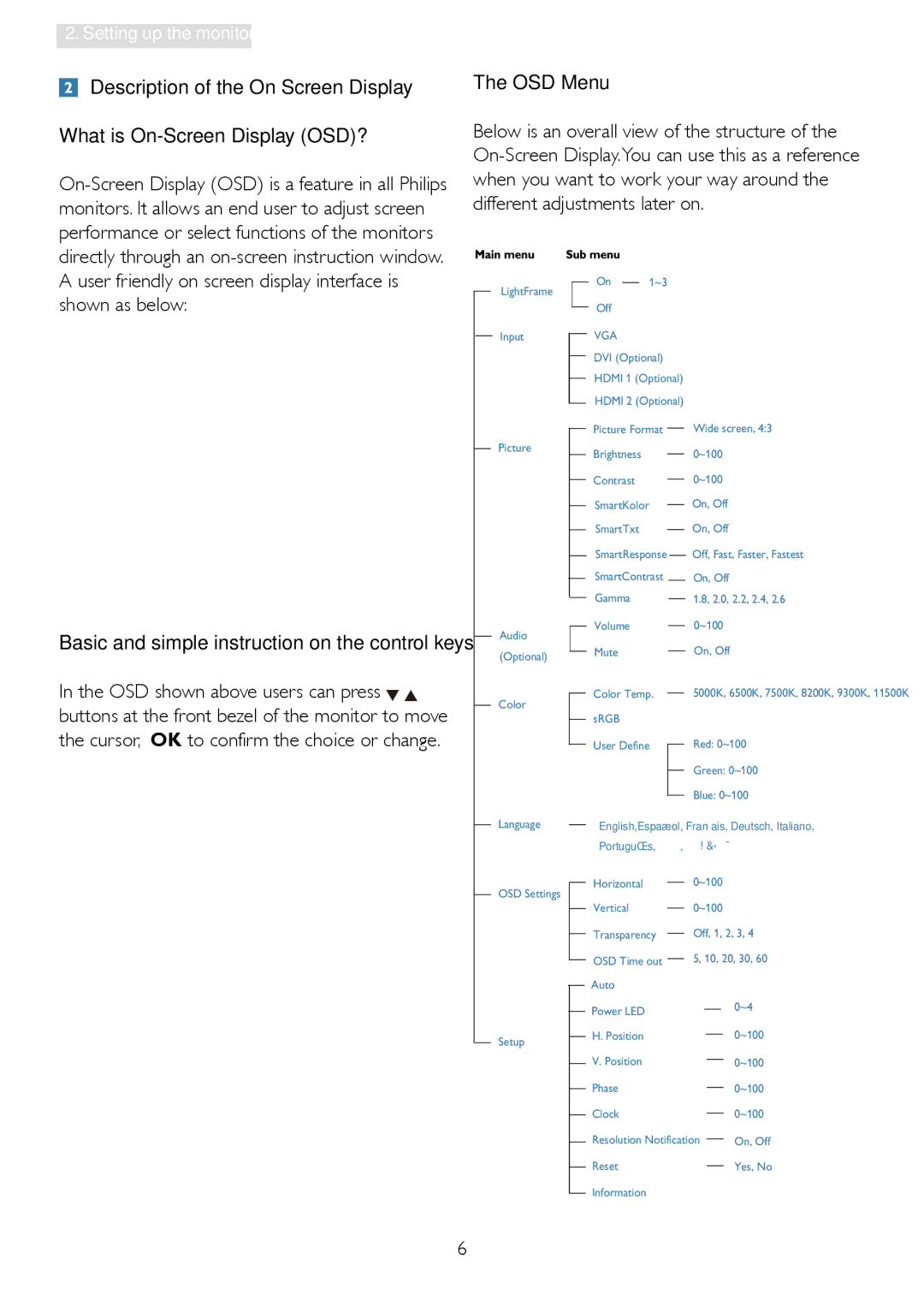
The OSD Menu
Below is an overall view of the structure of the
A user friendly on screen display interface is shown as below:
Basic and simple instruction on the control keys
In the OSD shown above users can press 
 buttons at the front bezel of the monitor to move the cursor, OK to confirm the choice or change.
LightFrame
Input
Picture
Audio (Optional)
Color
Language
OSD Settings
Setup
On |
|
| 1~3 |
|
|
|
|
|
|
|
|
|
|
|
|
|
|
|
|
|
|
|
|
|
|
|
|
| |||
Off |
|
|
|
|
|
|
|
|
|
|
|
|
| ||
VGA |
|
|
|
|
|
|
|
|
|
|
|
|
| ||
DVI (Optional) |
|
|
|
|
|
|
|
|
|
| |||||
HDMI 1 (Optional) |
|
|
|
|
|
|
|
|
|
| |||||
HDMI 2 (Optional) |
|
|
|
|
|
|
|
|
|
| |||||
Picture Format |
|
|
|
|
|
| Wide screen, 4:3 | ||||||||
|
| ||||||||||||||
Brightness |
|
|
| 0~100 |
|
|
| ||||||||
|
|
|
| ||||||||||||
Contrast |
|
|
| 0~100 |
|
|
| ||||||||
|
|
|
| ||||||||||||
SmartKolor |
|
|
|
|
|
|
| On, Off |
| ||||||
|
|
|
| ||||||||||||
SmartTxt |
|
|
|
|
|
|
| On, Off |
| ||||||
|
|
|
|
| |||||||||||
SmartResponse |
|
|
|
|
| Off, Fast, Faster, Fastest | |||||||||
|
|
|
|
| |||||||||||
SmartContrast |
|
|
|
|
| On, Off |
| ||||||||
Gamma |
|
|
|
| 1.8, 2.0, 2.2, 2.4, 2.6 | ||||||||||
|
|
|
| ||||||||||||
Volume |
|
|
|
| 0~100 |
|
| ||||||||
|
|
|
|
|
| ||||||||||
Mute |
|
|
|
|
|
|
| On, Off |
| ||||||
|
|
|
|
|
| ||||||||||
Color Temp. |
|
|
|
|
|
| 5000K, 6500K, 7500K, 8200K, 9300K, 11500K | ||||||||
|
| ||||||||||||||
sRGB |
|
|
|
|
|
|
|
|
|
|
|
|
| ||
User Define |
|
|
|
|
|
| Red: 0~100 | ||||||||
|
|
|
|
|
|
|
|
|
| Green: 0~100 | |||||
|
|
|
|
|
|
| |||||||||
|
|
|
|
|
|
|
|
|
| Blue: 0~100 | |||||
|
|
|
|
|
|
| |||||||||
English,Español, Français, Deutsch, Italiano, | |||||||||||||||
Português, Русский, |
| ||||||||||||||
Horizontal |
|
|
| 0~100 |
|
|
| ||||||||
|
|
|
| ||||||||||||
Vertical |
|
|
| 0~100 |
|
|
| ||||||||
|
|
|
| ||||||||||||
Transparency |
|
|
|
|
|
| Off, 1, 2, 3, 4 | ||||||||
|
| ||||||||||||||
OSD Time out |
|
| 5, 10, 20, 30, 60 | ||||||||||||
|
| ||||||||||||||
Auto |
|
|
|
|
|
|
|
|
|
|
|
|
| ||
Power LED |
|
|
|
|
|
|
|
|
|
|
|
| 0~4 | ||
|
|
|
|
|
|
|
|
|
|
|
| ||||
|
|
|
|
|
|
|
|
|
|
|
|
| |||
H. Position |
|
|
|
|
|
|
|
|
|
|
|
| 0~100 | ||
|
|
|
|
|
|
|
|
|
|
|
| ||||
V. Position |
|
|
|
|
|
|
|
|
|
|
|
| 0~100 | ||
|
|
|
|
|
|
|
|
|
|
|
| ||||
Phase |
|
|
|
|
|
|
|
|
|
|
|
| 0~100 | ||
|
|
|
|
|
|
|
|
|
|
|
| ||||
Clock |
|
|
|
|
|
|
|
|
|
|
|
| 0~100 | ||
|
|
|
|
|
|
|
|
|
|
|
| ||||
Resolution Notification |
|
|
| On, Off | |||||||||||
|
| ||||||||||||||
Reset |
|
|
|
|
|
|
|
|
|
|
|
| Yes, No | ||
|
|
|
|
|
|
|
|
|
|
|
| ||||
Information |
|
|
|
|
|
|
|
|
|
|
|
|
| ||
6