E n g l i s h
Functional Overview
Remote Control
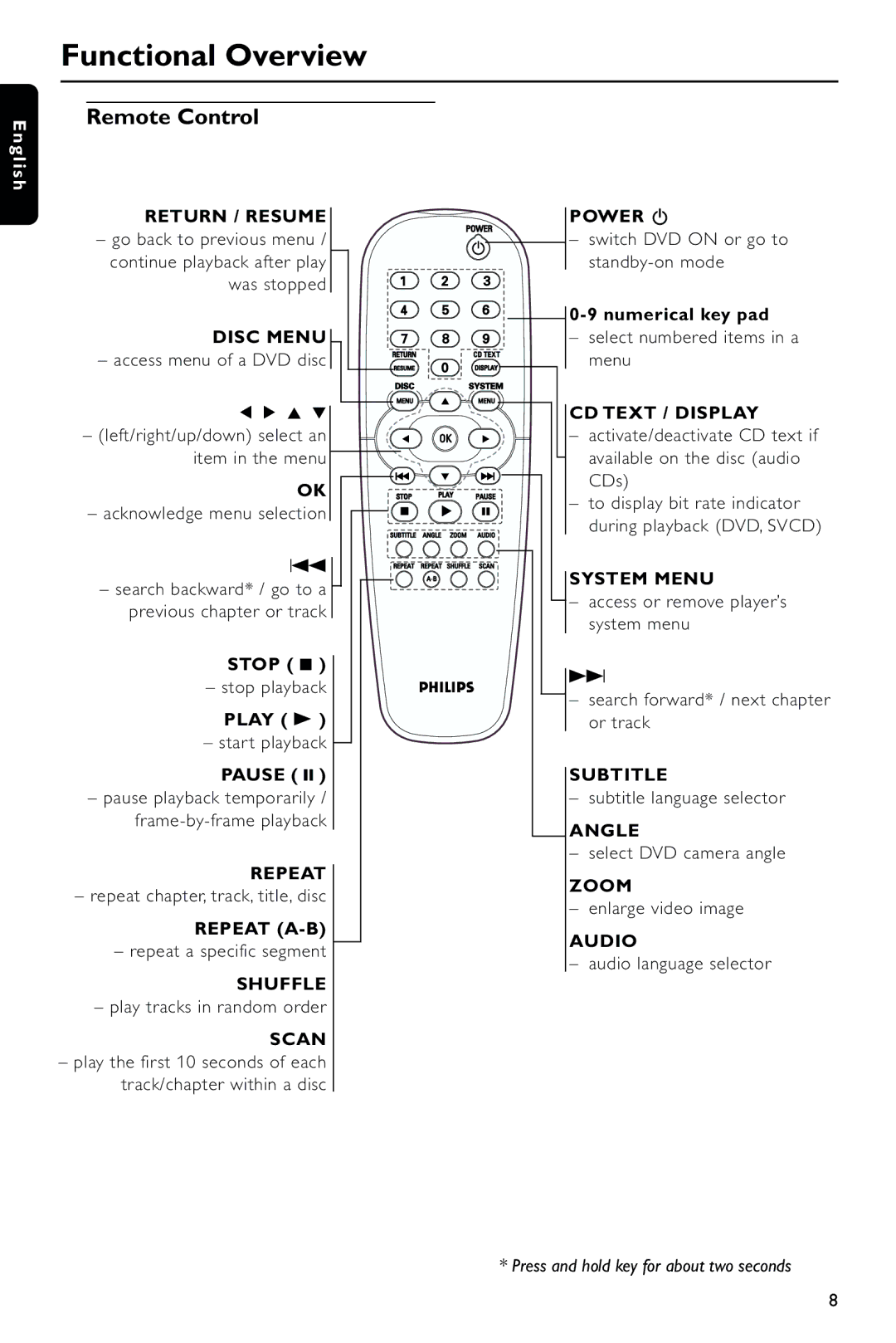
RETURN / RESUME
–go back to previous menu / continue playback after play
was stopped
DISC MENU
– access menu of a DVD disc
1 2 3 4
– (left/right/up/down) select an item in the menu
OK
– acknowledge menu selection
S
–search backward* / go to a previous chapter or track
STOP ( 9 )
– stop playback
PLAY ( B )
–star t playback PAUSE ( ; )
–pause playback temporarily /
REPEAT
–repeat chapter, track, title, disc
REPEAT
–repeat a specific segment
SHUFFLE
–play tracks in random order
SCAN
–play the first 10 seconds of each track/chapter within a disc
POWER B
–switch DVD ON or go to
–select numbered items in a menu
CD TEXT / DISPLAY
–activate/deactivate CD text if available on the disc (audio CDs)
–to display bit rate indicator during playback (DVD, SVCD)
SYSTEM MENU
–access or remove player’s system menu
T
–search forward* / next chapter or track
SUBTITLE
–subtitle language selector
ANGLE
–select DVD camera angle
ZOOM
–enlarge video image
AUDIO
–audio language selector
* Press and hold key for about two seconds
8