USING THE CLOSED CAPTION CONTROL
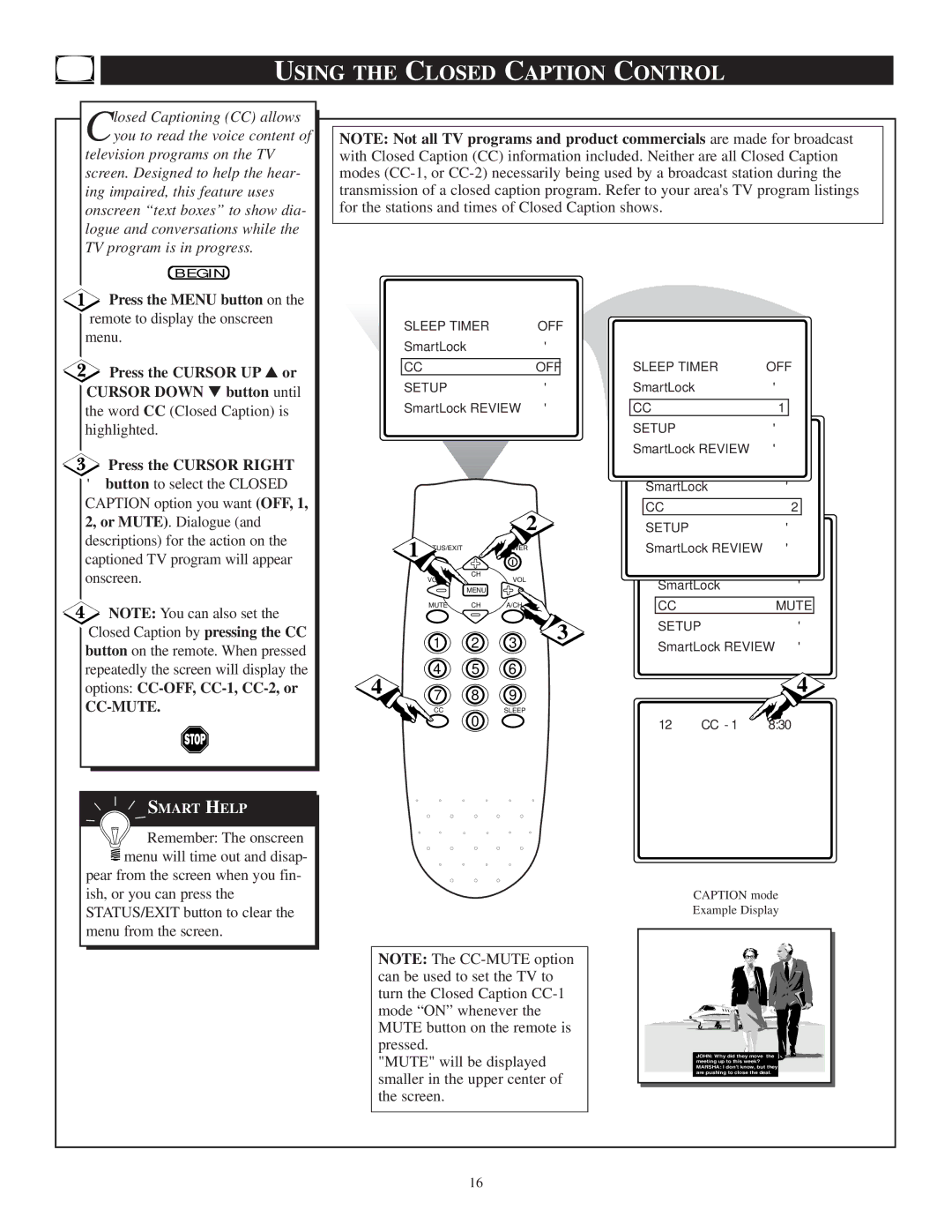
Closed Captioning (CC) allows you to read the voice content of
television programs on the TV screen. Designed to help the hear- ing impaired, this feature uses onscreen “text boxes” to show dia- logue and conversations while the TV program is in progress.
BEGIN
Press the MENU button on the
NOTE: Not all TV programs and product commercials are made for broadcast with Closed Caption (CC) information included. Neither are all Closed Caption modes
remote to display the onscreen menu.
 Press the CURSOR UP ▲ or CURSOR DOWN ▼ button until
the word CC (Closed Caption) is highlighted.
Press the CURSOR RIGHT
▶button to select the CLOSED
CAPTION option you want (OFF, 1, 2, or MUTE). Dialogue (and descriptions) for the action on the captioned TV program will appear onscreen.
 NOTE: You can also set the Closed Caption by pressing the CC button on the remote. When pressed repeatedly the screen will display the options:
CC-MUTE.
 SMART HELP

 Remember: The onscreen
  menu will time out and disap-
pear from the screen when you fin- ish, or you can press the STATUS/EXIT button to clear the menu from the screen.
SLEEP TIMER | OFF |
SmartLock▶
CC | OFF |
SETUP | ▶ |
SmartLock REVIEW ▶
| 1 |
|
| 2 |
|
| POWER |
| |
| VOL | CH | VOL |
|
|
|
| ||
|
| MENU |
|
|
| MUTE | CH | A/CH |
|
| 1 | 2 | 3 | 3 |
|
| |||
4 | 4 | 5 | 6 |
|
7 | 8 | 9 |
| |
| CC | 0 | SLEEP |
|
|
|
|
|
SLEEP TIMER | OFF | ||
SmartLock | ▶ | ||
|
|
| |
CC | 1 |
| |
SETUP | ▶ | ||
SmartLock REVIEW | ▶ | ||
| SmartLock | ▶ | |
|
|
|
|
| CC | 2 | |
| SETUP | ▶ | |
SmartLock REVIEW ▶
SmartLock▶
CCMUTE
SETUP▶
SmartLock REVIEW ▶
4
12 CC - 1 8:30
CAPTION mode
Example Display
NOTE: The
"MUTE" will be displayed smaller in the upper center of the screen.
JOHN: Why did they move the  meeting up to this week? MARSHA: I don't know, but they are pushing to close the deal.
16