TAKE A GOOD LOOK
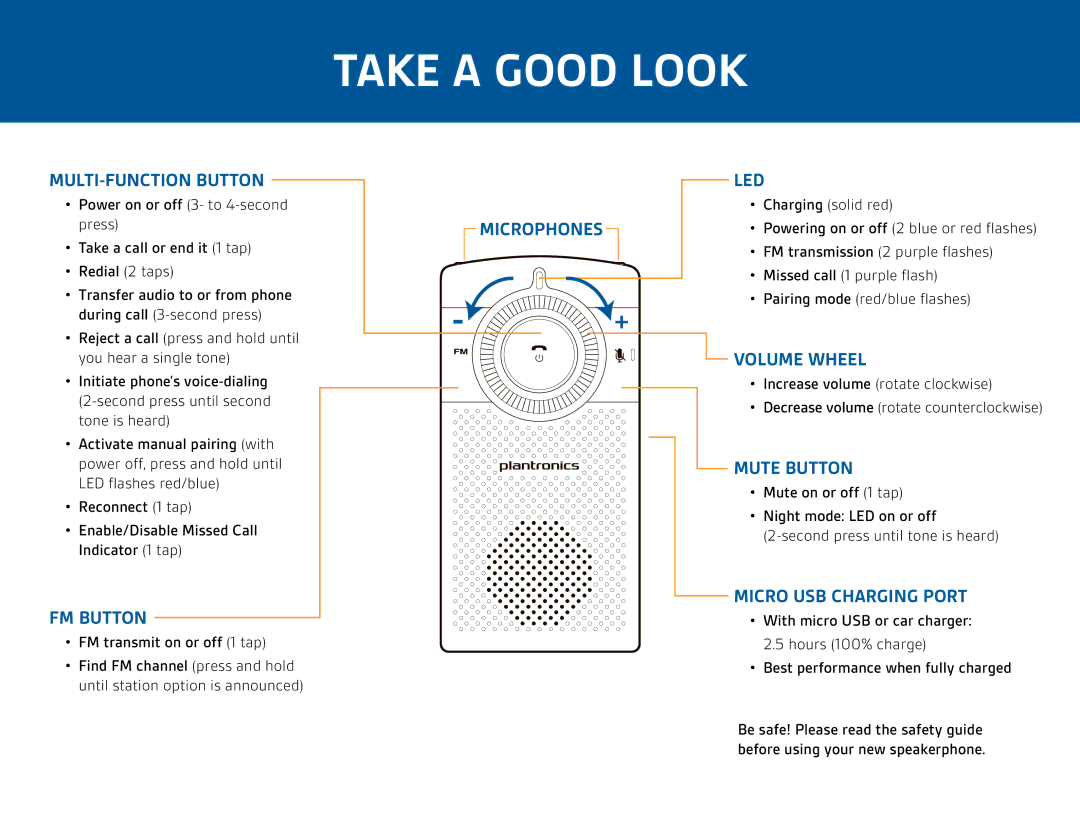
MULTI-FUNCTION BUTTON
•Power on or off (3- to
•Take a call or end it (1 tap)
•Redial (2 taps)
•Transfer audio to or from phone during call
•Reject a call (press and hold until you hear a single tone)
•Initiate phone’s
•Activate manual pairing (with power off, press and hold until LED flashes red/blue)
•Reconnect (1 tap)
•Enable/Disable Missed Call Indicator (1 tap)
FM BUTTON
•FM transmit on or off (1 tap)
•Find FM channel (press and hold until station option is announced)
MICROPHONES

 +
+
LED
•Charging (solid red)
•Powering on or off (2 blue or red flashes)
•FM transmission (2 purple flashes)
•Missed call (1 purple flash)
•Pairing mode (red/blue flashes)
 VOLUME WHEEL
•Increase volume (rotate clockwise)
•Decrease volume (rotate counterclockwise)
MUTE BUTTON
•Mute on or off (1 tap)
•Night mode: LED on or off
MICRO USB CHARGING PORT
•With micro USB or car charger:
2.5 hours (100% charge)
•Best performance when fully charged
Be safe! Please read the safety guide before using your new speakerphone.