Install the Stand
Components
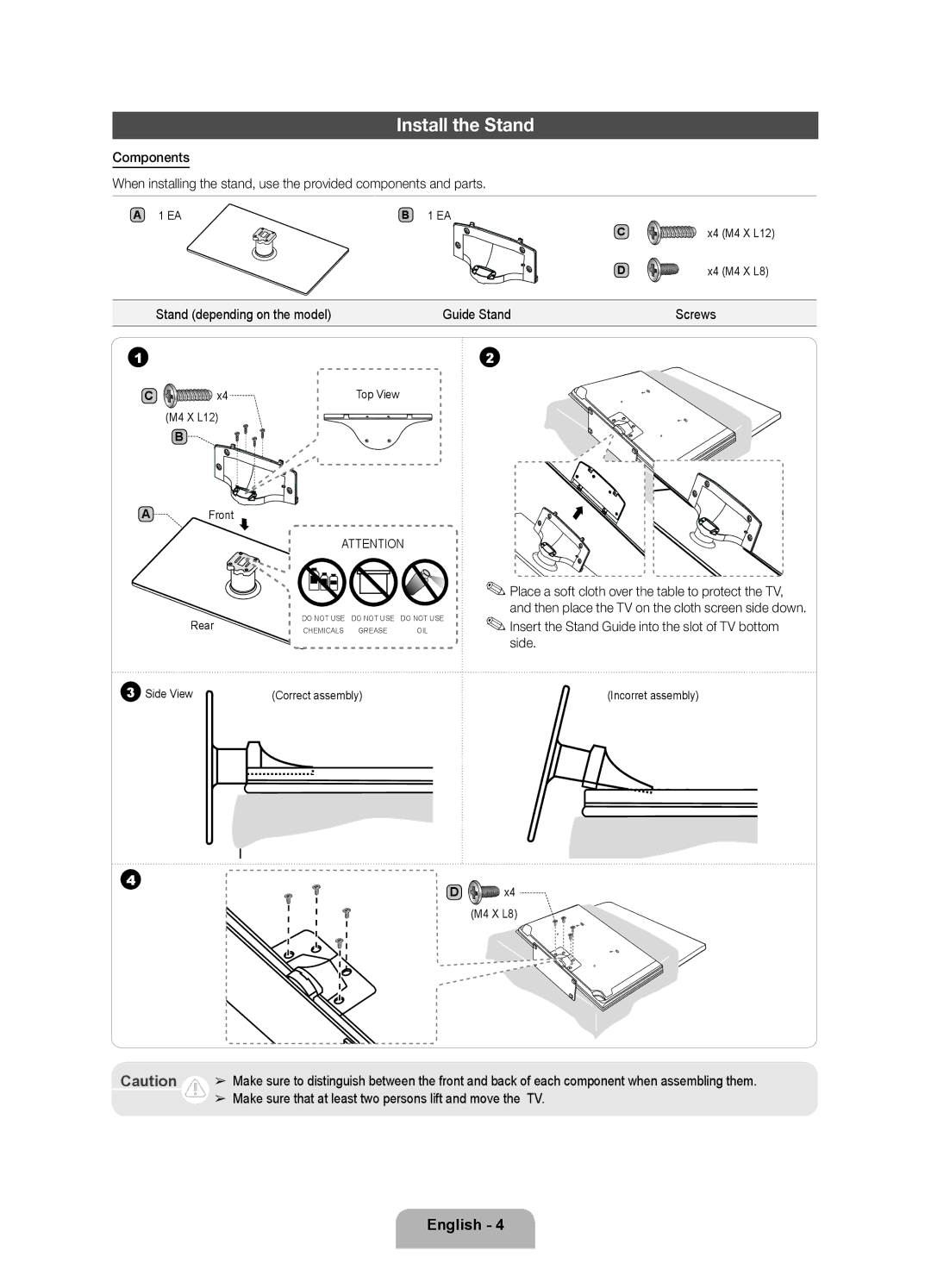
When installing the stand, use the provided components and parts.
A 1 EA | B 1 EA |
|
|
|
| C | x4 | (M4 | X L12) |
| D | x4 | (M4 | X L8) |
Stand (depending on the model) | Guide Stand | Screws |
|
|
1
C | x4 | Top View |
| (M4 X L12) |
|
B
AFront
ATTENTION
Rear | DO NOT USE | DO NOT USE | DO NOT USE |
CHEMICALS | GREASE | OIL |
2
✎✎Place a soft cloth over the table to protect the TV, and then place the TV on the cloth screen side down.
✎✎Insert the Stand Guide into the slot of TV bottom side.
3 Side View | (Correct assembly) | (Incorret assembly) |
4 | x4 |
D | |
| (M4 X L8) |
Caution ➢ Make sure to distinguish between the front and back of each component when assembling them.
➢ Make sure that at least two persons lift and move the TV.
English - 4