CONNECTIONS
DETACHING THE WALL MOUNT
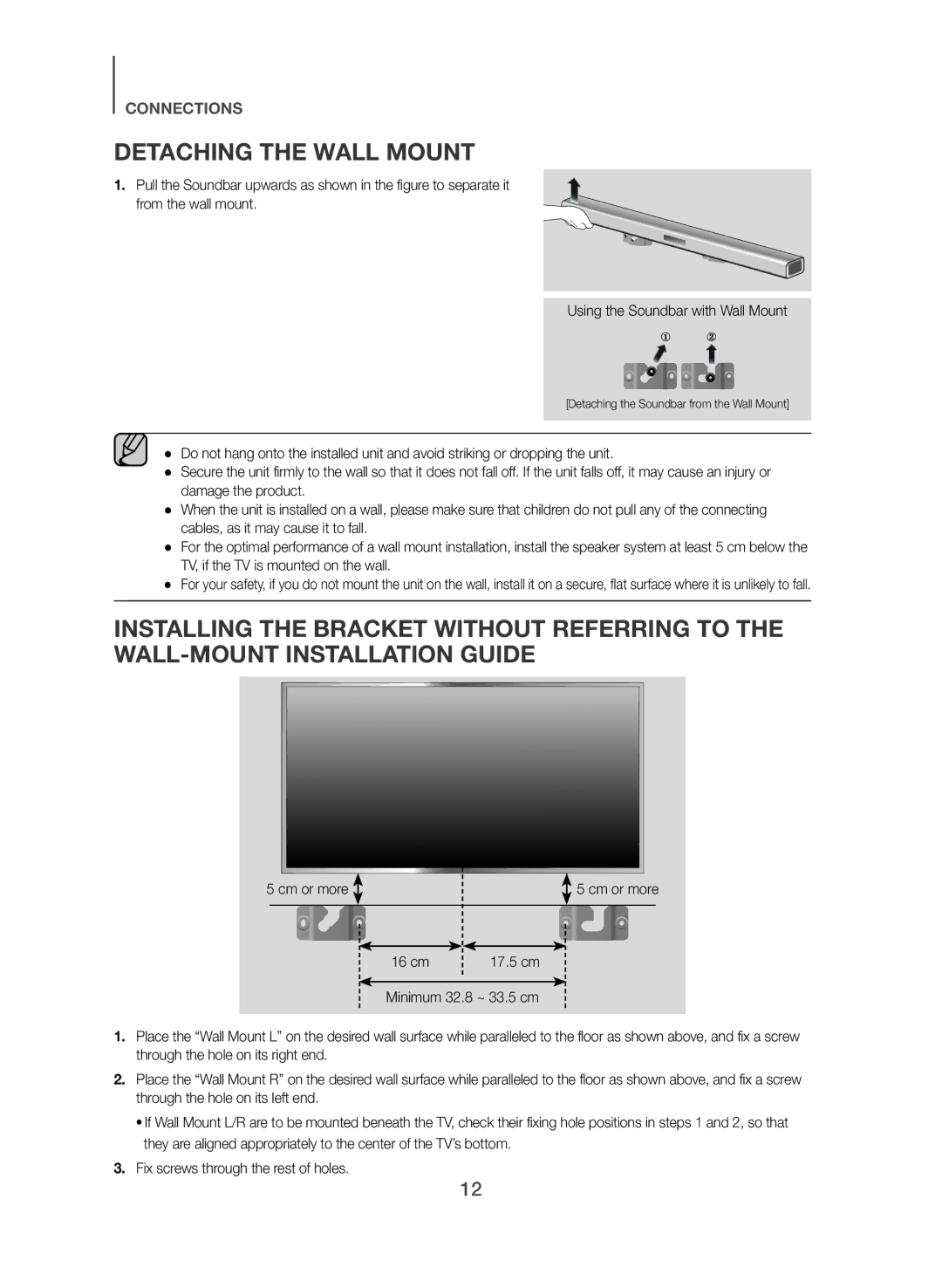
1.Pull the Soundbar upwards as shown in the figure to separate it from the wall mount.
Using the Soundbar with Wall Mount
[Detaching the Soundbar from the Wall Mount]
●● Do not hang onto the installed unit and avoid striking or dropping the unit.
●● Secure the unit firmly to the wall so that it does not fall off. If the unit falls off, it may cause an injury or damage the product.
●● When the unit is installed on a wall, please make sure that children do not pull any of the connecting cables, as it may cause it to fall.
●● For the optimal performance of a wall mount installation, install the speaker system at least 5 cm below the TV, if the TV is mounted on the wall.
●● For your safety, if you do not mount the unit on the wall, install it on a secure, flat surface where it is unlikely to fall.
INSTALLING THE BRACKET WITHOUT REFERRING TO THE
5 cm or more |
|
|
|
|
|
|
| 5 cm or more | |||
|
|
|
|
| |||||||
|
|
|
|
|
|
|
|
|
|
|
|
|
|
|
|
|
|
|
|
|
|
|
|
|
|
|
| 16 cm |
| 17.5 cm | |||||
|
|
|
|
|
|
|
|
|
|
| |
|
|
|
| Minimum 32.8 ~ 33.5 cm | |||||||
|
|
|
|
|
|
|
|
|
|
|
|
1. Place the “Wall Mount L” on the desired wall surface while paralleled to the floor as shown above, and fix a screw through the hole on its right end.
2. Place the “Wall Mount R” on the desired wall surface while paralleled to the floor as shown above, and fix a screw through the hole on its left end.
• If Wall Mount L/R are to be mounted beneath the TV, check their fixing hole positions in steps 1 and 2, so that they are aligned appropriately to the center of the TV’s bottom.
3. Fix screws through the rest of holes.
12