
 SLEEP T IMER
  V I DEO ADJUST
 PRESET
  CLOSED CAPT I ON
 V–CH
V–CH SET UP
 ] Line Output is selected, Output volume is fixed, Speaker output is available.
 ] Line Output is selected, Output volume is variable, Speaker output is Mute.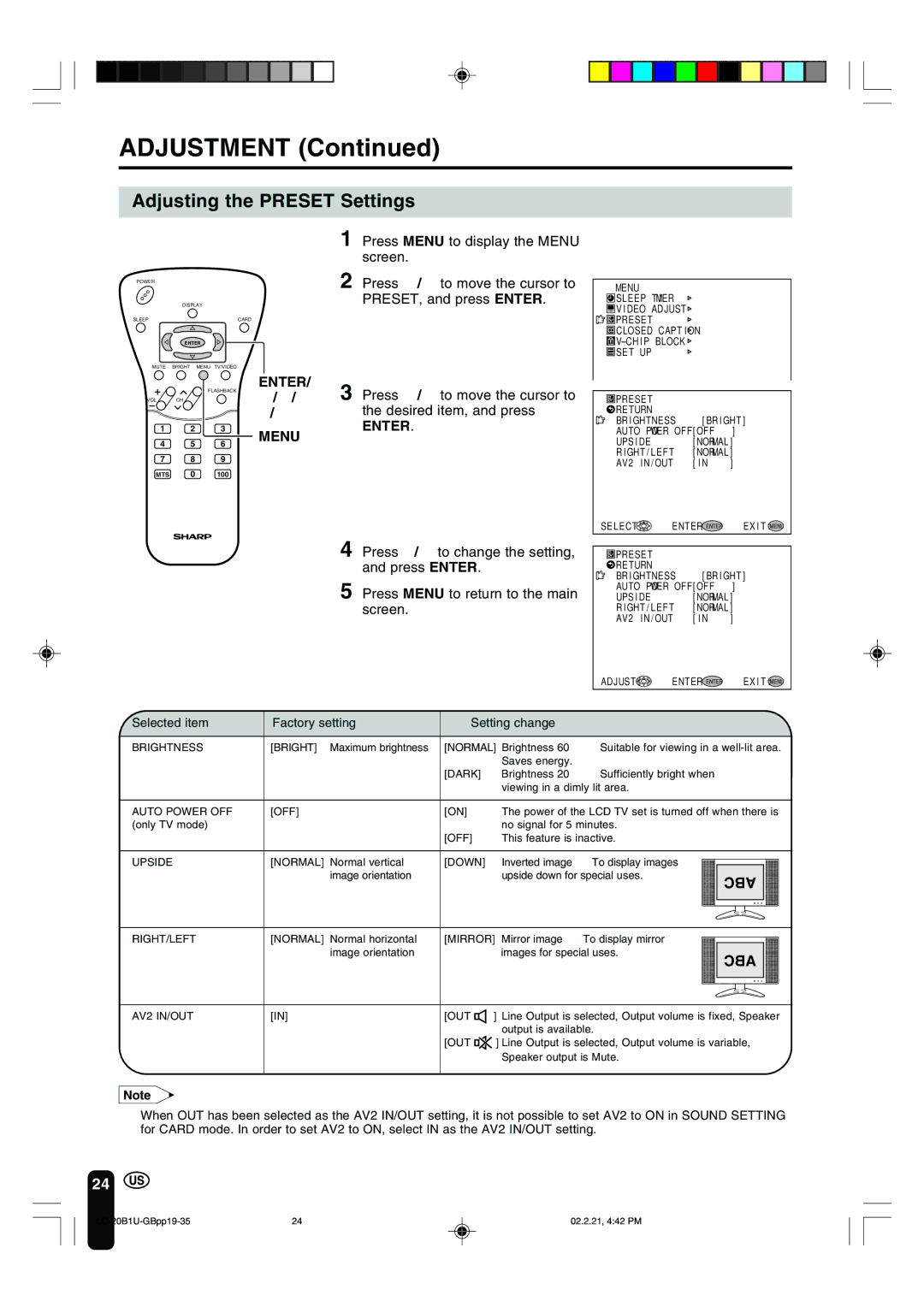
LC 20B1U specifications
The Sharp LC 20B1U is a compact LCD television that offers a range of features designed for users seeking functionality and modern technology in a small form factor. This model is particularly appealing for environments like kitchens, bedrooms, or small living spaces, where a larger television might be unwieldy or impractical.One of the standout features of the Sharp LC 20B1U is its 20-inch screen, which provides a clear and vibrant display. The LCD panel technology ensures that users can enjoy high-quality images with good color accuracy and contrast. The resolution is typically HD, making it suitable for watching a variety of content, from digital TV broadcasts to movies and streaming services.
The audio experience on this model is enhanced by built-in speakers that deliver decent sound quality. While the audio output might not rival larger home theater systems, it is more than adequate for small room setups, ensuring that dialogue and sound effects are clear and natural.
Connectivity is a key aspect of the Sharp LC 20B1U. The television comes equipped with multiple input options, including HDMI ports, allowing users to connect various devices such as gaming consoles, Blu-ray players, or streaming devices. The availability of USB ports also facilitates the playback of multimedia files directly from flash drives, making it easy to enjoy personal video and audio content.
In terms of energy efficiency, the Sharp LC 20B1U is designed to consume less power compared to larger models. This aspect not only translates to cost savings on electricity bills but also makes it an eco-friendly choice for conscientious consumers.
The design of the Sharp LC 20B1U is sleek and unassuming, featuring a slim profile that allows it to fit seamlessly into any room decor. Its lightweight construction also makes it easy to mount on walls or place on furniture without overwhelming the space.
For users who appreciate flexibility, the Sharp LC 20B1U often includes features like parental controls and multiple picture modes, enabling customization based on viewing preferences and content types.
Overall, the Sharp LC 20B1U combines modern technology with practical functionality, making it an excellent choice for those in need of a reliable, compact television. Its array of features, solid performance, and user-friendly interfaces make it a versatile option for a variety of entertainment needs.