Connecting a PC (Personal computer)
Viewing an image from a PC
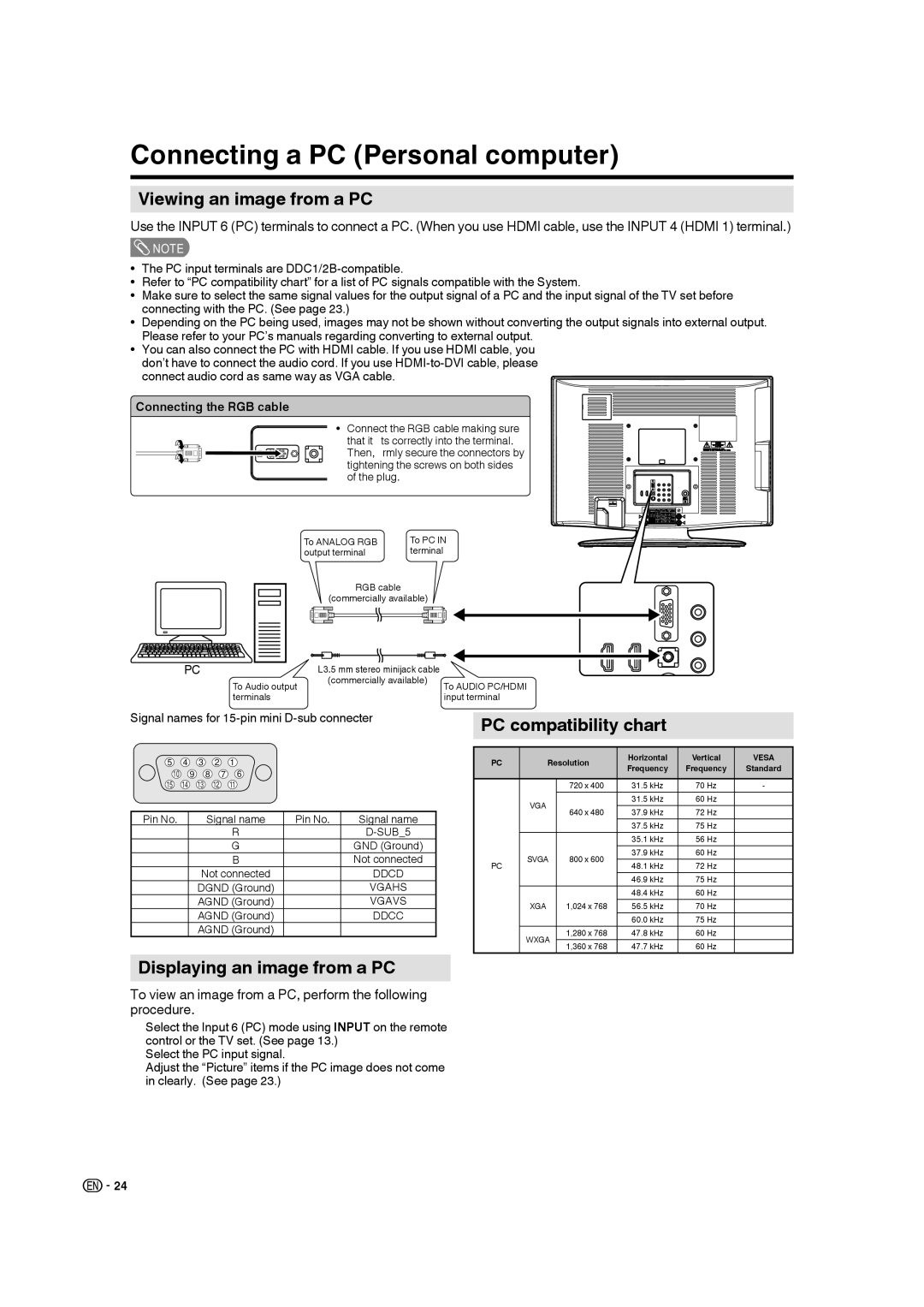
Use the INPUT 6 (PC) terminals to connect a PC. (When you use HDMI cable, use the INPUT 4 (HDMI 1) terminal.)
 NOTE
NOTE
•The PC input terminals are
•Refer to “PC compatibility chart” for a list of PC signals compatible with the System.
•Make sure to select the same signal values for the output signal of a PC and the input signal of the TV set before connecting with the PC. (See page 23.)
•Depending on the PC being used, images may not be shown without converting the output signals into external output. Please refer to your PC’s manuals regarding converting to external output.
•You can also connect the PC with HDMI cable. If you use HDMI cable, you don’t have to connect the audio cord. If you use
Connecting the RGB cable
•Connect the RGB cable making sure that it fits correctly into the terminal. Then, firmly secure the connectors by tightening the screws on both sides of the plug.
To ANALOG RGB | To PC IN |
output terminal | terminal |
RGB cable
(commercially available)
PC |
|
| ∅3.5 mm stereo minijack cable | |
To Audio output | (commercially available) | To AUDIO PC/HDMI | ||
terminals |
| input terminal | ||
Signal names for 15-pin mini D-sub connecter
5 4 3 2 1
10 9 8 7 6
15 14 13 12 11
Pin No. | Signal name | Pin No. | Signal name |
① | R | ⑨ | |
② | G | ⑩ | GND (Ground) |
③ | B | ⑪ | Not connected |
④ | Not connected | ⑫ | DDCD |
⑤ | DGND (Ground) | ⑬ | VGAHS |
⑥ | AGND (Ground) | ⑭ | VGAVS |
⑦ | AGND (Ground) | ⑮ | DDCC |
⑧ | AGND (Ground) |
|
|
Displaying an image from a PC
To view an image from a PC, perform the following procedure.
①Select the Input 6 (PC) mode using INPUT on the remote control or the TV set. (See page 13.)
Select the PC input signal.
Adjust the “Picture” items if the PC image does not come
in clearly. (See page 23.)②③
PC compatibility chart
PC | Resolution | Horizontal | Vertical | VESA | ||
Frequency | Frequency | Standard | ||||
|
|
| ||||
|
|
|
|
|
| |
|
| 720 x 400 | 31.5 kHz | 70 Hz | - | |
| VGA |
| 31.5 kHz | 60 Hz | ○ | |
| 640 x 480 | 37.9 kHz | 72 Hz | ○ | ||
|
| |||||
|
|
| 37.5 kHz | 75 Hz | ○ | |
|
|
| 35.1 kHz | 56 Hz | ○ | |
PC | SVGA | 800 x 600 | 37.9 kHz | 60 Hz | ○ | |
48.1 kHz | 72 Hz | ○ | ||||
|
| |||||
|
|
| 46.9 kHz | 75 Hz | ○ | |
| XGA | 1,024 x 768 | 48.4 kHz | 60 Hz | ○ | |
| 56.5 kHz | 70 Hz | ○ | |||
|
|
| 60.0 kHz | 75 Hz | ○ | |
| WXGA | 1,280 x 768 | 47.8 kHz | 60 Hz | ○ | |
| 1,360 x 768 | 47.7 kHz | 60 Hz | ○ | ||
|
| |||||

 24
24