Manuals
/
Abocom
/
Computer Equipment
/
Network Card
Abocom
EFM560
manual
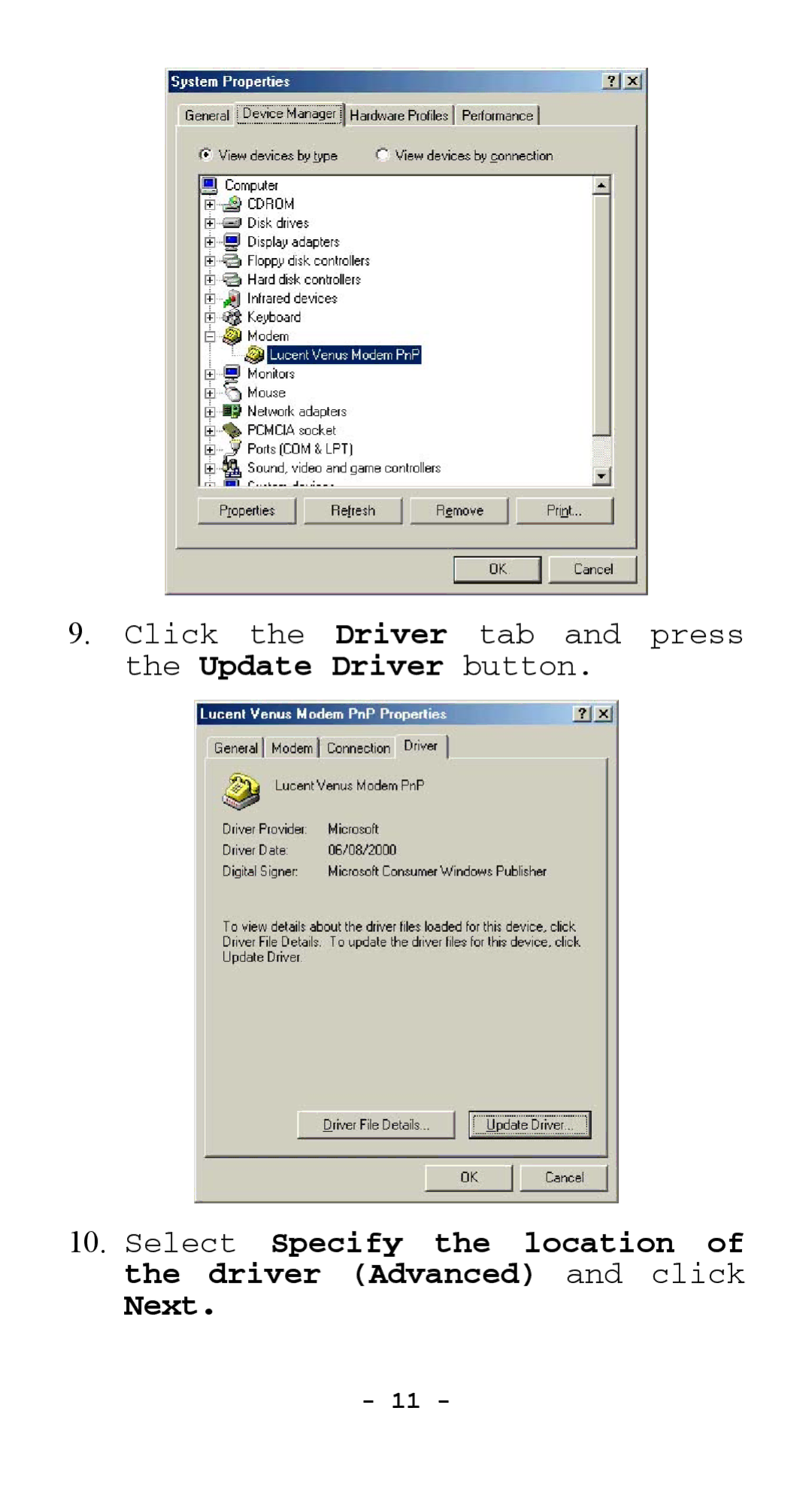
Click the Driver tab and press the Update Driver button
Models:
EFM560
1
12
18
18
Download
18 pages
21.6 Kb
9
10
11
12
13
14
15
16
Page 12
Image 12
9.
Click the
Driver
tab and press the
Update Driver
button.
10.
Select
Specify the location of the driver (Advanced)
and click
Next.
-
11 -
Page 11
Page 13
Page 12
Image 12
Page 11
Page 13
Contents
External Fax Modem 56K
Hardware Installation
Page
Software Installation
StartÆSettingsÆControl PanelÆPhone and Modem Options
Click the Driver tab and press the Update Driver button
Page
Click Next Click Yes
Page
Installation for Windows Millennium
Click StartÆSettingsÆControl PanelÆSystemÆ Device Manager
Click the Driver tab and press the Update Driver button
Page
Page
Click Finish
Windows NT
Top
Page
Image
Contents