Trademarks and License
Rear Seat Infotainment
Voice Recognition
Page
Infotainment
Overview
Infotainment System
Power On/Off/Mute
Customer Assistance
Volume
Retained Accessory Power RAP
Rear Seat Armrest Control Panel
Home
Managing Home Page Icons
Steering Wheel Controls
Interaction Selector Press to display the favorites list
Using the System
Weather If Equipped
OnStar If Equipped
Climate
Rear Climate If Equipped
Haptic Feedback
Infotainment Gestures
Press/Tap
Press and Hold
Nudge Fling or Swipe Spread
Software Updates
Infotainment System Settings
AM-FM Radio
Playing the Radio
Infotainment System
Storing Radio Station Presets
Tuning a Station
Finding a Station
Mixed-Audio Favorites
Buffer Reset
Timeshifting
HD Radio Technology
SiriusXM Menu
SiriusXM Satellite Radio Service If Equipped
Satellite Radio
SiriusXM Travel Link If Equipped
Bose AudioPilot Noise Compensation Technology
Current Condition
Weather Regions
Weather Screen Not Under Guidance
Forecast Information Weather Menu
Interaction Selector
SiriusXM NavTraffic If Equipped
Traffic Alert While Under Guidance
Traffic Alert While Not Under Guidance
SiriusXM Travel Link Movie Listings
SiriusXM Travel Link Fuel Pricing If Equipped
SiriusXM Satellite Radio Service
Radio Reception
Backglass Antenna
Cell Phone Usage
Multi-Band Antenna
Pandora Internet Radio
Using the iPhone
Using an Android or BlackBerry Phone
Launching Pandora
Pandora Menus
Pandora Troubleshooting
Pandora Features
Advertisements on Pandora
Unable to Connect Device to Vehicle
Loss of Audio
Thumbs Up or Thumbs Down Error
No Bluetooth Signal The Bluetooth signal is lost
Playing an Audio MP3 or CD
CD Player
Loading and Ejecting Discs
Error Messages
Previous/Fast Reverse
Next/Fast Forward
MP3/CD Menu
USB/SD Port
MP3 Guidelines
Playing from a USB
MP3 Folder Information
My Media Library
USB MP3 Player and USB Drives
Previous/Reverse
USB Menu
USB Browse Menu
Playlists
Artists
Albums
Supported Apple Devices
Folder View If Equipped
File System and Naming
SD Card Reader
Storing and Recalling Media Favorites
Auxiliary Jack
Bluetooth Audio
Bluetooth Audio Menu
OnStar System
OnStar with 4G LTE
Rear Seat Entertainment RSE System
Before Driving
System Operation
Rear Seat Screens As Equipped
Menus and Features
Sources
AM/FM Menu
XM Menu
Disc Menu BD
Disc Menu DVD
CD Menu
Pop Up Menu BD Only
Color BD Only Keypad BD/DVD
Disc Control Bdav Bdmv Only
Settings BD/DVD
Stop Disc DVD Only
More BD/DVD
Prev Still/Next Still/Stills Off
Player Setup BD/DVD
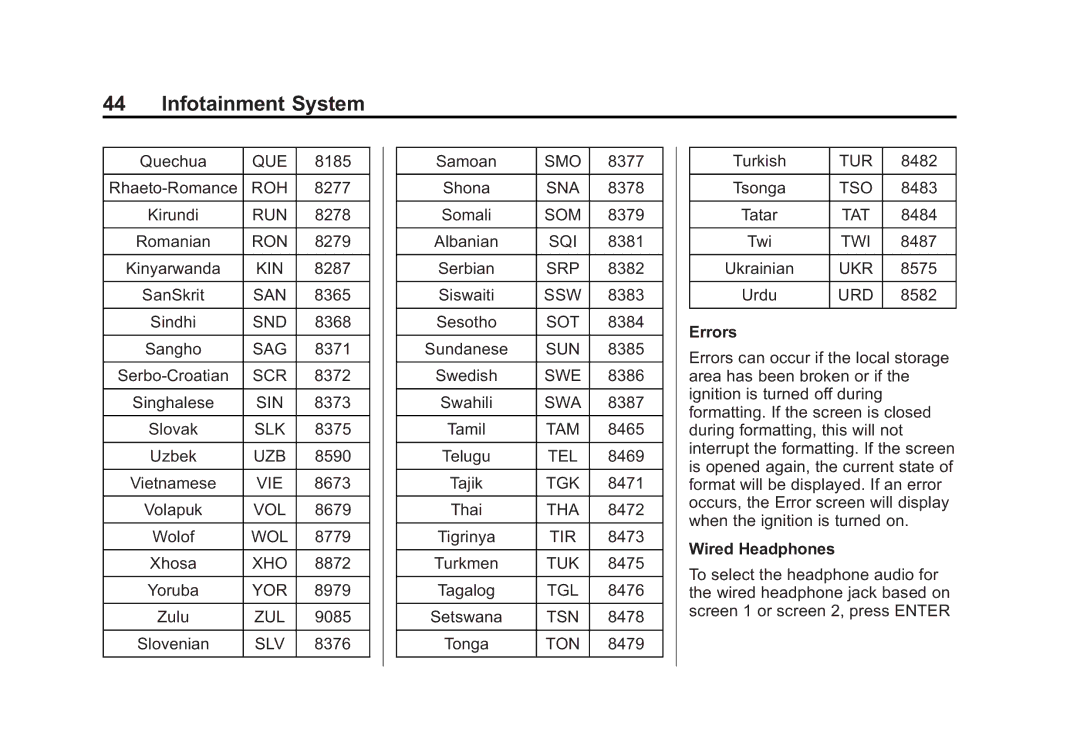
Enter Language Code
EUS
Errors
Wired Headphones
Player Setup CD-DA Only
Title Search CD-DA Only
Disc Information CD-DA Only
DivX
RSE Controls Available from the Front Screen
Sourcing to DVD/BD
Rear Media
DVD/BD Disc Menu
Fast Forward/Fast Rewind
Play/Pause
Keypad for DVD/VCD/SD/USB
Cursor
Tone Settings DVD/BD
Auto Volume Control DVD/BD
Power
Previous Track/Next Track
Headphones
Audio/Video A/V Jacks Rear Media Connections As Equipped
Battery Replacement
Auxiliary Inputs
Remote Control
Wired Headphone Jack
Remote Control Buttons
Audio Output
Screen
Radio
RSE Troubleshooting
Video Display Error Messages
Rear Seat Entertainment RSE System Platinum
Video Distortion
Video Display Screens
RSE Overview System
‐ Jpeg ‐ JPG
Using the RSE On-Screen Display OSD Menus
Stop c Press once to stop playing a DVD
Quality Setup Menu
General Setup Menu
Audio Setup Menu
Preference Setup Menu
Vehicle Speakers
Adult
Wired Headphones
Channel FM-Modulation Control For Monitor a Only
Remote Control Buttons
Q, r Navigation Arrows Press to navigate through menus
Playing Audio CD
CLR Clear Press to clear the previous menu selection
Selecting a Play Mode
Playing MP3 CD
Selecting Folders and Songs
Skipping a Song
Tips and Troubleshooting
Cleaning the Video Screens
Cleaning the Components
Using the Repeat Feature
Using the Navigation System
Cancel/Resume Route
Voice Volume
Navigation Voice Preferences
Voice Prompts
Prompts During Phone Calls
Display Places of Interest Icons
Map View
3D View
Heading Up View
Day/Night Mode
Audio Information On/Off
Routing Preferences
Route Style
Traffic If Equipped
Traffic Routing Preferences
Traffic Types
Recent Destinations
Address Book Entries
My POIs
Map Adjustments
Scroll Features
Maps
Detailed Areas
Navigation Symbols
Vehicle Address Callout
Driving on a Route
Autozoom
Maneuver Road Name
Map View with Proximity Map View without Proximity
Available Methods of Search
Destination
Navigation Next Turn Maneuver Alert
Special Characters
Alpha-Numeric Keyboard
Dropdown Arrow Press to display a list of matches
Character Handwriting Recognition
Special Character List
Option Settings ABC/abc Character Set
Draw Speed Setting
Audio Feedback Press to turn
Address
Infotainment System
Multiple Matches
Spelling Mistakes
Places of Interest POI
Using the Keyboard
POI Category Restaurants POI Name and Category
POI Phone Number
POI Name and Location
POI Search Location
Favorite POIs
Recalling a POI Category or Chain
Creating and Downloading Predefined POIs My POIs
Creating a Text File with Information
Storing the POI on a USB Drive
Importing and Overwriting Categories
Address Book Download
Browsing Downloaded POIs
Edit My POIs
Changing POI Categories
Deleting POI
Saved Destinations
Contacts
Favorite Destinations
Route Guidance
Estimated Time of Arrival ETA and Distance
Turn List
Destination
End Guidance
Avoid Areas
Optimized Route
Saved Trips
Waypoints
OnStar System
Edit Route
Turn-by-Turn Navigation
My Destination
Settings
Cancel a Route
Route Preview
Repeat
Low Fuel Alert
Voice
Display
Global Positioning System GPS
Vehicle Positioning
Problems with Route Guidance
If the System Needs Service
Map Data Updates
Database Coverage Explanations
Using Voice Recognition
Prompts and Screen Displays
Canceling Voice Recognition
Helpful Hints for Speaking Commands
Using Voice Recognition for List Options
Help
Back Command
Voice Recognition for the Radio
Voice Recognition for Audio My Media
Play Genre genre name
Handling Large Amounts of Media Content
Voice Recognition for Navigation
Voice Recognition for the Phone
Voice Pass-Thru
Bluetooth Overview
Voice Recognition for OnStar If Equipped
Voice Recognition for Weather If Equipped
Controls
Audio System
Bluetooth Infotainment Controls
Pairing
Switching to Handset or Handsfree Mode
Disconnecting a Connected Phone
Listing All Paired and Connected Phones
Deleting a Paired Phone
Making a Call Using Contacts and Recent Calls
Making a Call Using the Keypad
Accepting or Declining a Call
Accepting a Call
Switching Between Calls Call Waiting Calls Only
Call Waiting
Three-Way Calling
Ending a Call
Bluetooth Voice Recognition
Using Bluetooth Voice Recognition
Dual Tone Multi-Frequency Dtmf Tones
Voice Mail
Text Menu
Text Messaging
Clearing the System
Wireless Charging Escalade
Text Settings
Viewing a Text Message
Viewing Sender Information
Wireless Charging Except Escalade
Infotainment System
Valet Mode If Equipped
Time and Date
Language
Radio
Vehicle Settings
Bluetooth
Return to Factory Settings
Teen Driver
Rear Camera
English and Metric Unit Conversion
For Pushbutton start system
Manage Settings
Register or Unregister a Key
FCC Information
Delete Report Card Data
Forgotten PIN
Infotainment System
Dolby
HD Radio Technology
Java
Cinavia
Schedule I Gracenote Eula
Gracenote Terms of Use
MPEG4-AVC H.264
MPEG4-Visual
Map End User License Agreement
VC-1
Restrictions
No Warranty
Disclaimer of Warranty
Governing Law
Disclaimer of Liability
Export Control
Government End Users
Here North America, LLC
West Randolph Street, Chicago, IL
Unicode
Free Type Project Open Source SW
Part C Eula
WMA
Linotype
END User Notice
Index
Global Positioning System GPS
OnStar If Equipped
Weather If Equipped Wired Headphones Wireless Charging