Manuals
/
Cannon
/
Communications
/
Answering Machine
Cannon
MX360
manual
Step
Models:
MX360
1
19
21
21
Download
21 pages
20.3 Kb
14
15
16
17
18
19
20
21
Connecting The Phone Lines
Setting Up The Receive Mode
Page 19
Image 19
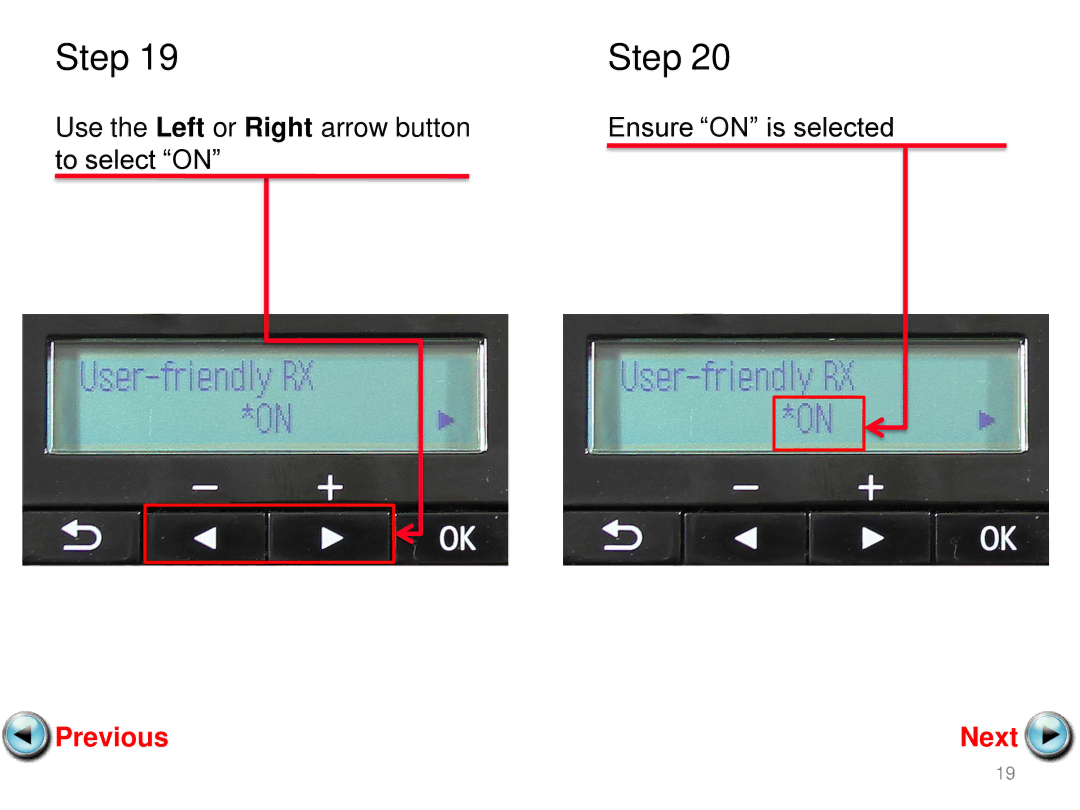
Step 19
Step 20
Use the
Left
or
Right
arrow button
Ensure “ON” is selected
to select “ON”
Previous
Next
19
Page 18
Page 20
Page 19
Image 19
Page 18
Page 20
Contents
Next
Connecting The Phone Lines
Fax to Phone Line Connection
Plug the provided phone cord into the wall jack
Fax to Phone Line Connection
Remove the white plug D from the upper jack
Fax to Phone Line Connection
Plug the second phone cord into the phone
Setting Up The Receive Mode
Step
Step
Press the OK button Receive mode set screen will Appear
Use the Left or Right arrow button
Step
Step
Press the OK button TEL priority mode screen will Appear
Step
Press the OK button User-friendly RX screen will Appear
Step
Step
Receiving a Fax
Top
Page
Image
Contents