SETTING
SETTING MENU
1 | Press MENU button and | |||||
POINT LEFT/RIGHT button(s) to move a | ||||||
| SETTING icon. | |||||
| Press POINT DOWN button to move a | |||||
|
|
|
|
|
|
|
|
|
|
|
|
|
|
|
|
|
|
|
|
|
|
|
|
|
|
|
|
|
|
|
|
|
|
|
|
|
|
|
|
|
|
|
|
|
|
|
|
|
|
|
|
|
|
|
|
|
|
|
|
|
|
|
|
|
|
|
|
|
|
|
|
|
|
|
|
|
|
|
|
|
|
|
|
|
|
|
|
|
|
|
|
|
|
|
|
|
|
SETTING MENU
2 item that you want to set and then press SET button. Setting |
dialog box appears.
Language
Language used in
Keystone
When the image is distorted vertically, select Keystone. ON- SCREEN MENU disappears and Keystone dialog box is displayed. Correct keystone distortion by pressing POINT UP/DOWN button(s). Refer to KEYSTONE ADJUSTMENT on page 20.
Blue back
When this function is “On,” this projector will produce a blue image instead of the video noise on the screen when any input source is unplugged or turned off.
Display
This function decides whether to display
Off ····sets
●ON-SCREEN MENU
●“Power off?” message
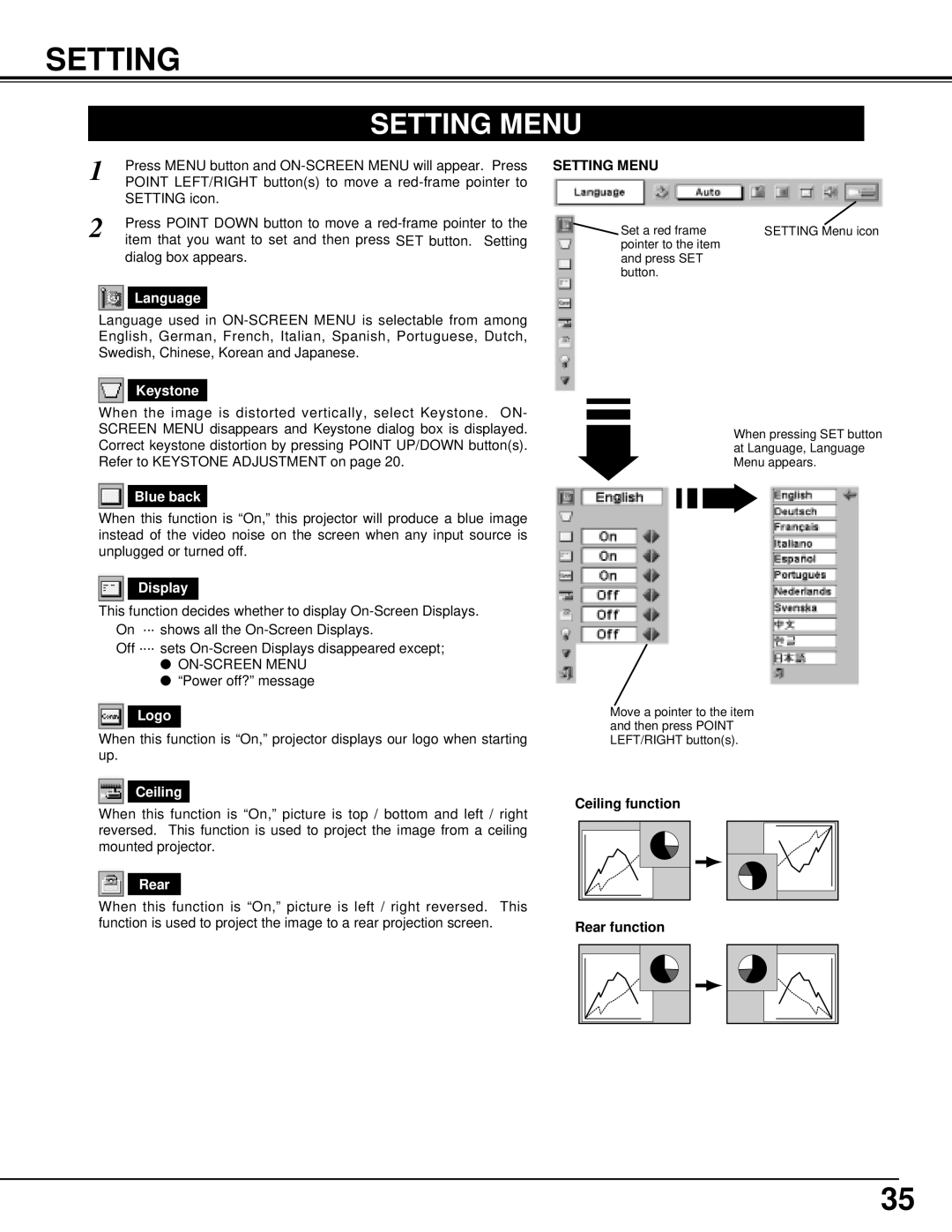
 Set a red frame pointer to the item and press SET button.
SETTING Menu icon
When pressing SET button at Language, Language Menu appears.
Logo
When this function is “On,” projector displays our logo when starting up.
Ceiling
When this function is “On,” picture is top / bottom and left / right reversed. This function is used to project the image from a ceiling mounted projector.
Rear
When this function is “On,” picture is left / right reversed. This function is used to project the image to a rear projection screen.
Move a pointer to the item and then press POINT LEFT/RIGHT button(s).
Ceiling function
Rear function
35