Product Features
Introduction
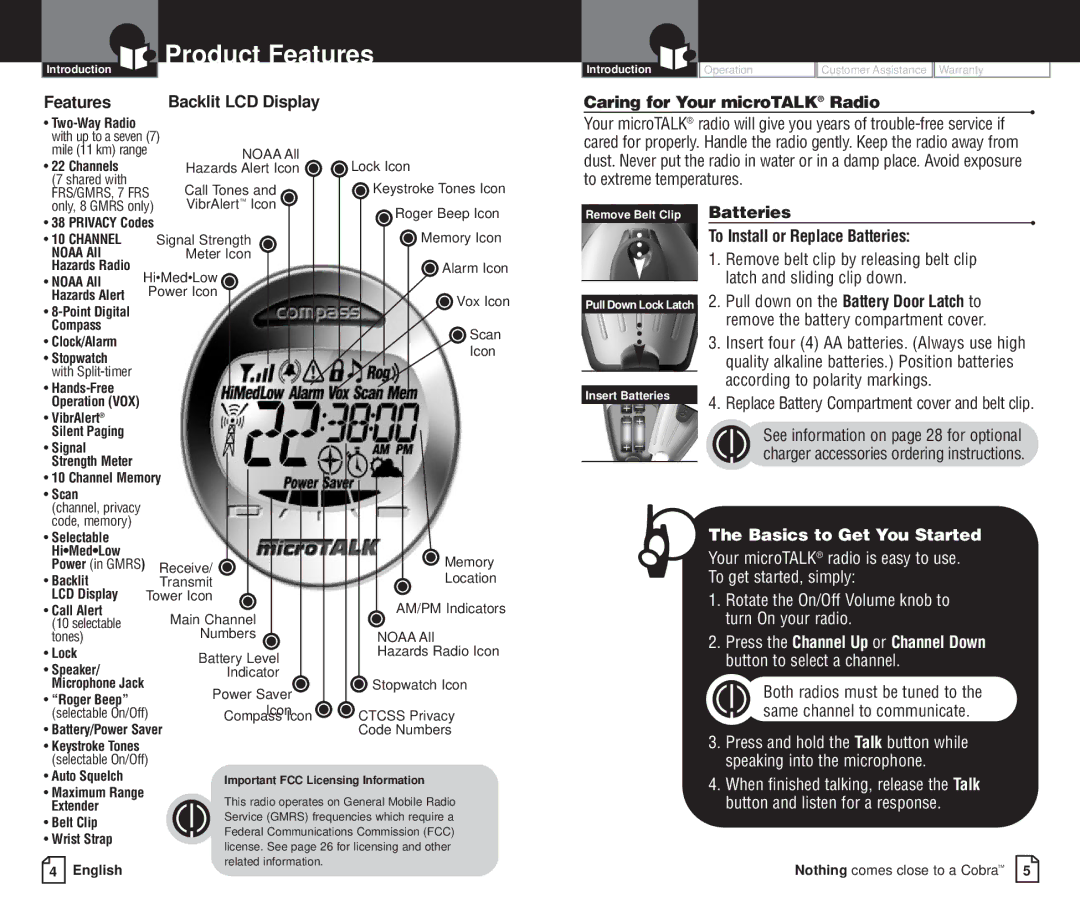
Features | Backlit LCD Display |
•
mile (11 km) range | NOAA All |
|
• 22 Channels | Hazards Alert Icon | Lock Icon |
(7 shared with | Call Tones and | Keystroke Tones Icon |
FRS/GMRS, 7 FRS | ||
only, 8 GMRS only) | VibrAlert™ Icon |
|
|
|
|
|
|
|
| Introduction | Operation | Customer Assistance | Warranty |
|
Caring for Your microTALK® Radio
•
Your microTALK® radio will give you years of
• 38 PRIVACY Codes |
| Roger Beep Icon | ||
| Memory Icon | |||
• 10 CHANNEL |
|
| Signal Strength | |
NOAA All |
|
| Meter Icon |
|
Hazards Radio | Hi•Med•Low | Alarm Icon | ||
• NOAA All |
| |||
| Power Icon |
| ||
Hazards Alert |
| Vox Icon | ||
• |
|
|
| |
|
|
|
| |
Compass |
|
|
| Scan |
• Clock/Alarm |
|
|
| |
|
|
| Icon | |
• Stopwatch |
|
|
| |
|
|
|
| |
with |
|
|
|
|
• |
|
|
|
|
Operation (VOX) |
|
|
|
|
• VibrAlert® |
|
|
|
|
Silent Paging |
|
|
|
|
• Signal |
|
|
|
|
Strength Meter |
|
|
|
|
• 10 Channel Memory |
| |||
• Scan |
|
|
|
|
(channel, privacy |
|
|
|
|
code, memory) |
|
|
|
|
• Selectable |
|
|
|
|
Hi•Med•Low |
|
|
| Memory |
Power (in GMRS) |
| Receive/ | ||
• Backlit |
|
| Transmit | Location |
LCD Display |
| Tower Icon | AM/PM Indicators | |
• Call Alert |
|
| Main Channel | |
(10 selectable |
|
|
| |
tones) |
|
| Numbers | NOAA All |
• Lock |
|
| Battery Level | Hazards Radio Icon |
• Speaker/ |
|
| Indicator | Stopwatch Icon |
Microphone Jack |
| Power Saver | ||
• “Roger Beep” |
|
|
| |
(selectable On/Off) | Icon | CTCSS Privacy | ||
Compass Icon | ||||
• Battery/Power Saver | Code Numbers | |||
•Keystroke Tones (selectable On/Off)
• Auto Squelch | Important FCC Licensing Information |
•Maximum Range
Extender | This radio operates on General Mobile Radio | |
• Belt Clip | Service (GMRS) frequencies which require a | |
Federal Communications Commission (FCC) | ||
• Wrist Strap | ||
license. See page 26 for licensing and other | ||
| ||
| related information. |
Remove Belt Clip
Pull Down Lock Latch
Insert Batteries
Batteries
•
To Install or Replace Batteries:
1.Remove belt clip by releasing belt clip latch and sliding clip down.
2.Pull down on the Battery Door Latch to remove the battery compartment cover.
3.Insert four (4) AA batteries. (Always use high quality alkaline batteries.) Position batteries according to polarity markings.
4.Replace Battery Compartment cover and belt clip.
See information on page 28 for optional charger accessories ordering instructions.
The Basics to Get You Started
Your microTALK® radio is easy to use. To get started, simply:
1.Rotate the On/Off Volume knob to turn On your radio.
2.Press the Channel Up or Channel Down button to select a channel.
Both radios must be tuned to the same channel to communicate.
3.Press and hold the Talk button while speaking into the microphone.
4.When finished talking, release the Talk button and listen for a response.
4 English |
Nothing comes close to a Cobra™ 5