EXCELL PRECISION CO., LTD.
CONFIGURATION SETTINGS
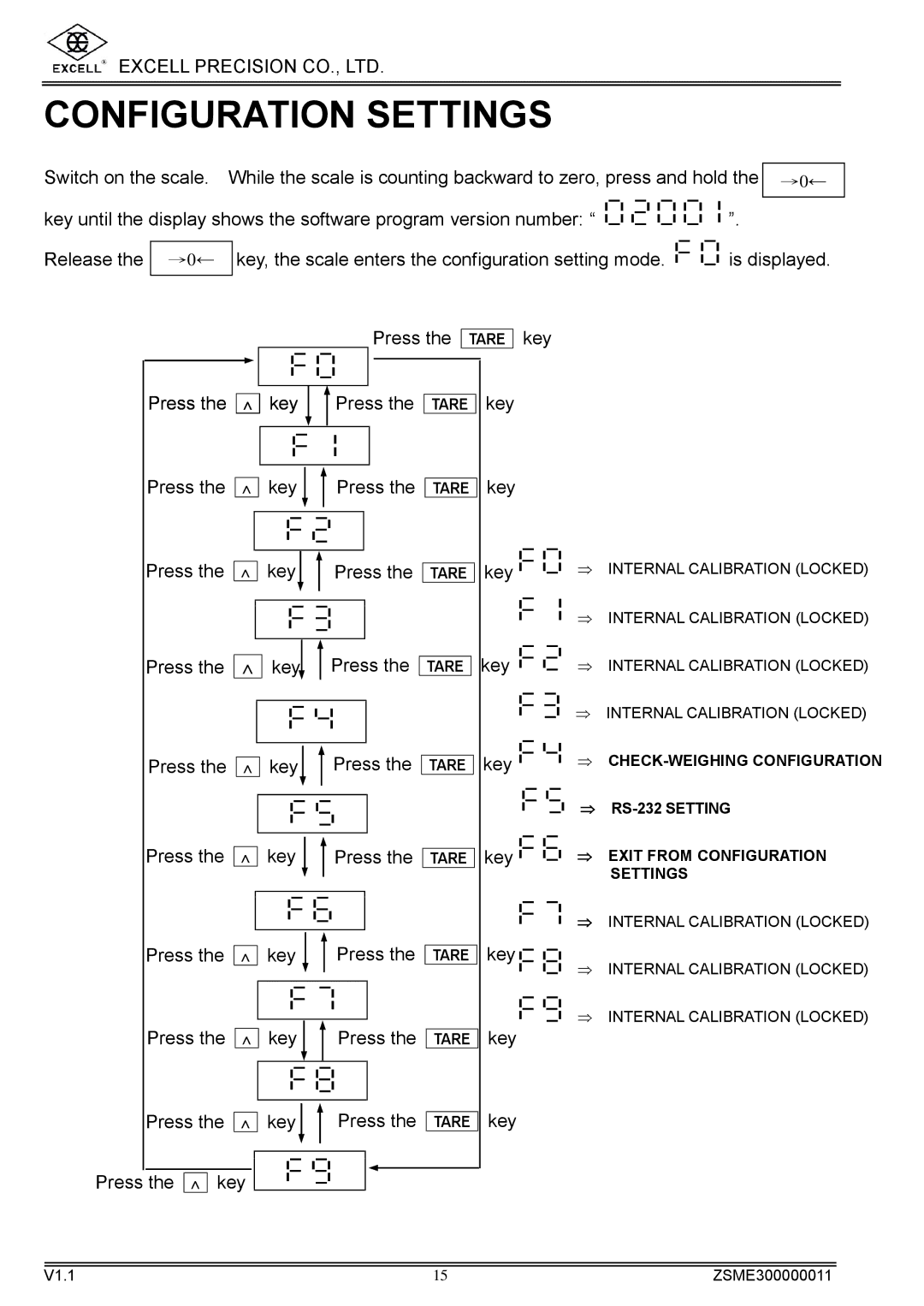
Switch on the scale. | While the scale is counting backward to zero, press and hold the | →0← | |||||||||||||||
|
|
|
|
|
|
|
|
|
|
|
|
|
|
|
|
| |
key until the display shows the software program version number: “ |
|
|
|
|
|
|
|
|
|
|
|
| ”. | ||||
|
|
|
|
|
|
|
|
|
|
|
| ||||||
|
|
|
|
|
|
|
|
|
|
|
| ||||||
|
|
|
|
|
|
|
|
|
|
|
| ||||||
|
|
|
|
|
|
|
|
|
|
|
| ||||||
Release the | →0← |
| key, the scale enters the configuration setting mode. |
|
|
|
|
|
| is displayed. | |||||||
|
|
|
|
|
| ||||||||||||
|
|
|
|
|
| ||||||||||||
|
|
|
|
|
|
|
|
|
|
|
|
|
|
|
|
|
|
Press the
TARE
key
Press the ∧
Press the ∧
Press the ∧
Press the ∧
Press the ∧
Press the ∧
Press the ∧
Press the ∧
Press the ∧
Press the ∧ key
key 
 Press the
key 
 Press the
key
 Press the
key  Press the
key
 Press the
key 
 Press the
key 
 Press the
key 
 Press the
key
 Press the
TARE
TARE
TARE
TARE
TARE
TARE
TARE
TARE
TARE
key
key
key |
|
|
|
|
|
|
|
|
|
|
| ⇒ INTERNAL CALIBRATION (LOCKED) |
|
|
| ||||||||||
|
|
|
| |||||||||
|
|
|
|
|
|
|
| |||||
key |
|
|
|
|
|
|
|
|
|
|
| ⇒ INTERNAL CALIBRATION (LOCKED) |
|
|
|
|
|
|
|
|
|
|
| ||
|
|
|
|
|
|
|
|
| ||||
|
|
|
|
|
|
|
|
| ||||
|
|
|
|
|
|
|
|
|
|
| ⇒ INTERNAL CALIBRATION (LOCKED) | |
|
|
|
|
|
|
|
|
|
|
| ||
|
|
|
|
|
|
|
|
| ||||
|
|
|
|
|
|
|
|
| ||||
|
|
|
|
|
|
|
|
|
|
|
| ⇒ INTERNAL CALIBRATION (LOCKED) |
|
|
|
|
|
|
|
|
|
|
|
| |
|
|
|
|
|
|
|
|
|
| |||
|
|
|
|
|
|
|
|
|
| |||
key |
|
|
|
|
|
|
|
|
|
|
| ⇒ |
|
|
|
|
|
|
|
|
|
|
| ||
|
|
|
|
|
|
|
|
| ||||
|
|
|
|
|
|
|
|
| ||||
key |
|
|
|
|
|
|
|
|
|
|
| ⇒ |
|
|
|
|
|
|
|
|
|
|
| ||
|
|
|
|
|
|
|
|
|
| |||
|
|
|
|
|
|
|
|
|
| |||
|
|
|
|
|
|
|
|
|
|
| ⇒ EXIT FROM CONFIGURATION | |
|
|
|
|
|
|
|
|
|
|
| ||
|
|
|
|
|
|
|
|
|
|
| ||
|
|
|
|
|
|
|
|
|
|
| ||
|
|
|
|
|
|
|
|
|
|
|
| SETTINGS |
⇒ INTERNAL CALIBRATION (LOCKED)
key | ⇒ INTERNAL CALIBRATION (LOCKED) |
| |
key | ⇒ INTERNAL CALIBRATION (LOCKED) |
|
key
V1.1 | 15 | ZSME300000011 |