Xda orbit
Please Read Before Proceeding
Copyright 2007 High Tech Computer Corp. All Rights Reserved
Page
Disclaimers
Important Health Information and Safety Precautions
Limitation of Damages
Handle battery packs carefully
Use the correct external power source
Take extra precautions
Safety Precautions for Direct Sunlight
Earphone, manufactured by HTC, Model name HS S168 and S200
Safety in Aircraft
Safety Precautions for RF Exposure
Antenna location
General Precautions
Cleaning
Mounting accessories
Adjust the volume
Avoid pushing objects into product
Contents
Synchronizing Information With Your Computer
107
145
125
137
169
221
175
213
229
Chapter
Left panel
Getting to Know Your PDA Phone and Accessories
Top panel
Right panel
Front panel
END
Back panel
Bottom Panel
Accessories
Accessory Function Battery
Installing the USIM/SIM Card and Battery
Talk time
Cut-off corner facing the battery compartment
To install the USIM/SIM card
To remove the back cover
To remove the battery
To install the battery
After you have inserted the battery, replace the back cover
To remove the USIM/SIM card
To insert a microSD card
Installing a Storage Card
To replace the back cover
Prise open the storage card slot cover
Press and hold the Power button for a few seconds
Auto configure the data connection settings
To turn on the power
To turn off the power
Select the I want to do auto configuration now check box
Charge the battery
To automatically configure data connection settings
Full battery icon appears on the Today screen’s title bar
Tap Start Settings System tab Screen
Manage screen settings
Switch your device to Sleep mode
Select the battery timeout period, then tap OK
Check battery power
Tap Start Settings System tab Power
To access the Today screen, tap Start Today
View Help information for the current screen
To open the Touch Cube
Touch Cube
To close the Touch Cube
Touch Cube screens
To navigate the Touch Cube
There are three sides to the Touch Cube interface
Name will be displayed
Touch these buttons to control music
Finger Scrolling and Finger Panning
To use finger scrolling
To continuously pan
To use finger panning
Release your finger to stop panning
To go to the next or previous message
TouchFLO settings
To go to the next or previous messaging account
Icons that appear in this area
No USIM/SIM card inserted
Programs in the Start Menu
Programs screen
Getting Started
Getting Started
Personal tab
System tab
Connections tab
Getting Started
Getting Started
Entering Text and Searching for Information
Entering Information
Icon Input method
To enlarge the on-screen Keyboard
To enter text using the on-screen Keyboard
Tap Large keys
To enter text using XT9 mode
XT9 mode
To enter text using the Touch Keyboard
To customize XT9 settings for the Touch Keyboard
Multitap mode
Numeric mode
To customize XT9 settings for the Touch Keypad
To enter text using the Touch Keypad
Tap the Input Selector arrow, and tap Touch Keypad
To open the Symbol Pad and select a symbol
To use Letter Recognizer
To use Block Recognizer
To enter punctuation and symbols
To write using Transcriber
Position the cursor where you want text to appear
To edit text
To search for a file or an item
Tap Start Programs Search
Using Phone Features
Setting Up Bluetooth SIM Access for Car Kit Phones
Phone screen
Using the Phone
To enable or disable the phone function
Enter your PIN
Adjust the device volume
To enable or disable Airplane Mode
Press the Talk button on your device to place the call
Make a call from Phone
Make a call from Contacts
To choose one of the numbers of a contact to dial
Make a call from Call History
Make a call from the Touch Cube
On the Phone screen, tap the Call History button
On the Phone screen, tap Menu Speed Dial
One-touch Speed Dial
To create a Speed Dial entry
Tap Menu New
To answer or reject an incoming call
Make a call from SIM Manager
To call a SIM contact
To end a call
To put a call on hold
To switch between two calls
To set up a conference call
To turn on and off the Speakerphone
Change Video Call settings
Swap Image options
Both parties equal Other party only
Set up video call options
To adjust the brightness
General tab
Services tab
Camera options
To end a video call
To answer or reject an incoming video call
To find a contact name or number
Make a call or send a text message using Smart Dialing
Make an emergency call
Setting Up Bluetooth SIM Access for Car Kit Phones
Tap Start Settings Connections tab Bluetooth SIM Access tab
Make an international call
Using Phone Features
Setting Up Your Device
Display settings
Basic Settings
Regional settings
Time and date
Ringer settings
Device name
Tap Start Settings System tab Clock & Alarms Alarms tab
Alarms and notifications
To set an alarm
To choose how to be notified about events or actions
To customize the Today screen
Phone services
To access and change settings of phone services
To use a custom background image
On the Identification tab, enter your personal information
Tap Start Settings Personal tab Owner Information
To display owner information
To set options for displaying tasks on the Today screen
Protect your SIM card with a PIN
Protect your device with a password
Customize the Start menu
To change the PIN
Tap Start Settings Personal tab Lock
To set a device password
Encrypt files on your storage card
Synchronizing Information With Your Computer
About Synchronization
Ways to synchronize
Setting Up Windows Mobile Device Center on Windows Vista
Set up synchronization in Windows Mobile Device Center
Use Windows Mobile Device Center
Set up synchronization in ActiveSync
Setting Up ActiveSync on Windows XP
Install ActiveSync
Click Setup and Installation
Start and stop synchronization
Synchronizing With Your Computer
Change which information is synchronized
Troubleshoot sync connection problem
To synchronize with a computer via Bluetooth
On your device, tap Start Programs ActiveSync
Organizing Contacts Appointments, Tasks, Other Information
Contacts SIM Manager Calendar Tasks Voice Recorder
Add new contacts
Contacts
To add a contact on your device
To add a contact to your SIM card
View, organize and search
To view contact information
To find a contact on your device
Do one of the following
Share contact information
To copy SIM contacts to your device
To create a contact on your SIM card
To copy contacts to the SIM card
To store your SIM card’s phone number
Tap Start Programs SIM Manager, then tap Menu Tools Options
Tap Menu Contacts to SIM
Tools List of Own
Create appointments
When finished, tap OK to return to the calendar
To set a default reminder for all new appointments
To schedule an appointment
View appointments
Tap Start Calendar
Send appointments
To send a meeting request
To send appointment details as a vCalendar
Tap Start Programs Tasks
To create a task
To change the priority of a task
To locate a task
To set the default reminder for all new tasks
To show start and due dates in the task list
To send task information as a vCalendar
To draw in a note
To create a note
Tap Start Programs Notes. In the note list, tap New
Tap Start Programs Notes
To record a voice note
Tap Start Settings Personal tab Input
To change recording formats
To send the voice recording through MMS
To record your voice
To play back a voice recording
To send the voice recording via e-mail
To rename or move a recording
To beam the voice recording
To set the voice recording as a ring tone
Select a voice recording then tap Menu Rename/Move
Exchanging Messages
To select a messaging account
To configure message account settings
Messaging
Tap Menu Tools Options while
Tap Start Messaging, then tap Menu Options Tap Signatures
Send text messages
To automatically add a signature in outgoing messages
Select the Use signature with this account check box
New text message is then created
Copy text messages from and to the SIM card
Tap Start Messaging SMS \ MMS
Change MMS settings
To configure MMS message settings
To compose an MMS message
Create and send MMS messages
Tap Start Messaging SMS \ MMS, then tap Menu New MMS
Tap Send to send the MMS message
To add text to an MMS message
To view an MMS message
View and reply to MMS messages
To add an audio clip to an MMS message
To reply to an MMS message
To block a phone number from sending you MMS messages
Tap Menu Save to Blacklist
After Auto Setup finishes, tap Next
Set up a POP3 or IMAP4 e-mail account
Tap Start Messaging New E-mail Account
To specify e-mail server settings
Tap Finish
To customize download and format settings
Options Description
To check the spelling, tap Menu Spell Check Tap Send
Create and send messages
To compose and send a message
To add an attachment to a message
To filter your Inbox
Filter the Inbox message list
View and reply to messages
To read an incoming message
To reply to or forward a message
To download an attachment
To view and reply to Html e-mails
To send and receive e-mail for an Outlook account
Download messages
To send and receive e-mail for a POP3/IMAP4 account
To automatically receive attachments on Outlook e-mails
Customize e-mail settings
To change the download size and format for Outlook e-mail
To automatically receive attachments on IMAP4 e-mails
To store attachments on a storage card
Working With Company E-mails and Meeting Appointments
Working With Company E-mails Managing Meeting Requests
Set up an Exchange Server connection
Synchronizing with the Exchange Server
Start synchronization
Working With Company E-mails
Automatic synchronization through Direct Push
To enable Direct Push via ActiveSync
To enable Direct Push via Comm Manager
ActiveSync on your device, tap Menu Schedule
Instant download through Fetch Mail
Scheduled synchronization
Tap Start Messaging Outlook E-mail
Search for e-mails on the Exchange Server
Tap Search
Select a message or open a message
Flag your messages
To flag or unflag a message
Tap Menu Follow Up and select one of the following options
To send out-of-office auto-reply messages
Out-of-office auto-reply
To reply to a meeting request
To view the list of meeting participants
Finding Contacts in the Company Directory
Contacts, tap Menu Company Directory
Working With Company E-mails and Meeting Appointments
Working With Company E-mails and Meeting Appointments
Working With Documents and Files
Tap Start Office Mobile
Microsoft Office Mobile
To use Microsoft Office Mobile
Tap the Office Mobile application that you want to use
Tap Start Programs Adobe Reader LE
To open Adobe Reader LE
To search for text in the document
Connect your device to the PC
To manage files on your device using File Explorer
Tap Start Programs File Explorer
To start ZIP on your device
To copy files to a storage card
Tap Menu Edit Paste
Tap Start Programs ZIP
To install Sprite Backup
To create a zip archive
To back up data in Basic mode
To open Sprite Backup
On your device, tap Start Programs Sprite Backup
To restore data in Basic mode
To restore data in Advanced mode
To back up data in Advanced mode
Tap Options Switch to Advanced Mode
To change the backup location and file name
Comm Manager 10.2 O2 Connection Settings
Bluetooth
Comm Manager
To open Comm Manager
To manually select the network operator
Tap Start Programs O2 Operator Settings
To automatically detect the network operator
Select your operator from the list and tap OK
Wi-Fi
Ways of Connecting to the Internet
Turn Wi-Fi on and off
To connect to a wireless network
Connect to wireless networks
On the next pop-up message window, do one of the following
Wi-Fi Status screen
To check wireless network status
Title bar
To save battery power while connected to a wireless network
To add a new GPRS/3G connection
Dial-up
To open Internet Explorer Mobile
To manually start a data connection
To disconnect active data connections
Tap Start Internet Explorer
To view a Web page using finger scrolling and panning
Browsing the Web
To set up Windows Live for the first time
Set up Windows Live
Tap Start Programs Windows Live Tap Sign in to Windows Live
Windows Live interface
Live Search Bar
To open Windows Live Messenger
Windows Live Messenger
Launch Messenger and sign
Tap Start Programs Messenger
To add a Windows Live contact in Live Messenger
Add Windows Live contacts
To start and end conversations
To add a Windows Live contact in Contacts
Plug in the USB cable between your device and the computer
Using Your Device as a Modem Internet Sharing
To set up your device as a USB modem
Tap Connect
To use your device as a Bluetooth modem
To end the Internet connection
Bluetooth modes
On the Internet Sharing screen, tap Disconnect
To turn Bluetooth on and make your device visible
Bluetooth partnerships
To create a Bluetooth partnership
To accept a Bluetooth partnership
Connect a Bluetooth hands-free or stereo headset
To connect a Bluetooth hands-free or stereo headset
Beam information using Bluetooth
To beam information from your device to a computer
To beam a contact, tap Menu Send Contact Beam
Tap Start Settings Connections tab Bluetooth FTP tab
Bluetooth Explorer and Bluetooth file sharing
To use Bluetooth Explorer
To print contact information
Print files via Bluetooth
Tap Menu Print via Bluetooth
To print a calendar appointment
To print a Jpeg file
Using GPS
GPS Controls
Guidelines and Preparation for Using GPS
Using GPS
Tap Start Programs QuickGPS
Downloading Satellite Data via QuickGPS
To open QuickGPS
To download data
Download options
GPS Controls
Experiencing Multimedia
Capture modes
To change the capture mode
Camera
To open the Camera screen
File formats supported
On-screen controls and indicators
Camera controls
Exit. Tap to exit the Camera program
Quick Settings Panel
To zoom
Zooming
To zoom out
Zoom range
Review screen
Icon Function
Camera settings
Capture Settings tab
Advanced tab
Experiencing Multimedia
Tap a property to adjust
To open Camera Album
Tap Start Programs Camera Album
To view an image
To go to the next image
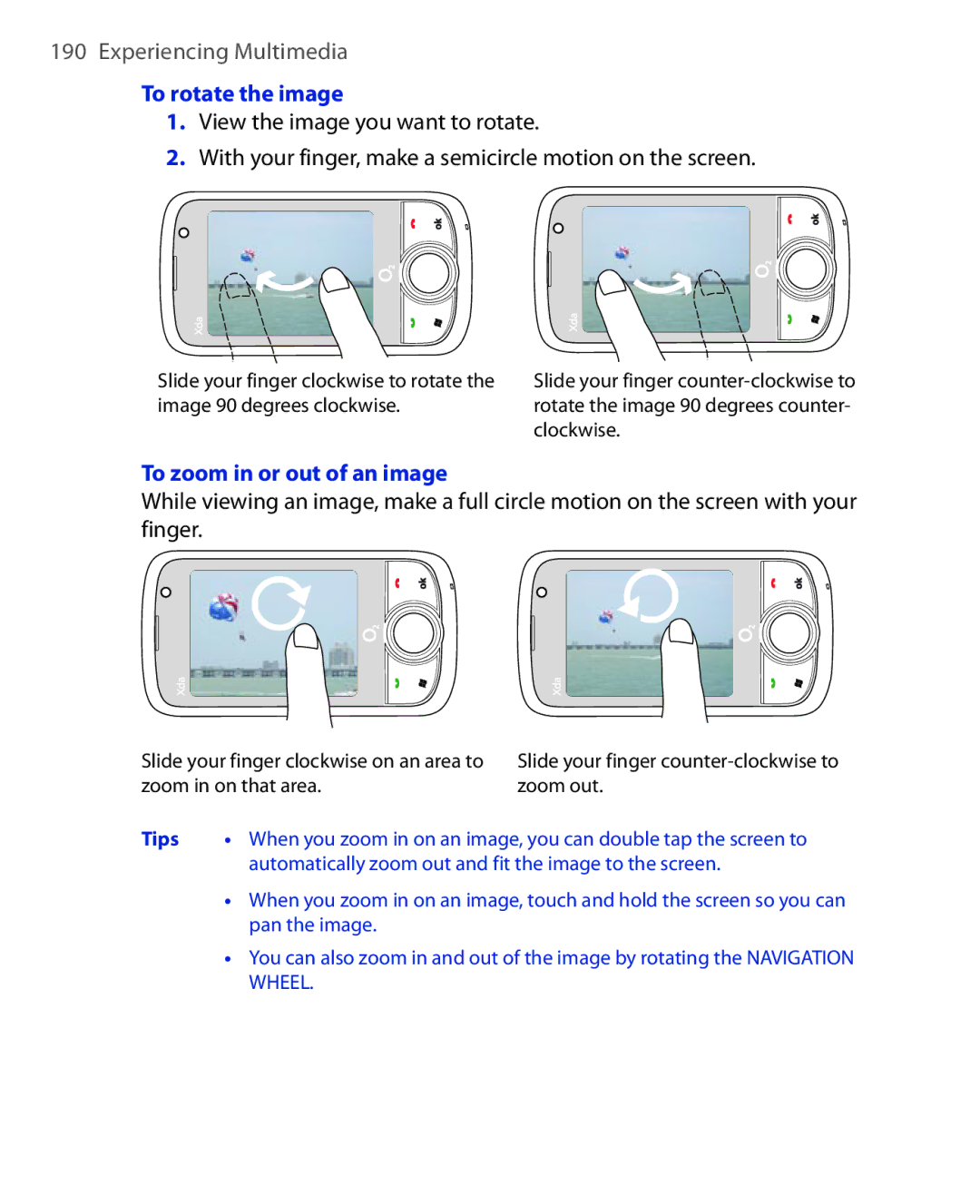
To rotate the image
To zoom in or out of an image
To close Camera Album and go to the Camera program
To view the images as a slide show
To play back video files
Go back to the main Camera Album screen and touch or
To copy media files to your device
To open Pictures & Videos
Tap Start Programs Pictures & Videos
To view pictures
To play videos
Pictures & Videos menu
To play GIF animation files
To edit a picture
To open Windows Media Player Mobile
Tap Start Programs Windows Media
About the controls
To synchronize content manually to your device
To synchronize content to your device automatically
Synchronize video and audio files
To update the Library
Play media
To play video and audio files on your device
Troubleshooting
Playlists
To save a new playlist
To access streaming content via Internet Explorer
Tap Start Programs Streaming Media
To configure streaming video connection settings
Tap Menu Options to configure the following settings
To view streaming video information
To launch Audio Manager
Library
Tap Start Programs Audio Manager
Music Player
Playback time Go to next song
To create a playlist
Tap Menu Add
To play back a playlist
Tap Set as Default Ring Tone
Set music as ring tone
Confirmation message is then displayed. Tap OK
To access Audio Booster
This control
To delete a custom equalizer preset
To create a custom equalizer preset
Select the Equalizer check box to enable the equalizer Tap
Tap Menu Delete Preset
To open FM Radio
To apply a preset
Tap Start Programs FM Radio
Switches between speaker and headset output
FM Radio controls
Navigation
Radio Display
Device controls used in FM Radio
Navigation Wheel
To save FM stations on the Presets screen
Saving presets
To save FM stations to the preset buttons
To listen to a preset FM station
FM Radio Main Menu
Experiencing Multimedia
Managing Your Device
Adding and Removing Programs
Soft reset
To perform a soft reset
To add programs
Hard reset
Clear Storage
Tap Start Settings System tab Clear Storage
Enter 1234 then tap Yes
To check for updates
To set up Windows Update
Tap Start Settings Systems tab Windows Update
Tap Start Settings Systems tab Windows Update Tap Check Now
To change Windows Update options
Tap Menu and select the option you want to change
Managing Your Device
Managing Your Device
Using Other Applications
Voice Speed Dial Java Spb Gprs Monitor
Voice Speed Dial
Create a voice tag for a phone number
Create a voice tag for a program
Make a call or launch programs using a voice tag
Tap Start Settings Personal tab Voice Speed Dial
Tap Start Programs Voice Speed Dial
To install from your device
Install and launch MIDlets/MIDlet suites
To download and install via Internet Explorer Mobile
To open the Java program
Manage MIDlets/MIDlet suites
Today Plug-in
Install Gprs Monitor
Tap inside the control bar to adjust the backlight level
4 5
Gprs Monitor icon and pop-up window
Set up monitoring and notification
Select the Enable connection monitoring check box
To show the Gprs Monitor icon on the title bar
To set up traffic limit notifications
View charts and reports
To enter your service plan details
To view charts and generate reports
Regulatory Notices Specifications
Appendix
European Union Notice
Regulatory Notices
Regulatory Agency Identifications
EN 60950-1 IEC
Etsi EN 300
EN 301
General public
Exposure to Radio Frequency RF Signals
Safety precautions for RF exposure
This equipment may be operated
72 w/kg @10g CE
SAR Information
Pacemakers
Hearing Aids
Weee Notice
Other Medical Devices
RoHS Compliance
System Information
GPS
FM Radio/RDS
Appendix
Index
Index
Live Messenger
QuickGPS 172 Put call on hold
Index
With Exchange Server 126 System information
ZIP
Index