LG501C User Guide English
Phone Overview
Charging with PC USB
Phone Overview
Internal Qwerty Keypad
Contacts
Menu Access
Prepaid
Messages
Menus Overview
Multimedia Phone Info My Number
Font Settings Word Prediciton Security Lock Phone
Display Wallpaper Backlight Auto Keyguard Menu Style
Icon Glossary Version
To use the charger provided with your phone
Battery
Charging the Battery
Press for about 3 seconds until the LCD screen lights up
Battery Charge Level
Charge time varies depending upon the battery level
Press and hold until the display turns off
Getting Started with Your Phone
Signal Strength
Menu Settings Phone Info -Icon Glossary on your phone
Making Calls
Receiving Calls
When the phone rings and/or
Redialing Calls
Options
Call Waiting
Lock Mode
Quick Volume Adjustment
Dialing Single Digit Speed Dials from 2 to
Caller ID
Speed Dialing
Text Input
Pressing this twice repeatedly allows you to FN lock
Press Save
Phone Numbers With Pauses
Mobile 1/ Home 1/ Office 1/ Mobile 2/ Home 2/ Office 2/ Fax
Use to highlight a Label and press
Menu Contacts Contact List
Contacts in Your Phone’s Memory
Contacts
List
Contacts Options
Menu
Contact
To call
Press Recent Calls
Press to place the call From Call History Press Menu
Prepaid
Contacts
Code Entry Mode
Contacts
Serial Number
Information, press to save the entry into your Contact List
Contact List
Press Enter the name, then press
Following
New
Groups
My vCard
Options
Speed Dials
Messages
Messages
New Text Message
Press Right Option Key
Press Enter the recipients address
Complete your message and send or save it
Sent
Inbox
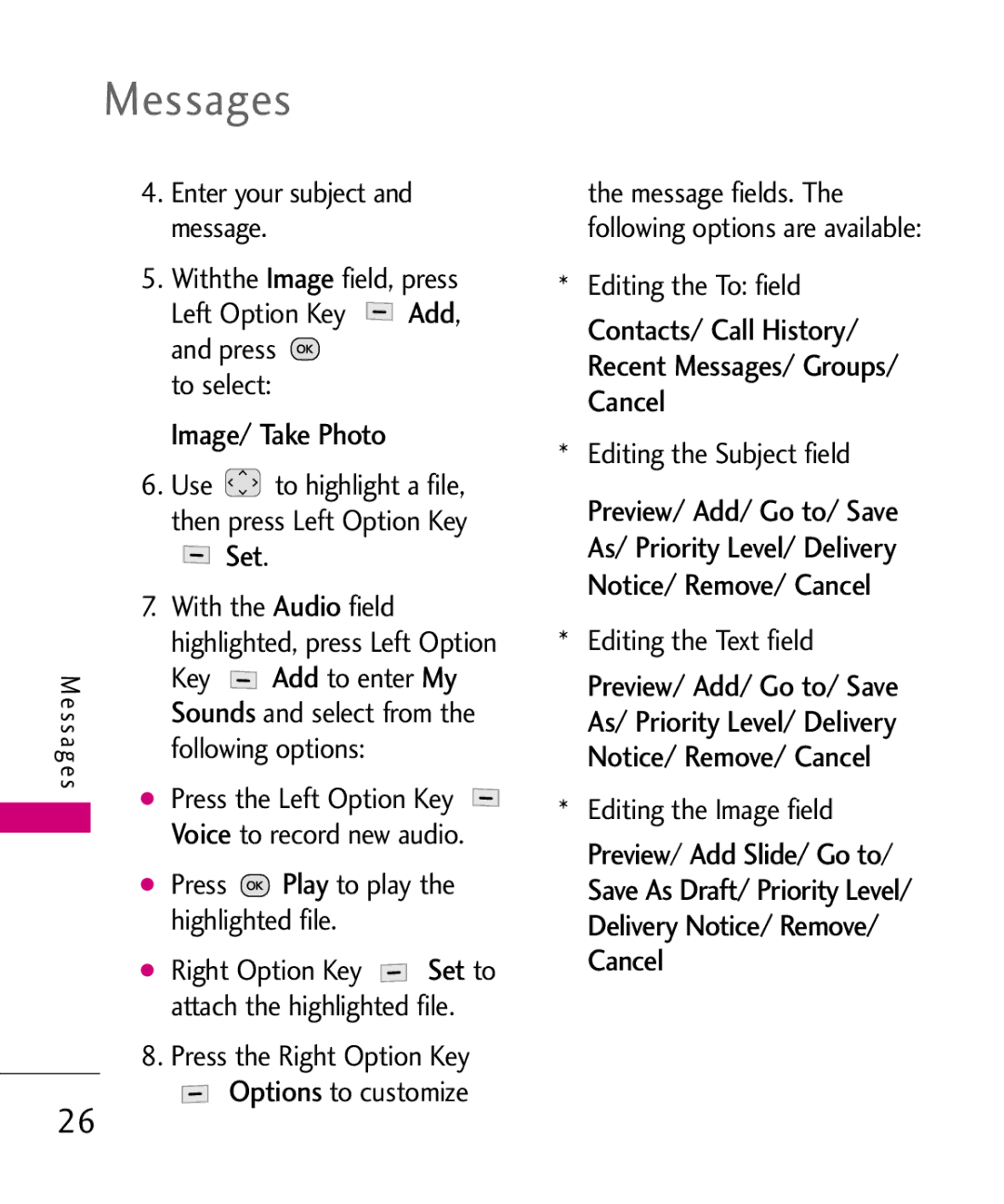
Sounds .Add
Image/ Take Photo
Set
Play
Delete
Inbox
Viewing Your Inbox
Press Use to highlight an inbox message
Contacts Stores
Outbox
Received message into your
Lock/Unlock Locks or unlocks Selected message
To access
Use to highlight a sent message
Voicemail
Contact Update Existing
Drafts
Edit
Templates
Settings
Entry Mode
Signature On/ Off/ Edit
Missed Calls
Messages/ Recent Calls
Delete All
Press Use To highlight an
Dialed Calls
Call Timer
Received Calls
All Calls
Browser
Games/ Browser
Games
Buy Games
Numbered options
Links embedded in content
Navigating Through the Browser
Text or numbers
Clearing Out Text/Numbers Entered
Entering Text, Numbers, or Symbols
Browser
Initiating a Phone Call From Web
Multimedia
Settings Tab
Multimedia
Take Photo
Record Voice
Images
Sounds
Time & Date
Voicemail
Missed Calls
Train Word
Command Mode
Announce Alert
Best Match
My Schedule
Alarm Clock
My Schedule
Calendar
Left Option Key Set to edit your schedule information
Bluetooth
Bluetooth
Ringtone Press Save
Search
Searchlect New Search/Last
Press Use to highlight a setting, then press
Power
My Bluetooth Info
My Visibility
Calculator
Tools
Tools
Ez Tip Calculator
Unit Converter
World Clock
Stopwatch
Sound
Settings
Settings
Ring Only/ Vibrate Only/ Ring & Vibrate
Service Alerts
Alert Type
Backlight
Power On/Off Tone
Display
Auto Keyguard
Clocks & Calendar
Font Settings
Languages Idiomas
Spanish
Off
Security
Word Prediction
Press Lock Phone
Camera Restriction
Reset Default
Press Reset Default
Press Change Lock Code and select Phone Only/ Camera
Answer Options
Call Settings
Airplane Mode
Auto Retry
Network
TTY Mode
System
System Select
Location
Memory
Phone Info
E911 Only
Important Information
Before You Start
For Your Safety
Memory card information and care
Do not disassemble or modify the memory card
FCC RF Exposure Information
Part 15.105 statement
Limits and should be avoided. FCC Part 15 Class B Compliance
Receiving antenna
Following measures
Reorient or relocate
Increase the separation
Adapter or battery charger is intended for indoor use only
Adapter Charger
Avoid damage to your hearing
Industry reviewed the available
TIA Safety Information
Over 120 scientists, engineers
Body of research to develop
Phone Operation
Safety Guidelines
Antenna Care
Driving
Persons with pacemakers
Electronic Devices
Hearing Aids
Should not carry the phone in a breast pocket
Vehicles
Other Medical Devices
Health Care Facilities
Posted Facilities
For Vehicles Equipped with an Air Bag
Blasting Areas
Potentially Explosive
Charger and Adapter Safety
Battery Information Care
Explosion, Shock, and Fire Hazards
General Notice
FDA Consumer Update
What is the FDA’s role
Wireless phones?
Term ‘wireless phone’ refers
Safety limits
Safety guidelines that were
Telephone wiring in a house
With built-in antennas, often
Years
Wireless phone RF?
Page
Energy coming from wireless phones?
What about children using wireless phones?
Equipment?
What about wireless phone
Interference with medical
Driver Safety Tips
Where can I find additional information?
Free device. a number
Accessories are readily
Off the road
Take advantage of these
Or nearby vehicles
Wireless phone to lend a
Special wireless non
For emergency services. But
Traffic signal, a minor traffic
Page
Compliance with the FCC RF
FCC has granted an
SAR levels evaluated as
Emission guidelines. SAR
Page
Standard battery is available
Battery Charger
Battery charger allows you to charge your phone
Limited Warranty Statement
Transferable to any subsequent purchaser/end user
Limited Warranty Statement
Damage resulting from use of non-LG approved accessories
11Consumables such as fuses
HOW to GET Warranty Service
Tel -800-793-8896 or Fax
Memo
Memo
Memo

 ,
, to select: