User Guide
Page
Never store your phone in temperatu res less than -4F or
Important Safety Precautions
Never use an unapproved battery since this could damage
Greater than 122F
Important Safety Precautions
Page
Table of Contents
Add New Device
New Contact Contact List Backup Assistant Favorites
New Message
Erasing Messages
Table of Contents
Memory Phone Info
Call Settings
TIA Safety Information
Safety Information
Accessories
Glossary
Hearing loss
Messaging, Voicemail, caller ID and chat
Welcome
Technical Details
Important Information
Information to User
Technical Details
Technical Details
FCC RF Exposure Information
Bodily Contact During Operation
Optional, if available
Vehicle-Mounted External Antenna
Earpiece Flip Main LCD Screen
International Call Prefix Key To make an
Rear view
Getting Started with Your Phone
Installing the Battery
Charging the Battery
Removing the Battery
Battery Temperature Protection
Charge time varies depending upon the battery level
Charging with USB
Turning the Phone On and Off
Battery Charge Level
Signal Strength
Getting Started with Your Phone
Correcting Dialing Mistakes
Redialing Calls
Receiving Calls
Screen Icons
Quick Access to Convenient Features
Voice Commands
Caller ID
Dial Search
Text Input
T9 Word/ Abc/ ABC T9 Palabra/ Symbols/ Quick Text
Left Soft Key Press to change the text input mode
Entering and Editing Information
Speed Dial
Contacts in Your Phone’s Memory
Storing Basics
Customizing Individual Entries
Storing a Number with Pauses
Contacts in Your Phone’s Memory
Changing Saved Information
From standby mode
Adding Another Phone Number
From the Contact List Screen
Enter additional numbers, then press
Changing the Default Number
Adding a Pause to an Existing Contact Entry
Add Wait
Removing a Speed Dial
Deleting
Speed Dialing
Deleting a Contact Entry
Single Digit Speed Dials
Multiple Digit Speed Dials
Speed Dials 95, 96, 97, 98,
Menus Overview
Menus Overview
Settings & Tools
Call Settings
Memory
Phone Info
Media Center
Search
Tunes & Tones
Get New Ringtones
My Ringtones
My Sounds
Media Center
Pictures
Get New Pictures
Press Media Center Press Pictures Press My Pictures
Options from here
Editing a Picture
Press Media Center Press Pictures Press Take Picture
Take Picture
Press Media Center Press Pictures Press Online Album
Games
Mobile Web
Online Album
Scrolling by
Entering Text, Numbers, or Symbols
Scrolling
Fast Scrolling
Initiating a Phone Call From the Browser
Browse & Download
Extras
Deleting Text/Number Entered
New Message Alert
When viewing a received
Messaging
New Message
TXT Message
Complete and then press to send the message
Using Contacts to Send a Message
Messaging
On/ Off/ Edit
To choose My Name Card
Picture Message
Basics of Sending a Picture Message
Press New Message
Name Card Field Options
Picture Field Options
Key Options
Sound Field Options
Press New Message Press Voice Message
Inbox
Voice Message
Subject Field Options
Received message into your Contacts
Viewing Your Inbox
Press Inbox
Press Open to view the message
Sent
Message Icon Reference
With the flip open, press Left Soft Key Message Press Sent
Drafts
Multiple Messages failed
Priority High Locked
Voicemail
Checking Your Voicemail Box
Press Voicemail
Messaging Settings
Chat
Select Mobile Email or Mobile Web Email
Auto Erase Inbox
Entry Mode
Messages View
Auto Save Sent
Erasing Messages
Search
Search
My Pictures
My Pictures
Press Bluetooth
Bluetooth
Bluetooth QD ID B015945
Turn On Bluetooth
Add New Device
Bluetooth
For pairing with a new Bluetooth device
Press Bluetooth Press Add New Device
Device Info Shows the device information
Following options are available in the paired device
Discovery Mode
My Device Info
Supported Profiles
Press Contacts Press New Contact
Contacts
New Contact
Contact List
Press Contacts Press Favorites
Backup Assistant
Favorites
Press Contacts
Speed Dials
Groups
Contacts
Case of Emergency
Entering Your ICE Personal Info
Press Contacts Press My Name Card
My Name Card
Press Recent Calls
Recent Calls
Missed
Received
Dialed
All
Press the Left Soft Key
View Timers
Press Recent Calls Press View Timers
VZ Navigator
Tools
Settings & Tools
Master Volume
My Verizon
Send Msg to Name or Number or Group
Settings & Tools
For Timeout, set 5 seconds or 10 seconds
Call Name or Number
Calculator
Numbers and press = for the result
Ez Tip Calculator
Calendar
Press Calendar
Alarm Clock
To Do List
Press To Do List
Press Alarm Clock
Info Search
Press Info Search
Press World Clock
Stopwatch
World Clock
Press Stopwatch Press Start
Easy Set-up
Bluetooth Menu
Sounds Settings
Press Sounds Settings Press Easy Set-up
Alert Sounds
Keypad Volume
Service Alerts
Power On/Off
Digit Dial Readout
Voice Clarity
Display Settings
Press Settings & Tools Press Display Settings
Customize the following display settings
Digital 12/ Large Digital 12/ Off
Seconds/ 15 Seconds/ 30 Seconds/ Always On/ Always Off
Seconds/ 15 Seconds/ 30 Seconds
Classic/ Urban/ Metal
Backlight
Banner
Wallpaper
Brightness
Main Menu Settings
Display Themes
Menu Layout
Press Font Type
Menu & List/ Message/ Volume Key Resize
Font Type
Font Size
Set Shortcuts
Phone Settings
Airplane Mode
Clock Format
Key to select one, then press
Press Phone Settings Press Set Shortcuts
Set Directional Keys
Use the Directional Key to highlight a shortcut key
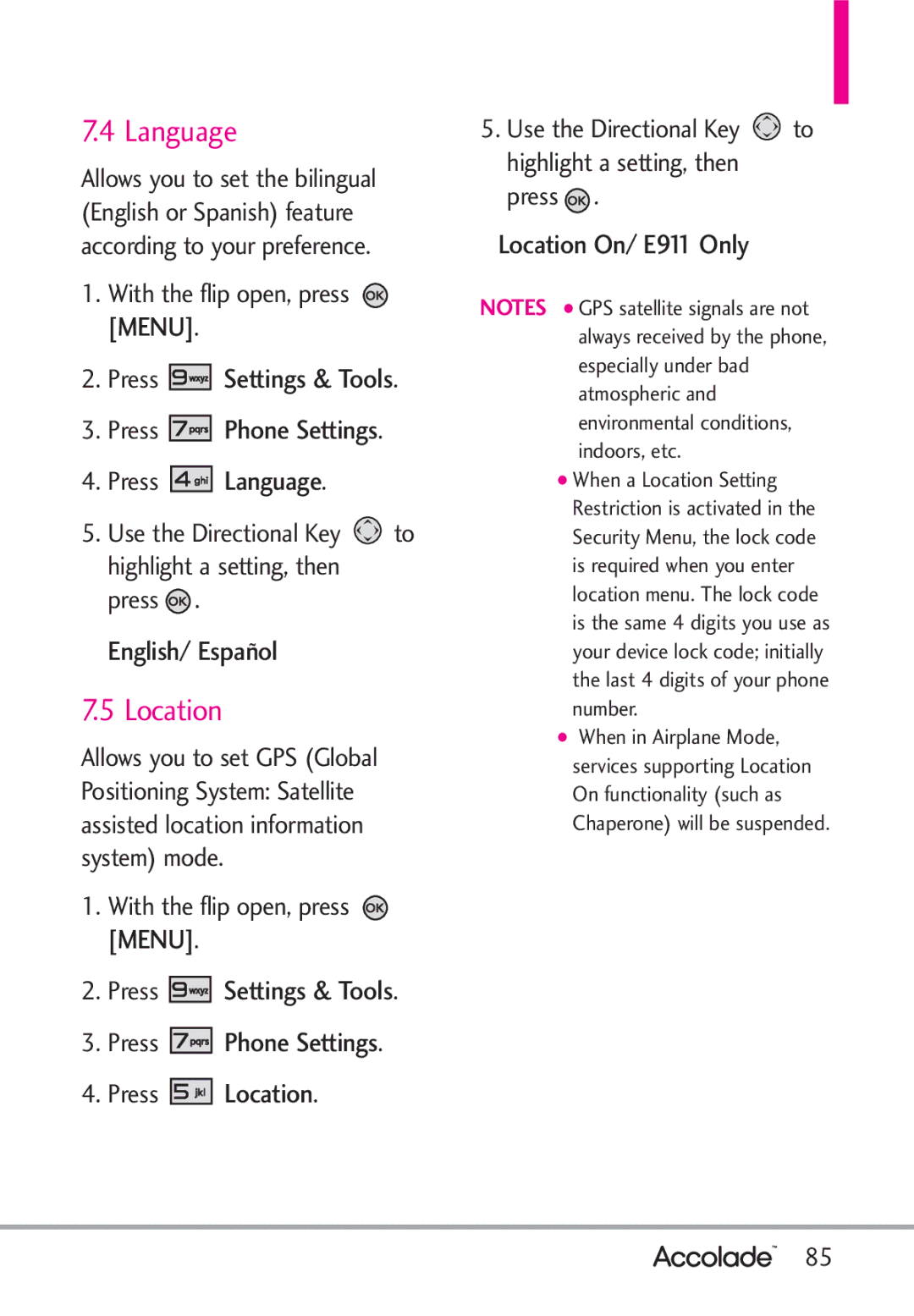
Location
Language
Edit Codes
Press Settings & Tools Press Phone Settings Press Security
Current Country
Security
Phone Lock Setting
Press Edit Codes Select Phone Only or Calls & Services
Press Phone Settings Press Security
Location Setting/ Calls/ Messages
Lock Phone Now
Reset Default
Press Reset Default
Restore Phone
NAM Select
Press Restore Phone
Press Phone Settings Press System Select
System Select
Auto Retry
Call Settings
TTY Mode
Answer Options
Press Call Settings Press TTY Mode
Connecting TTY Equipment and a Terminal
TTY Full/ TTY + Talk/ TTY + Hear/ TTY Off
Voice Privacy
Press Call Settings Press One Touch Dial
TTY Mode Tele Type writer
One Touch Dial
Normal/ Long
Press Call Settings Press Dtmf Tones
Dtmf Tones
Assisted Dialing
Phone Info
Press Call Settings Press Dial Search
Press Settings & Tools Press Phone Info
Memory
Icon Glossary
Software Update
My Number
SW/HW Version
Press Set-up Wizard
Manual Update
Press Software Update
Set-up Wizard
Tab/ List/ Grid
Ring Only/ Vibrate Only/ Ring and Vibrate/ Be Silent
Antenna Care
Safety
TIA Safety Information
Exposure to Radio Frequency Signal
Pacemakers
Tips on Efficient Operation
Driving
Electronic Devices
Safety
Potentially Explosive Atmosphere
Safety Information
For Vehicles Equipped with an Air Bag
Cause minor or serious damage to the product
Charger and Adapter Safety
Battery Information and Care
102
103
Explosion, Shock, and Fire Hazards
General Notice
Do not paint your phone
104
105
Avoid potential hearing loss
Hubert H. Humphrey Bldg
Voice 1-800-35-NIOSH 1-800 Internet Oise/default.html 106
FDA Consumer Update
Do wireless phones pose a health hazard?
107
108
Type emitted by wireless phones
What kinds of phones are the subject of this update?
National Institutes of Health
What are the results of the research done already?
109
110
Phone?
How can I find out how much
111
112
If there is a risk from these products
113
What about children using wireless phones?
114
Where can I find additional information?
115
Driver Safety Tips
116
Consumer Information on
Specific Absorption Rate
117
118
Before a phone model is available
119
120
121
122
Accessories
123
Limited Warranty Statement
124
Consumables such as fuses
Tel -800-793-8896 or Fax
State LAW Rights
126
Do not Return Your Product to the Above
Glossary
Terminology
Acronyms Abbreviations
128
Glossary
123
129
STATEMENT, Limited
130
131

 [MENU].


 Settings & Tools.


 Phone Settings.


 Language.
 to highlight a setting, then press
  .
. [MENU].


 Settings & Tools.


 Phone Settings.


 Location.
 to highlight a setting, then press
  .
.