Page
Important Safety Precautions
Important Safety Precautions
VX8100
Contents
Settings & Tools
Safety Information
Bilingual English and Spanish capabilities
Welcome
Important Information
FCC Part 15 Class B Compliance
Designator Description
Vehicle-Mounted External Antenna
FCC RF Exposure Information
Bodily Contact During Operation
Optional, if available
Phone Overview
Earpiece
Menus Overview
Missed Received Dialed All View Timer
New Contact Contact List Groups Speed Dials
Menus Overview
Battery Charge Level
Battery
Charging the Battery
Getting Started with Your Phone
Making Calls
Signal Strength
Turning the Phone On and Off
Redialing Calls
Receiving Calls
Screen Icons
Quick Access to Convenient Features
Speed Dialing
Voice Command
Caller ID
Dialing Single Digit Speed Dials from 1 to
Entering and Editing Information
Text Input
Text Input Examples
Using the Next Key
Using T9 Mode Text Input
Press Left Soft Key to change to T9Word mode
After you have finished entering a word, if the word
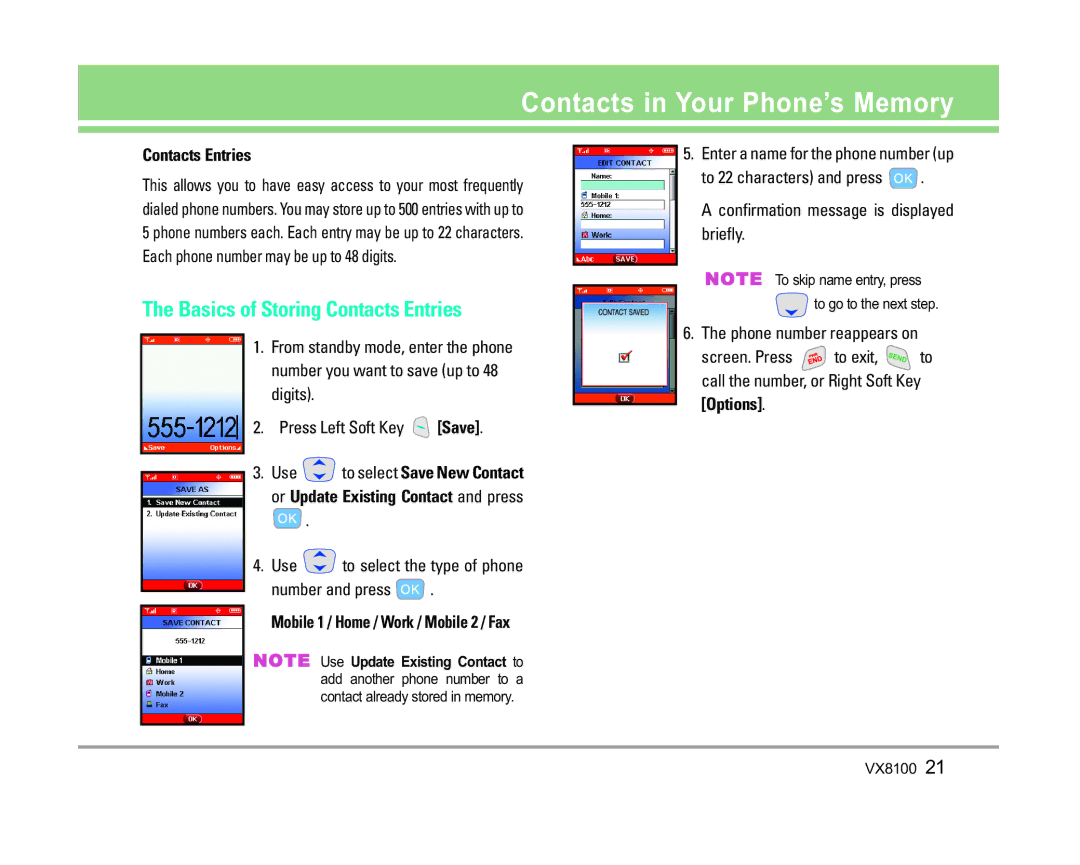
Contacts Entries
Contacts in Your Phone’s Memory
Basics of Storing Contacts Entries
Mobile 1 / Home / Work / Mobile 2 / Fax
Set
Options to Customize Your Contacts
Adding or Changing the Group
School
Use to select a graphic and press Press to save
Changing the Message Ringtone
Adding or Changing the Picture ID
Adding or Changing the Email
Editing Contacts Entries
Press again to save
Default Numbers
Changing the Default Number
Editing Stored Phone Numbers
Deleting a Contact Entry
Deleting
Deleting a Phone Number from a Contact
Deleting a Speed Dial
Phone Numbers With Pauses
Scrolling Through Your Contacts
Searching Your Phone’s Memory
Making a Call From Your Phone’s Memory
Searching by Letter
Speed Dialing
Missed / Received / Dialed / All / View Timer
From Recent Calls
For Speed Dials From 2 to
For example
Using Phone Menus
Menu Access
Downloading Applications
Access and Options
Get Extras
Get New Ringtones
Get Tunes & Tones
Get V Cast Music
Press Get Tunes & Tones
My Music
My Ringtones
Key Options
Manage Music
My Sounds
Sync Music
Record New You can record and save desired sounds
Get V Cast Video
Quick Access to Get PIX & Flix Feature
Get PIX & Flix
Get PIX & Flix
Deleting Video Clips Press for GET PIX & Flix
To view a Streaming Video
To download a Video Clip, if applicable
Press Erase
Get New PIX
My PIX
My Flix
Other files
PIX Place
Take PIX
Take Flix
Using the Side Camera Key
Brightness
Get Fun & Games
Get News & Info
Scrolling by
Entering Text, Numbers or Symbols
Fast Scrolling
Home
Initiating a Phone Call From the Browser
Get Going
Get Extras
Press MENU, 2 times Press Get New App
Message
Message Preview
New TXT MSG
New PIX MSG
Using Contacts to Send a Message
On / Off / Edit
Inbox
Out of Memory Warning
Message Icon Reference
Sent
Viewing Your Inbox
Drafts
Chat
Voicemail
Mobile IM
Checking Your Voicemail Box
MSG Settings
Message Settings Sub-Menu Descriptions
MSG Erase
Press Menu Select a submenu
New Contact
New Contact Contact List Groups Speed Dials
New Contact / Erase / Send TXT MSG / Send PIX MSG / Call
Contact List
Groups
Send TXT MSG / Send PIX MSG / Rename Erase / Add
Speed Dials
Press Menu Press to select Recent Calls Select a submenu
Missed Received Dialed All View Timer
Missed
Press Left Soft Key Message to select
Received
Dialed
View Timer
All
Tools
Settings & Tools menu has options to customize your phone
Calendar
Alarm Clock
Can only press
World Clock
Voice Command
Shortcut Key
Calculator
Announce Alert
Command Mode
Select Voice Command / Answer / Digit Dial then
Train Words
Sounds
Master Volume
Call Sounds
Earpiece Volume
Keypad Volume
Service Alerts
Alert Sounds
Display
Press Menu Press 2 times to select Settings & Tools
Press Display
Banner
Backlight
Display Themes
Power On/Off Anim
Wallpaper
Fonts
System
Standalone Mode
Network
Device Info
Manage Memory
Phone Memory
Save Options
Card Memory
My Music wma Removable memory storage functionality
Using the miniSD Card
Memory Usage Ring Tone
Memory Usage
Location
Security
Lock Phone
Press Emergency #s
Press Lock Phone
Emergency #s
Change Code
Language
Call Settings
Reset Default
Revert
Answer Options
TTY Mode
When Ringer is set to mute with side key or Quiet
Auto Retry
Ringer ID
Auto Volume
Clock Format
One-Touch Dial
Picture ID
BluetoothTM
PC Connection
Paired Devices
Power
For pairing new Bluetooth device
Passkey and press
My Visibility
My Bluetooth Name
My Bluetooth Info
Transfering Audio
Antenna Care
Safety
Exposure to Radio Frequency Signal
Phone Operation
Pacemakers
Driving
Electronic Devices
Hearing Aids
Posted Facilities
Health Care Facilities
Vehicles
Aircraft
Battery Information and Care
Charger and Adapter Safety
Explosion, Shock, and Fire Hazards
General Notice
Do not paint your phone
FDA Consumer Update
Do wireless phones pose a health hazard?
What kinds of phones are the subject of this update?
What are the results of the research done already?
Safety
VX8100
What about children using wireless phones?
Driver Safety Tips
Where can I find additional information?
Safety
Consumer Information on SAR
Specific Absorption Rate
Safety
VX8100
Gallaudet University, Rerc
Accessories
Warranty Information
What this Warranty Covers
State LAW Rights


 .
 to select the type of phone
 .
 .
 to go to the next step.
 to exit,
 to call the number, or Right Soft Key