VX9400
Page
Important Safety Precautions
Important Safety Precautions
VX9400
Table of Contents
Settings & Tools
Limited Warranty
Technical Details
Welcome
Important Information
FCC Part 15 Class B Compliance
Designator Description
Technical Details
Optional, if available
Bodily Contact During Operation
Vehicle-Mounted External Antenna
Earpiece
Phone Overview
Mode
How to Use your VX9400 Phone with Swivel
Charger or other available accessories
Function
New Contact Contact List Groups Speed Dials My Name Card
Missed Received Dialed All View Timers
Menus Overview
Settings & Tools
Edit Code Reset Default System Select NAM Select Auto NAM
Getting Started with Your Phone
Installing the Battery
Removing the Battery
Charging the Battery
Press and hold until the display turns off
Turning the Phone On
Turning the Phone Off
Once to erase the last digit entered, or hold
Press Press to end the call
Vibrate Mode Quick Activation
Quick Access to Convenient Features
Vibrate Mode
Lock Mode
Mute Function
Keyguard Mode
Volume Quick Adjustment
To dial Speed Dials
Call Waiting
Caller ID
Speed Dialing
Entering and Editing Information
Text Entry Mode
Word Mode
Using the Next Key
Type numbers pressing each key only once
Symbols Mode
Abc Multi-tap Text Input
Numbers Text Input
Adding Words to the Word Database
Customizing Individual Entries
Setting Up Your Speed Dial
Contacts in Your Phone’s Memory
Storing Basics
Press Left Soft Key Release to advance to the next number
From Standby Mode
Storing a Number with Pauses
Adding Another Phone Number
Changing the Default Number
Searching Your Phone’s Memory
Deleting
Calling From Your Phone’s Memory
Downloading Applications
Menu Access
For example
Options from here
Incoming Calls
Anything Unclear?
Swivel the LCD, then press Menu , 2 times
Press Music & Tones
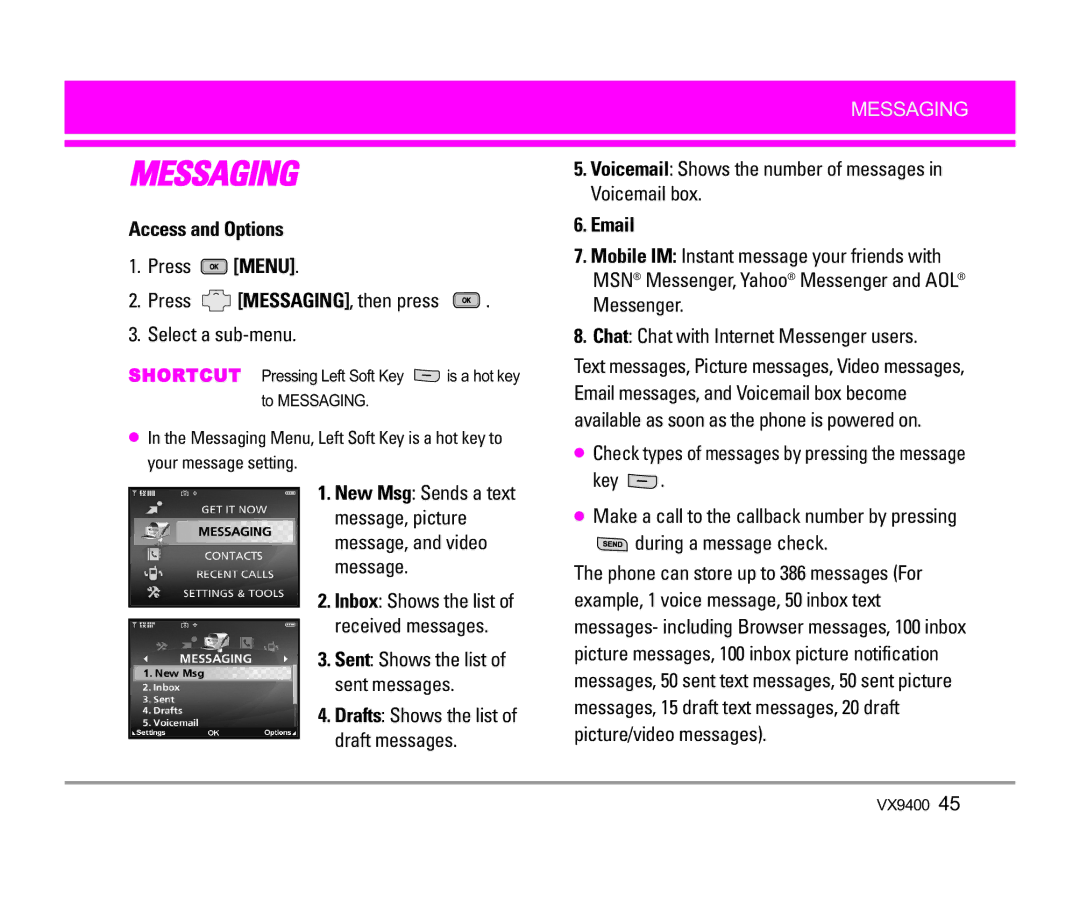
Access and Options
Music & Tones
Swivel the LCD, then press Menu Times
Press Get New Applications
Cast Music
Get New Ringtones
My Ringtones
Use to highlight a sound Press Right Soft Key Options
My Music
My Sounds
Sync Music
Select a sub-menu
Picture & Video
Cast Mobile TV
Press Picture & Video
Subscribe
Agree
Cast Mobile TV Options
Using Phone Menus
To view a Streaming Video
Cast Videos
Select brand and Video Clip you want to view
Deleting Video Clips
Configure Alerts for New Video Clips
Get New Picture
To download a Video Clip
My Videos
My Pictures
Size/ Bit Rate
Picture Place
Negative
Take Picture
Lets you take digital pictures
Ready! 1 2
Record Video
Games
News & Info
Navigating Through the Browser
Quick Access to News & Info
Links embedded in content
Ending a Browser Session
Extras
Tools on the Go
During a message check
Press Menu Press MESSAGING, then press Select a sub-menu
Key
Basics of Sending a Message
New Msg
TXT Msg
New Message Alert
On/ Off/ Edit
Customizing the Message Using Options
High/ Normal
Key Pictures
Using Contacts to Send a Message
Picture Msg
Message
Key Videos
Video Msg
Out of Memory Warning
Inbox
Viewing Your Inbox
Sent
Checking Your Voicemail Box
Drafts
Voicemail
Chat
MSG Settings
Settings Select All Msg/ TXT Msg/ Picture-Video Msg
Mobile IM
Auto Erase
Message Settings Sub-Menu Descriptions All Msg Auto Save
Entry Mode
None/ Custom
Name Card
MSG Options
TXT Msg Auto View
Auto Play
New Contact Contact List Groups Speed Dials My Name Card
New Contact
Contact List
Press Menu Select a sub-menu
Press View to view the Contact information
Groups
Speed Dials
Press Left Soft Key Edit to edit
Options
Then press Send your name card using the Right Soft Key
My Name Card
Press Menu Press , Recent Calls and press Select a sub-menu
Missed Received Dialed All View Timers
Missed
Dialed
Erase All/ View Timers
Received
All
View Timers
Press Tools Select a sub-menu
Settings & Tools Menu has options to customize your phone
My Account
Tools
Voice Commands
Lookup Name
Calculator
Go to Menu
Check Item
Managing Your Calendar Events
Alarm Clock
Calendar
Tones
Accordingly
Press Press Save to save the alarm settings
World Clock
Weekends
Right Soft Key Close to close the calculation
Ez Tip Calc
Managing Your Notepad Entries
Search/ Erase/ Erase All
Call Sounds
Sounds Settings
Master Volume
Press 2 times, Settings & Tools Press Sounds Settings
Alert Sounds
Keypad Volume
Earpiece Volume
Service Alerts
Call Connect
Display Settings
Press 2 times, Settings & Tools Press Display Settings
Banner
Wallpaper
Backlight
VZW/ LG Theme
Display Themes
Dial Fonts
Clock Format
Set Shortcut Key
Phone Settings
Standalone Mode
Press 2 times, Settings & Tools Press Phone Settings
Name Repeat
Language
Location
Security
Edit Code
Lock Mode
Press Lock Mode
Device
Auto NAM
System Select
NAM Select
Unlock Options
Call Settings
Keyguard Timer
Press 2 times, Settings & Tools Press Call Settings
Auto Retry
TTY Mode
Answer Options
End Call Options
TTY Off
TTY Full
TTY + Talk
TTY + Hear
When making
TTY Mode Tele Type writer Menu User Feature
Ringer ID
One Touch Dial
Voice Privacy
PC Connections
Add New Device
Bluetooth Menu
Press Bluetooth Menu
For pairing new Bluetooth device
Press My Phone Name
Power
My Phone Name
Profile Information
Discovery Mode
Press Discovery Mode
Visible/ Hidden
Device Info Shows the device information
Last Search
Transferring Audio
Audio device
Save Options
Memory
Supported Profiles
Auto Connection
Help
Phone Info
Antenna Care
Safety
Exposure to Radio Frequency Signal
Ansi C95.1 Ncrp Report 86 Icnirp
Pacemakers
Tips on Efficient Operation
Driving
Electronic Devices
Vehicles
Hearing Aids
Other Medical Devices
Health Care Facilities
For Vehicles Equipped with an Air Bag
Potentially Explosive Atmosphere
Battery Information and Care
Charger and Adapter Safety
General Notice
Explosion, Shock, and Fire Hazards
Do not paint your phone
Safety
American Academy of Audiology
National Institute for Occupational Safety and Health
Do wireless phones pose a health hazard?
FDA Consumer Update
What kinds of phones are the subject of this update?
What are the results of the research done already?
Page
Safety
What about children using wireless phones?
104
Where can I find additional information?
Driver Safety Tips
106
VX9400
Specific Absorption Rate
Consumer Information on SAR
Page
Safety
Gallaudet University, Rerc
Accessories
Limited Warranty Statement
State LAW Rights
Glossary
Acronyms and Abbreviations
VOD
Contacts
Index
Recent Calls
Memo

 [MENU].
 [MESSAGING], then press
  .
. is a hot key to MESSAGING.
 .
. during a message check.