Manuals
/
MaxTech
/
Computer Equipment
/
Network Card
MaxTech
xpvs336i
user manual
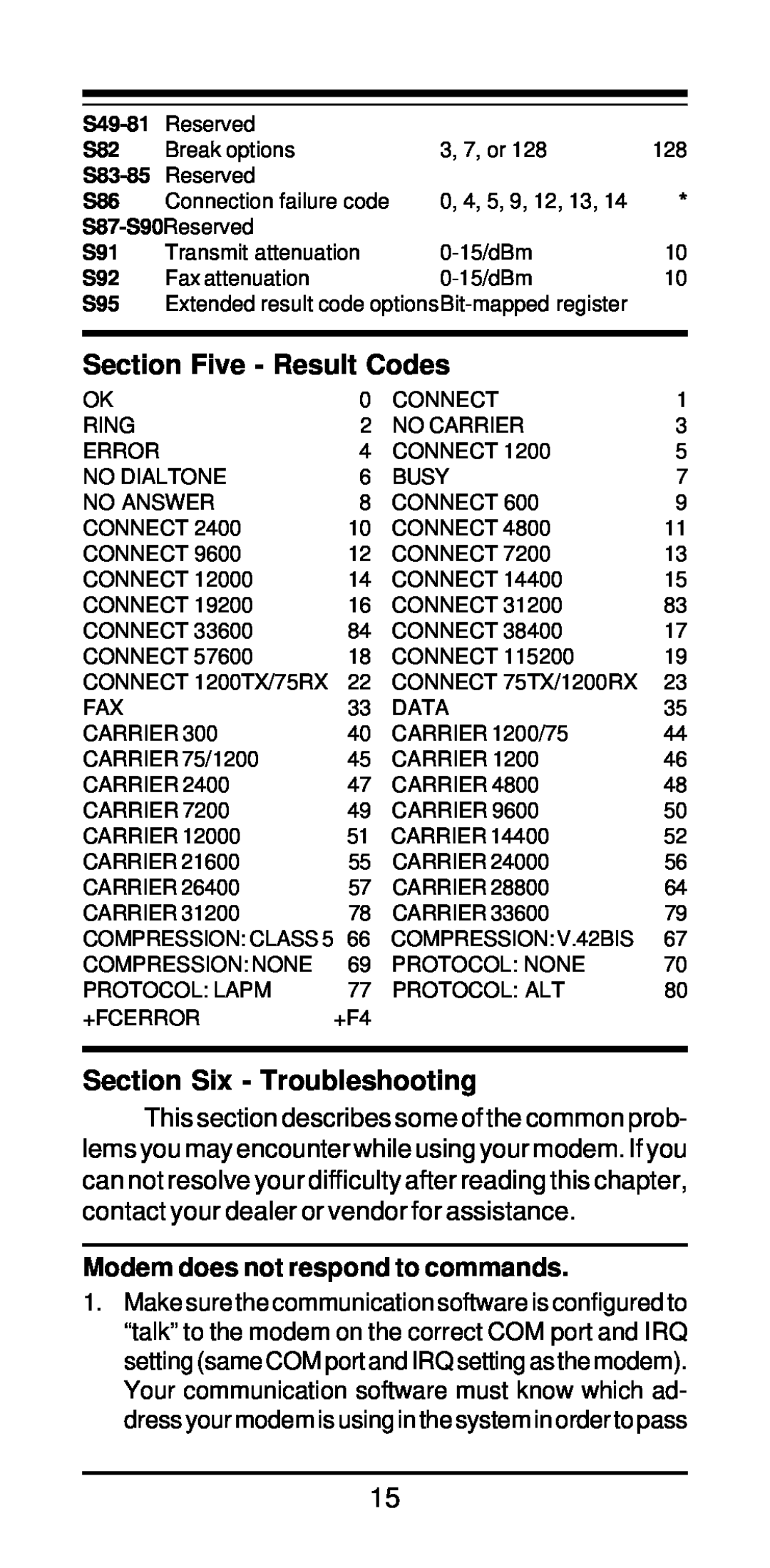
Section Five - Result Codes, Section Six - Troubleshooting
Models:
xpvs336i
1
17
22
22
Download
22 pages
60.67 Kb
14
15
16
17
18
19
20
21
Page 17
Image 17
Page 16
Page 18
Page 17
Image 17
Page 16
Page 18
Contents
FAX/Voice/Data Modem
High Performance V.34+/V.42bis 33,600 BPS Internal Plug and Play
Featuring Advanced Full Duplex Speakerphone Functions
MAN081 Rev
Contents
Section One - Introduction
Section Two - Installation
2.1 Unpacking Your Modem
2.2 What You Need You will need
Back Plate
2.3 Hardware Installation
Expansion Slots
Section 2.4.3 if you are running Windows 3.1x on a non-PnP PC
2.4.3 Configuring in a Non-Plug and Play System
2.4.2 Configuring in a Plug and Play System without Windows
2.5 Software Installation and Configuration
2.9 Where To Go From Here
2.7 Testing Your Modem After Installation
2.8 Using Your Modem
Section Three - AT Command Set
@ wait for five seconds of silence flash
Modemsendsbreaksignalforfourseconds
Reportlinespeed,errorcorrectionprotocol
Force Carrier Detect Signal High ON
Modem returns to Command Mode after
Grant Remote Digital Loopback Test
Configuration Profile 0 active upon
Enable MNP Class 5 and V.42bis data
enabledwithV.8/V.32AnnexA.Parameter
300, 33600. Parameter “a” specifies the
Returns Caller ID capabilities of modem
V.42/MNP/Normal data link
V.42 data link only
MNP data link only
Section Four - S Registers
Enable Caller ID detection and reporting
Table 4-1 S - Registers
Range/units Default
Register
Function
Section Five - Result Codes
Section Six - Troubleshooting
Modem does not respond to commands
Modem does not dial
Modem experiences errors while communicating with a remote modem
Modem dials but does not connect
Modem makes a connection but no data appears on your screen
Modem exhibits poor voice record or playback
Section Seven - Support and Service
Appendix A - Specifications
FCC Class B Statement
Appendix B - FCC , DOC & Other Notices
FCC Compliance
DOC Compliance Information
UL Notice
Top
Page
Image
Contents