Manuals
/
MaxTech
/
Computer Equipment
/
Network Card
MaxTech
xpvs336i
user manual
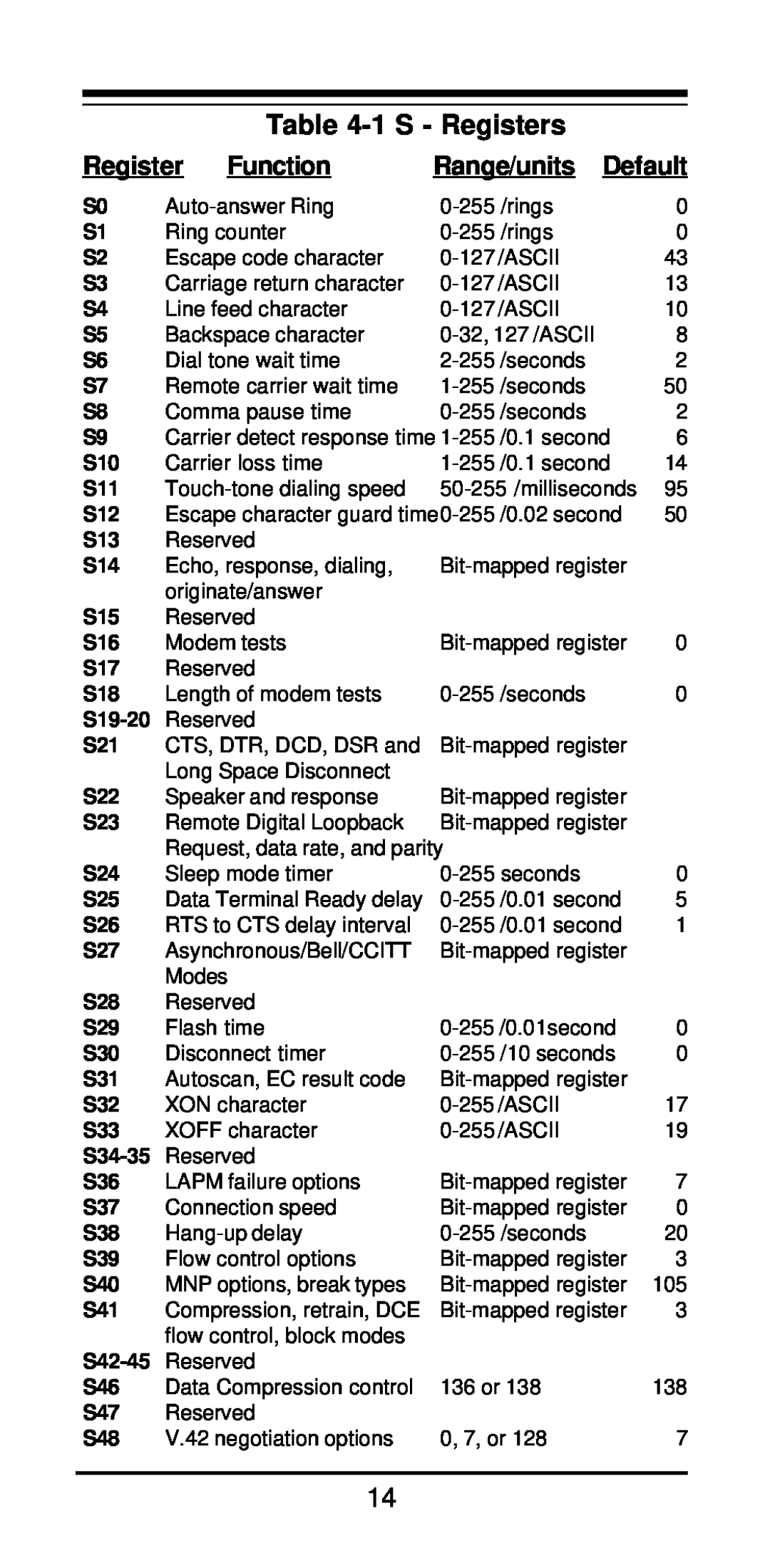
1 S - Registers, Function, Range/units Default
Models:
xpvs336i
1
16
22
22
Download
22 pages
60.67 Kb
13
14
15
16
17
18
19
20
Page 16
Image 16
Page 15
Page 17
Page 16
Image 16
Page 15
Page 17
Contents
High Performance V.34+/V.42bis 33,600 BPS Internal Plug and Play
FAX/Voice/Data Modem
Featuring Advanced Full Duplex Speakerphone Functions
MAN081 Rev
Contents
Section Two - Installation
Section One - Introduction
2.1 Unpacking Your Modem
2.2 What You Need You will need
Expansion Slots
2.3 Hardware Installation
Back Plate
Section 2.4.3 if you are running Windows 3.1x on a non-PnP PC
2.4.2 Configuring in a Plug and Play System without Windows
2.4.3 Configuring in a Non-Plug and Play System
2.5 Software Installation and Configuration
2.8 Using Your Modem
2.7 Testing Your Modem After Installation
2.9 Where To Go From Here
Section Three - AT Command Set
@ wait for five seconds of silence flash
Reportlinespeed,errorcorrectionprotocol
Modemsendsbreaksignalforfourseconds
Force Carrier Detect Signal High ON
Modem returns to Command Mode after
Configuration Profile 0 active upon
Grant Remote Digital Loopback Test
enabledwithV.8/V.32AnnexA.Parameter
Enable MNP Class 5 and V.42bis data
300, 33600. Parameter “a” specifies the
Returns Caller ID capabilities of modem
MNP data link only
V.42 data link only
V.42/MNP/Normal data link
Enable Caller ID detection and reporting
Section Four - S Registers
Range/units Default
Table 4-1 S - Registers
Register
Function
Modem does not respond to commands
Section Six - Troubleshooting
Section Five - Result Codes
Modem experiences errors while communicating with a remote modem
Modem does not dial
Modem dials but does not connect
Modem makes a connection but no data appears on your screen
Appendix A - Specifications
Section Seven - Support and Service
Modem exhibits poor voice record or playback
FCC Compliance
Appendix B - FCC , DOC & Other Notices
FCC Class B Statement
DOC Compliance Information
UL Notice
Top
Page
Image
Contents