QUICK REFERENCE GUIDE
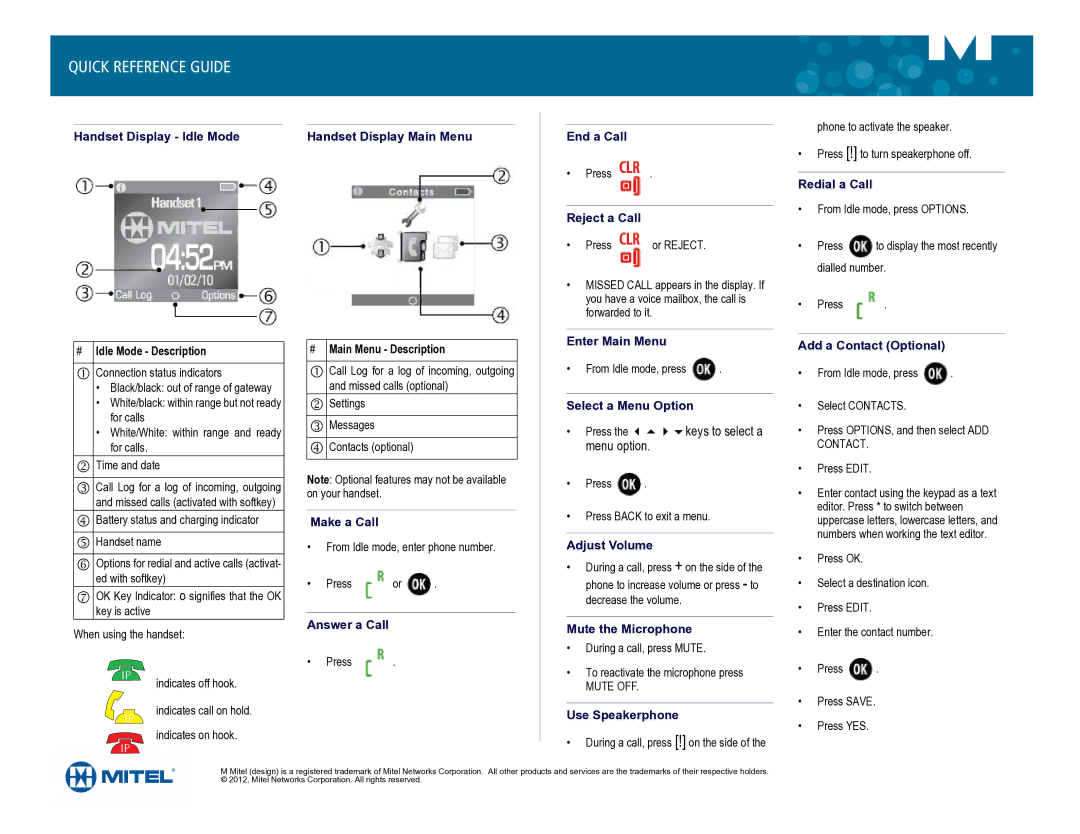
Handset Display - Idle Mode | Handset Display Main Menu |
End a Call
•Press  .
.
Reject a Call
• Press  or REJECT.
•MISSED CALL appears in the display. If you have a voice mailbox, the call is forwarded to it.
phone to activate the speaker.
•Press [!] to turn speakerphone off.
Redial a Call
•From Idle mode, press OPTIONS.
•Press  to display the most recently dialled number.
•Press  .
.
#Idle Mode - Description
Connection status indicators
•Black/black: out of range of gateway
•White/black: within range but not ready for calls
•White/White: within range and ready for calls.
Time and date
Call Log for a log of incoming, outgoing and missed calls (activated with softkey)
Battery status and charging indicator Handset name
Options for redial and active calls (activat- ed with softkey)
OK Key Indicator: o signifies that the OK key is active
When using the handset:
indicates off hook.
indicates call on hold.
indicates on hook.
#Main Menu - Description
Call Log for a log of incoming, outgoing and missed calls (optional)
Settings Messages
Contacts (optional)
Note: Optional features may not be available on your handset.
Make a Call
•From Idle mode, enter phone number.
•Press  or
or  .
.
Answer a Call
• | Press | . |
Enter Main Menu
•From Idle mode, press  .
.
Select a Menu Option
•Press the keys to select a menu option.
•Press  .
.
•Press BACK to exit a menu.
Adjust Volume
•During a call, press + on the side of the phone to increase volume or press - to decrease the volume.
Mute the Microphone
•During a call, press MUTE.
•To reactivate the microphone press
MUTE OFF.
Use Speakerphone
•During a call, press [!] on the side of the
Add a Contact (Optional)
•From Idle mode, press  .
.
•Select CONTACTS.
•Press OPTIONS, and then select ADD CONTACT.
•Press EDIT.
•Enter contact using the keypad as a text editor. Press * to switch between uppercase letters, lowercase letters, and numbers when working the text editor.
•Press OK.
•Select a destination icon.
•Press EDIT.
•Enter the contact number.
•Press  .
.
•Press SAVE.
•Press YES.
M Mitel (design) is a registered trademark of Mitel Networks Corporation. All other products and services are the trademarks of their respective holders. © 2012, Mitel Networks Corporation. All rights reserved.