Page
Trademark Information
Page
Handle the camera strap with care
For Your Safety
Turn off in the event of malfunction
Do not disassemble
Skin, rinse immediately with plenty of water
For Your Safety
Observe caution when handling the battery
Iii
CD-ROMs
Observe caution when using the flash
Use appropriate cables
Handle moving parts with care
Tel
Modifications
Interface Cables
Nikon Inc Walt Whitman Road Melville, New York
Following apply only to users in European countries
Symbol for Separate Collection in European Countries
Table of Contents
Viii
Table of Contents
103
100
101
102
104
About This Manual
Before Taking Important Pictures
Information and Precautions
Use Only Nikon Brand Electronic Accessories
Life-Long Learning
Disposing of Data Storage Devices
Information and Precautions
110
Parts of the Camera
Camera Body
Lens cover closed
Opening the pin cover
Parts of the Camera
Shooting/playback button
Shooting
Monitor
113
Electronic VR not available
Playback
Current frame number
Shooting-mode Selection Menu
E Mode Button
Basic Operations
CShooting/Playback Button
For the Menu Screen
Multi Selector
For Shooting
For Playback
To proceed to the next set Or k to apply selection Options
Displayed when there are one or more menu items to follow
D Button
Press the multi selector K or
Attaching the Camera Strap
Help Displays
Battery is inserted 3. Charging is
Charging the Battery
Connect the power cable
Charge the battery
Unplug the charger
Charging the Battery
Close the battery-chamber/memory card slot cover
Inserting the Battery
Open the battery-chamber/memory card slot Cover
Insert the battery
Turning On and Off the Camera
Removing the Battery
Inserting the Battery
Auto Power-Off Standby Mode
Press k
Setting Display Language, Date and Time
Press the power switch to turn on the camera
Choose Yes and press k
Changing the date and time
Setting Display Language, Date and Time
Select your home time zone a 96 and press k
Edit the date
Insert the memory card
Inserting Memory Cards
Inserting Memory Cards
Formatting Memory Cards
Write Protect Switch
Removing Memory Cards
Inserting Memory Cards
Exposures remaining
Turn the Camera On and Select AAuto Mode
Check the battery level and number
Press e Use the multi selector to choose Aand press
Electronic vibration Reduction
Indicators Displayed in AAuto Mode
Turn the Camera On and Select a Auto Mode
Available Functions in a Auto Mode
Frame the picture
Using the Zoom
Frame a Picture
Ready the camera
Frame a Picture
Digital Zoom and Image Quality
Maximum zoom ratio without interpolation
Shutter speed Aperture
When people’s faces front view are recognized
Focus and Shoot
Press the shutter-release button halfway
Shutter-release Button
Press the shutter-release button the rest of the way down
During Recording
Autofocus
Press c
Viewing Pictures Playback Mode
Viewing and Deleting Pictures
Deleting Pictures
Viewing Pictures
Playback Mode
Power on by pressing c
Viewing and Deleting Pictures
Flash menu is displayed
Using the Flash
Setting the Flash Mode
Press m flash mode
Flash Lamp
Using the Flash
W Off Indicator
Flash Mode Setting
Frame the picture and press Shutter-release button halfway
Taking Pictures with the Self-timer
Press nself-timer
Use the multi selector to choose 10 s or 2 s and press k
Press gi or fh to frame the picture
Macro Mode
Press pmacro mode
Use the multi selector to choose on and press k
Press the multi selector oexposure Compensation
Use the multi selector to adjust exposure
Setting is applied
Exposure Compensation
No faces are recognized the camera
Shooting in the High-sensitivity Shooting Mode
Enter high-sensitivity shooting
Options that can be used in High-sensitivity Shooting
Menu screen, choose the desired
Shooting in the Scene Mode
Setting the Scene Mode
Enter scene mode by pressing e
Icons Used for Descriptions
Features
Shooting in the Scene Mode
Scene Mode Settings
Off2
Other settings can be selected
Shooting in the Scene Mode
Fireworks show
Use the multi selector to choose the direction and press k
Taking Pictures for a Panorama
Panorama Assist
Press kwhen shooting is completed
Shoot the first picture
Shoot the second picture
More Information
Panorama Maker
Viewing Multiple Pictures Thumbnail Playback
Thumbnail Playback Mode Display
Press k Playback Switch to
Shooting mode To the last shooting mode selected
Description Zoom
Portion visible in the monitor Switch to
Taking a Closer Look Playback Zoom
Pictures Taken in Face Priority
Original Pictures and Edited
Editing Pictures
Picture Editing
Restrictions on Picture Editing
Editing Pictures
Enhancing Brightness and Contrast D-Lighting
Choose D-Lightingwith the multi selector and press k
Choose OK and press k
Use the multi selector to choose OK and press k
Compensating Blurred Images After Shooting Electronic VR
J1,024 × K640 × L320 × M160 ×
Creating a Cropped Copy Crop
Refine copy composition
Press d Use the multi selector to choose Yes Press k
Playback menu is displayed
GResizing Pictures Small Picture
Use the multi selector to choose Small pic. and press k
Choose the desired copy size and press k
Viewing Pictures by Date
Selecting a Date in Calendar Mode
Choose the desired date and press k
Viewing Pictures by Date
Selecting a Date in List by Date Mode
Dates for which pictures exist will be listed
Using Calendar Mode and List by Date Mode
Print Set
Calendar and List by Date Menus
Recording Movies
Changing Movie Settings
Recording Movies
Selecting Movie Options
Movie Menu
Movie menu offers the options shown below
Time-lapse movieP
WElectronic VR
Movie Menu
Movie Options and Maximum Movie Length and Frames
Press d
Time-Lapse Movies
Choose Time-lapse moviePand press k
Choose the interval between shots and press k
Time-Lapse Movie
Deleting Movie Files
Movie Playback
Tune the television to the video channel
Connecting to a TV
Connecting an AV Cable
Video Mode
Operating Systems Compatible with Coolpix S202 Windows
Connecting to a Computer
Before Connecting the Camera
Install the Software
Transferring Pictures from a Camera to a Computer
Connecting to a Computer
Connecting the USB Cable
Power-on lamp will light up
Source device
Transfer pictures when Nikon Transfer has finished loading
Disconnect the camera when transfer is complete
For Users of Windows 2000 Professional
Panorama Creation with Panorama Maker
Using Standard OS Operations to Open Camera Files
Image File Names and Folder Names
Printing Pictures
Connecting to a Printer
Turn camera off and disconnect USB cable
Turn off the camera Turn on the printer
Connecting the Camera and Printer
Connecting to a Printer
Check printer settings
Choose Paper size and press k
Printing Pictures One at a Time
Choose Copies and press k
Choose the number of copies up to nine and press k
Printing starts
When the print selection screen is displayed, press d
Printing Multiple Pictures
Choose Start print and press k
Print all images
Print selection
Dpof printing
Paper Size
Current print Total number of prints
Creating a Dpof Print Order Print Set
Deleting All Print Orders
Creating a Dpof Print Order Print Set
Date Imprint
Shooting Options The Shooting Menu
To exit the shooting or high-sensitivity menu, press d
Use the multi selector to choose and apply settings a
Displaying the Shooting Menu and High-sensitivity Menu
Shooting Options The Shooting Menu
Image Mode
169
Setting Internal memory Memory card1
Number of Exposures Remaining
TV screen
BWhite Balance
Flash Mode
Choose Measure
Preset Manual
Use the multi selector to choose bPreset
Manual in the White balance menu, and press k
BSS Best Shot Selector
Continuous
Multi-shot
Shooting in the Continuous menu, and press k
Interval Timer Photography
Use the multi selector to choose Intvl timer
Power Source
Make colors more vivid or record pictures in monochrome
Auto default setting
Eiso Sensitivity
Color Options
To end focus-area selection and adjust the flash
AF Area Mode
Face priority default setting
Camera When shooting non-human subjects or when no
Focus Lock
Frame a picture
Face Priority
Restrictions apply to the following settings in a auto mode
Restrictions on Camera Settings
Flash mode
Display the playback menu by pressing c and pressing d
Playback Options The Playback Menu
Displaying the Playback Menu
Playback menu contains the following options
Press Hor Ito select on or OFF or
Selecting Multiple Pictures
Press the multi selector Jor K to choose
Desired picture
Choose End or Restart
BSlide Show
Use the multi selector to choose Start and press k
Slide show begins
Delete selected pictures or all pictures
Delete
Protect
FRotate image
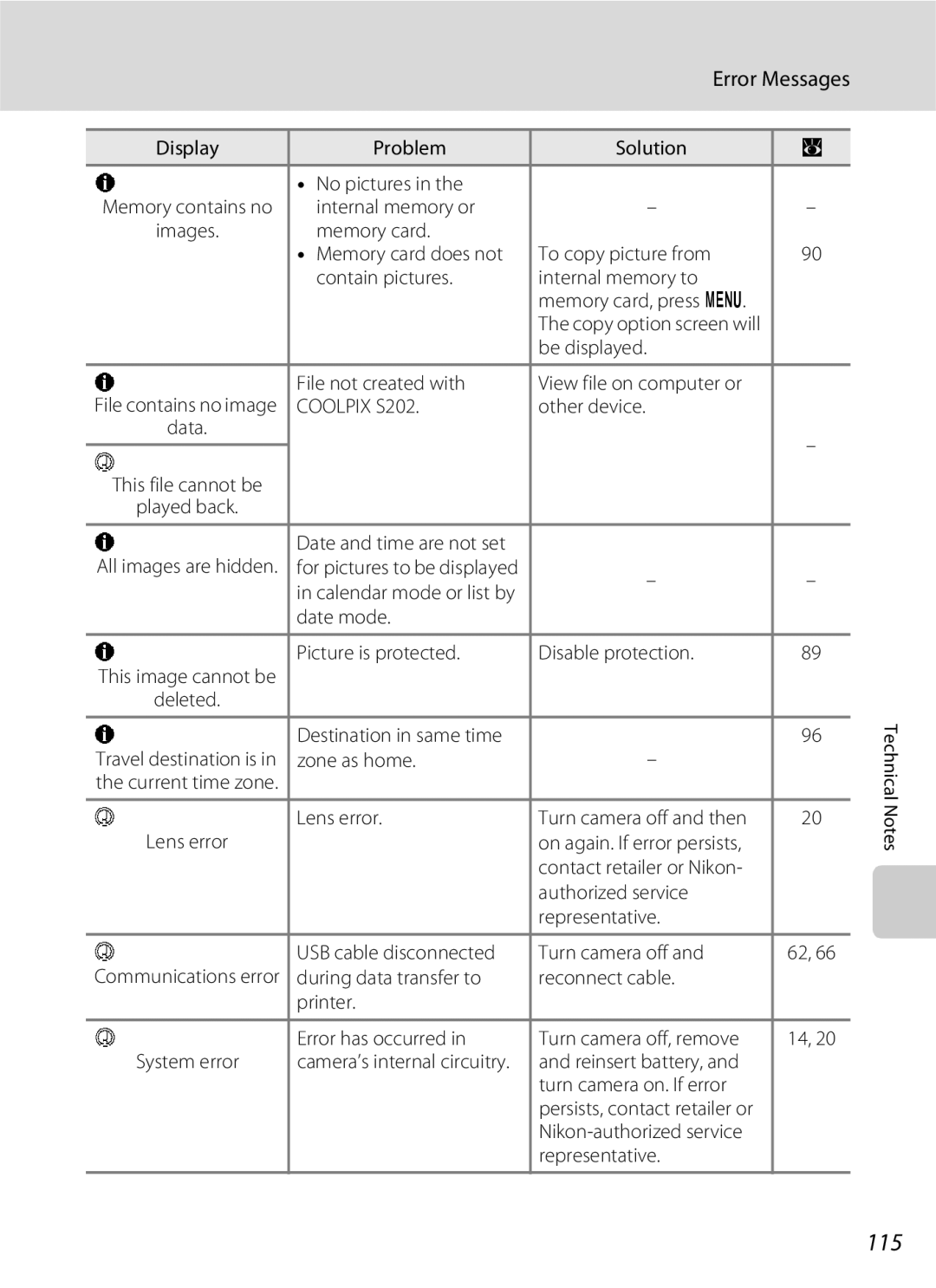
Memory contains no images. Message
Copy
Select a copy option and press k
Copy pictures between the internal memory and a memory card
Setup menu contains the following options
Basic Camera Setup The Setup Menu
Menus
Displaying the Setup Menu
Displays a welcome screen Select an image
Welcome Screen
Choose x and press k
Setting Travel Destination Time Zone
Date
Use the multi selector to choose Time zone and press k
Choose the travel destination time zone and press k
Clock Battery
Home Time Zone
UTC + Location
Time Zones a
Same Auto info
EMonitor Settings
Photo Info
Auto info above
Date Imprint and Print Set
Date Imprint
Sample date counter time stamps are shown below
Date Counter
100
Electronic VR Icons in Playback Mode
Electronic VR for Movies
UDigital Zoom
Adjust settings for using digital zoom
101
102
ISound Settings
Adjust the following sound settings
Auto Off
103
LFormat Memory/mFormat Card
Formatting the Internal Memory
Formatting a Memory Card
Language
Video Mode
104
105
Reset All
106
Setup Menu
Others
107
RFirmware Version
View the current camera firmware version
Damaged during closure
Optional Accessories
Approved Memory Cards
108
Dscn 0001 .JPG
Image File and Folder Names
109
Pictures and movies are assigned file names as follows
110
Caring for the Camera
111
Battery
Caring for the Camera
Do not use alcohol, thinner, or other volatile chemicals
Cleaning
Storage
112
113
Error Messages
Image mode setting 169 1920 or pictures
Error Messages
114
115
116
Display, Settings and Power Supply
Troubleshooting
117
118
Troubleshooting
Electronically Controlled Cameras
Shooting
Shot 16 is selected for Continuous
DSports scene mode or l Museum
119
Continuous
120
Playback
121
122
Specifications
Nikon Coolpix S202 Digital Camera
ISO 64, 100, 200, 400, 800, 1600, 2000, Auto
Specifications
× H × D Projections Weight
123
124
Rechargeable Li-ion Battery EN-EL10
Battery Charger MH-63
Specifications
125
Supported Standards
Index
Symbols
AF area mode 82 Audio-in/Video-in jack 60 Auto flash
Auto power off 15, 102 AV cable AVI
Landscape c 35 Language 104 Lens 4
127
Zoom 22 Zoom button 5, 22
TV movie 55 USB cable 61, 62 Video Mode 60, 104 Vivid color
128
Index
129
130
Page
Nikon Corporation
FX8H0211