DVD Player
Important Safety Instructions
FCC Note for U.S.A
Precautions
Maintenance of Cabinet
Handling Cautions
Disc Storage
Install Batteries in the Remote control
Accessories
If the remote control doesn’t operate properly
Before you start
Choosing a Connection
DVD+RW, -RW V mode
General Features
Discs which cannot be played with this player
CDGs play audio only, not graphics
Characteristics
Disc Type and Characteristics
Disc Markings
Region Number
Description
Operation indicators are displayed here
Front Panel Controls
STANDBY/ON
7 8 9 10 11 12 13 14 15 16
Front Panel Display
ENG-10
Video Output in Setup Menu must be set to
Rear Panel
Use these jacks if you have a TV with Component
ENG-12
Tour of the Remote Control
Choosing a Connection
Before Connecting the DVD Player
Connection to a TV Video
ENG-13
Audio signals are delivered through the audio output
Connecting to your TV using an S-Video cable
Connection to a TV S-Video
Video in terminal of your TV
Picture element into black and whiteY, blueP
Connection to a TV Interlace
PB, Y
Set ENG-15
What is Progressive Scan?
Connection to a TV Progressive
ENG-16
Connecting to a TV with Hdmi Jack
Connecting to a TV with DVI Jack
Hdmi Video Specifications
Hdmi SEL. button brings up the current resolution
What is the HDCP?
Why does Samsung use HDMI?
Hdmi connection description
ENG-18
Set up the Anynet function on the Samsung TV
What is Anynet?
Connection to a TV with Anynet Jack
Black terminal of the TV
Connection to an Audio System 2 Channel Amplifier
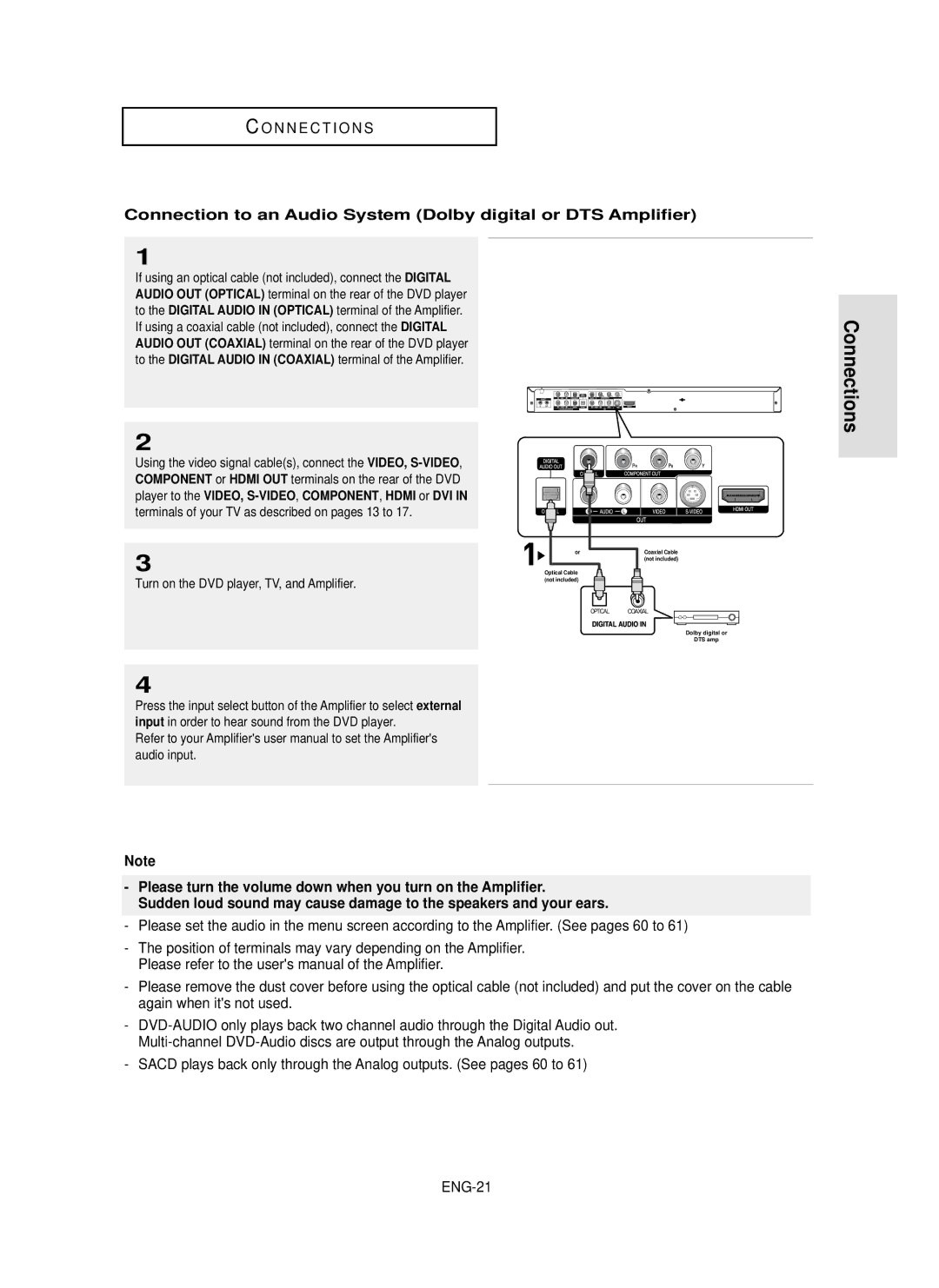
Turn on the DVD player, TV, and Amplifier
Audio input
Audio input
Connection to an Audio System Dolby digital or DTS Amplifier
Connection to a 5.1CH Analog Amplifier
Before Play
Playing a Disc
Playback
Resume function
Once again
Screen stops, no sound
Turned, a new frame will appear
Normal play
Button
Using the Search and Skip Functions
Searching through a Chapter or Track
Skipping Tracks
Using the Display Function
When Playing a DVD/VCD/CD
ENG-26
ENG-27
Using the Disc Menu DVD
Using the Disc and Title Menu
Using the Title Menu DVD
ENG-28
Using the Function Menu DVD/VCD
Using the Function Menu
Buttons on the remote control
Disc Menu button
Repeat Play
Using the A-B Repeat function
Slow Repeat Play
When playing a DVD/VCD
Disc Menu buton
ENG-31
Random Play plays a discs tracks in random order
Program Play & Random Play
Random Play CD
ENG-32
To play back using aspect ratio DVD
Adjusting the Aspect Ratio EZ View
If you are using a 169 TV
ENG-33
Displays the content of the DVD title in 43 aspect ratio
If you are using a 43 TV
ENG-34
For 169 aspect ratio discs 43 Letter Box
Selecting the Audio Language
Using the Audio button DVD/VCD/CD
ENG-35
DVD disc can contain up to 8 audio languages
Using the Subtitle button DVD
Refer to Using the Subtitle Language on ENG-36
Selecting the Subtitle Language
Using the Angle button DVD
Using the Instant Replay/Skip Function
Using the Instant Replay function DVD
Using the Instant Skip function DVD
Using the Bookmark Function DVD/VCD
Using the Bookmark Function
Using the Menu button
ENG-38
Clearing a Bookmark
Recalling a Marked Scene
ENG-39
Bookmark button on
Using the Zoom Function DVD/VCD
Using the Zoom Function
2X/4X/2X/Normal in order
2X/Normal in order
ENG-41
DVD Audio Playback
Open the disc tray Place the DVD Audio disc on the tray
Tray closes and disc plays
Page, Index Function
Audio Format Display
Repeat Play
ENG-43
Title , Group , then
Super Audio CD Clips Menu On Play Function
Super Audio CD Playback
ENG-44
Off Normal Playback
ENG-45
Super Audio CD Clips Menu Off Play Function
Stop mode, press Disc Menu button until Clips menu is off
…/† buttons to
During Super Audio CD Playback, press
CD Layer Play Function
Clips Menu for MP3/WMA/JPEG
Folder Selection
ENG-47
Repeat/Random playback
MP3/WMA Playback
ENG-48
File
CD-R MP3/WMA file
ENG-49
Prevent illegal copying. These files are of the following
Press the Stop button to return to the clips menu
Picture CD Playback
Album Screen Slide Show
Rotation
Picture CD Playback for HD-JPEG
To exit the setup menu, press the Menu Button
Clips menu
ENG-51
ENG-52
CD-R Jpeg Discs
= +
Can
Using the Setup Menu
Sub features
ENG-53
ENG-54
Setting up EZ-Setup
Enter to
ENG-55
Using the Player Menu Language
Setting Up the Language Features
To exit the setup menu, press the Menu button ENG-56
Select Language Setup
If the selected language is not recorded on
Using the Disc Menu Language
ENG-57
Select Others if the language you want is not listed
To exit the setup menu, press the Menu button ENG-58
Using the Audio Language
ENG-59
Using the Subtitle Language
To exit the setup menu, press the Menu button ENG-60
Setting Up the Audio Options
ENG-61
To exit the setup menu, press the Menu button
To exit the setup menu, press the Menu button ENG-62
Surround Sound Speaker Setup
Select Setup, then press
Select Speaker Setup
ENG-63
Setting up Test
To exit the setup menu, press the Menu button ENG-64
Setting Up the Display Options
Sequence in no disc mode
´ Still Mode
TV Aspect
Screen Messages
Picture Quality
Hdmi
ENG-67
Setting Up the Parental Control
ENG-68
Setting Up the Rating Level
…/† buttons to
√ or Enter button
Setup
Changing the Password
ENG-69
TV Codes
Controlling a TV with the Remote control
Troubleshooting
Problem Action
ENG-71
Output Please refer to the user’s manual of your TV
ENG-72
Specifications
Weight and dimensions are approximate
ENG-73
ENG-74
One 1 Year Parts / Ninety 90 days Labor
Challenger Road Ridgefield Park, NJ
Valley Road, Suite Mount Arlington, NJ
AK68-00627B-00