GT-I9000
Using this manual
Instructional icons
Copyright information
Pat ,295,673 7,460,688 7,519,274
→ DivX VOD → Register
Contents
Web
Communication Personal information
Entertainment
Connectivity
Settings
Tools
Safety and usage information
Troubleshooting
Index
Assembling
Install the SIM or Usim card and battery
Unpack
Some menus
Off to turn it off Remove the back cover
Remove the back cover Slot
Charge the battery
Insert the battery Replace the back cover
Multifunction jack
›› Charge with the travel adapter
Device
Outlet
Insert a memory card optional
›› Charge with the PC data cable
›› Remove the memory card
Locks in place
›› Format the memory card
Attach a hand strap optional
Small projection
Get to know your device
Getting started
Turn your device on and off
›› Device layout
››Keys
Icon Definition
››Indicator icons
Your region or service provider Call on hold
Voice call in progress
Use the touch screen
Current time
Lock or unlock the touch screen and keys
›› Move items on the idle screen
Get to know the idle screen
›› Add items to the idle screen
Samsung Widgets Add Samsung widgets to the idle screen
›› Use the shortcuts panel
›› Remove items from the idle screen
→ Save
Access applications
Orientation
Customise your device
›› Adjust the brightness of the display
›› Switch to the silent mode
›› Activate animation for switching Windows
›› Change your ringtone
Settings → Location and security → Set unlock pattern
Adjustment
›› Set an unlock pattern
›› Lock your SIM or Usim card
›› Activate the mobile tracker
Enter text
›› Change the keyboard type
On the screen
Select and select a text input method
Clear your input Start a new line Insert a space
Download applications from Android Market
›› Copy and paste text
›› Uninstall an application
›› Install an application
Download files from the web
Synchronise data
›› Set up a server account
Settings → Accounts and sync
›› Activate automatic sync
›› Synchronise data manually
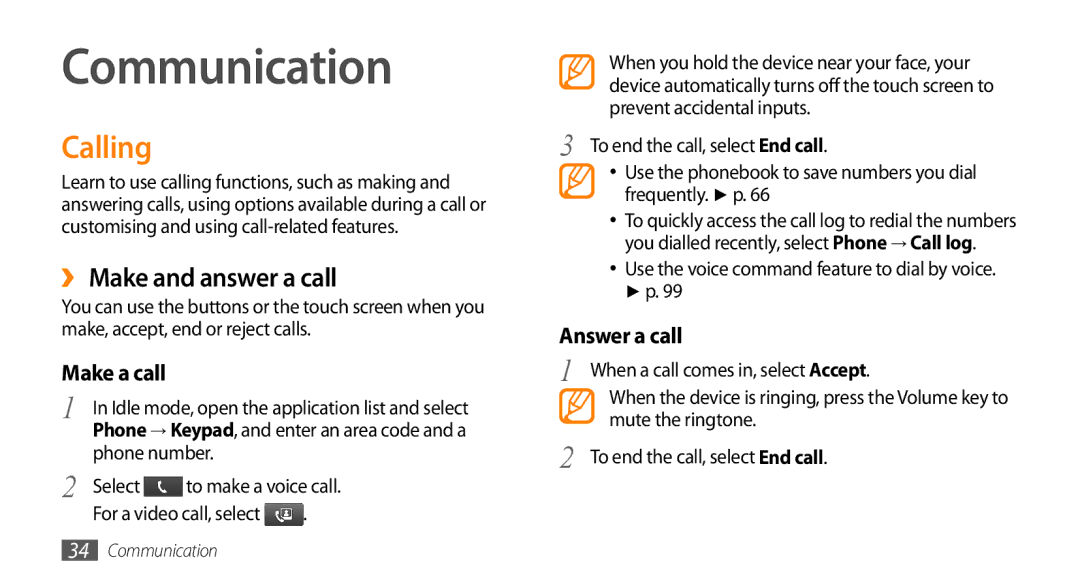
Calling
Use the voice command feature to dial by voice. p
Communication
›› Make and answer a call
Character
›› Use the headset
›› Use options during a voice call
To dial the number
›› Use options during a video call
To open the dialling screen, select Dialpad
›› View and dial missed calls
›› Use additional features
Select Auto reject list
→ Enable FDN
Forwarding
Select a call type to restrict
›› View call logs
Phone → Call log
›› Send a multimedia message
Messages
›› Send a text message
Messaging → New message
›› Listen to voice mail messages
›› View a text or multimedia message
Messaging
›› View email messages
Google Mail
›› Send an email message
Google Mail
›› Organise email by labels
›› Set up an email account
Select Change labels
›› View an email message
→ an email account
›› Add friends to your friend list
Talk
›› Start a chat
Social Hub
Social Hub
›› Capture a photo
Entertainment
Camera
Camera
Change the camera settings
To send a photo to others, select Share
Select → a scene →
Make any necessary adjustments
›› Capture a series of photos
→ Continuous
→ Panorama
›› Capture a photo in Smile shot mode
›› Capture a panoramic photo
→ Smile shot
›› Capture a vintage photo
›› Capture a photo in Self shot mode
›› Capture a beauty photo
→ Self shot
→ Add me
›› Capture a photo of action
→ Action shot
›› Capture a photo in Cartoon mode
›› Customise camera settings
Setting Function Guidelines
Adjust Adjust contrast, saturation, Sharpness
→ to access
Screen Setting Function Review
Default storage location Change the recording mode for
›› Capture a video
›› Customise camcorder settings
Video Player
Gallery
›› Supported file formats
›› Share images or videos
›› View a photo
›› Play a video
Gallery
›› Play music
Music Player
›› Add music files to your device
Music Player
Scroll left or right to an album
›› Access the album list
Display switches to album view
Select or to pause or resume the current
›› Create a playlist
›› Customise music player settings
›› Add songs to the quick list
FM Radio
›› Listen to the FM radio
Radio
›› Save a radio station automatically
Plug the supplied headset into the device
Select Scan → a scanning option
›› Customise FM radio settings
→ Settings
›› Create a contact
Contacts
›› Import or export contacts
›› Set a speed dial number
›› Find a contact
›› Create your namecard
›› Copy contacts
Accounts
›› Create a group of contacts
›› View the communication log
›› Create an event
Calendar
›› View the social network activities
›› View events
›› Create a memo
››Stop an event alarm
Memo
›› View memos
›› Play a voice memo
Voice Recorder
›› Record a voice memo
Recorder
›› Browse web pages
Web
Internet
Available icons may vary depending on your region
→ Find on
→ Add bookmark
To view the web page details, press → More → Page info
›› Bookmark your favourite web pages
Select → Bookmarks
Maps
Select a web page to access
Layar
›› Add an RSS feed address
›› Search for a specific location
›› Search the map
›› Find your location
›› Get directions to a specific destination
YouTube
›› Watch videos
Tap and hold a video
›› Share videos
›› Upload videos
Select Share → an option
Synchronise
›› Set up a synchronisation profile
›› Start synchronisation
Briefing
Daily Briefing
Market
Region
Feature
Bluetooth
Connectivity
›› Send data using the Bluetooth wireless feature
›› Find and pair with other Bluetooth- enabled devices
›› Receive data using the Bluetooth wireless feature
›› Activate the Wlan feature
Wi-Fi
›› Find and connect to a Wlan
›› Connect to a Wlan using a Wi-Fi Protected Setup WPS
›› Add a Wlan manually
AllShare
›› Customise Dlna settings for sharing Media files
AllShare
›› Play others files on your device
›› Play your files on another DLNA- enabled device
›› Play files of one device on the other device
Mobile AP
TV connections TV out mode
Select TV out to activate TV out mode
Select OK to confirm
Region Option
PC connections
›› Connect with Samsung Kies
TV with a TV out cable
›› Synchronise with Windows Media Player
Press the Home key to return to Idle mode
Player
›› Connect as a mass storage device
›› Use your device as a wireless modem
Storage
Activate an internet connection will appear
Software
Create a modem connection on your PC
›› Delete an alarm
›› Set a new alarm
›› Stop an alarm
Tools
›› Create a world clock
›› Use the count-down timer
›› Use the stopwatch
›› Perform the calculation
Calculator
Aldiko eBook
›› View the calculation history
›› Download book files from the online book store
›› Import book files
Mini Diary
›› Create a Mini diary
›› View a Mini diary
My Files
ThinkFree Office
Files
›› Manage documents online
›› Create a new document
›› View and edit a document on your device
ThinkFree Office
›› Open an application
Voice Dialer
›› Call a contact by voice dialling
Dialer
To send a text message with the text, select Send message
Write and Go
To the selected option
Access the Settings menu
Settings
Wireless and network
›› Mobile networks
Call settings
›› VPN settings
›› Synchronise
›› Fixed Dialing Numbers
›› Voice call
›› Video call
›› Voicemail
Media volume Set the default volume for music and videos
Sound and display
Location and security
Set up SIM card lock
Brightness Set the brightness of the display
Help Access help information for the mobile tracker feature
Applications
Privacy
Accounts and sync
Development
Locale and text
SD card and phone storage
Search
›› Select locale
Enable Tip Indicator Activate the indicator for quick help
›› Samsung keypad
Tutorial Learn how to enter text with the Samsung keypad
Accessibility settings
Text-to-speech
Date and time
About phone
Your device displays Service unavailable or Network error
Troubleshooting
Lock SIM card menu
Calls are being dropped
Your device freezes or has fatal errors
Touch screen responds slowly or improperly
→ Erase everything
Incoming calls are not connected
When dialling from contacts, the call is not connected
Outgoing calls are not connected
Others cannot hear you speaking on a call
Error messages appear when launching the camera
Battery does not charge properly or the device turns off
Your device is hot to the touch
Error messages appear when launching the FM radio
Error messages appear when opening music files
Another Bluetooth device is not located
Protect your hearing
Install mobile devices and equipment with caution
Keep your device away from small children and pets
Handle and dispose of batteries and chargers with care
Turn off the device in potentially explosive environments
Avoid interference with pacemakers
Reduce the risk of repetitive motion injuries
Do not use the device if the screen is cracked or broken
Follow all safety warnings and regulations
Use only Samsung-approved accessories
Drive safely at all times
Handle your device carefully and sensibly
Avoid interference with other electronic devices
Ensure access to emergency services
Allow only qualified personnel to service your device
Ensure maximum battery and charger life
Use your device in the normal position
Specific Absorption Rate SAR certification information
Correct disposal of this product
Disclaimer
Correct disposal of batteries in this product
Safety and usage information
Bluetooth DLNA PC WLAN
Bluetooth activating 81 finding and pairing with devices
Using options during voice 35 viewing missed 37 waiting
Index
101
Setting accounts 43 viewing
See web browser
107
Capturing by scene
110
106
Video player 57
104 Text-to-speech
Wlan
Declaration of Conformity R&TTE
To install Kies PC Sync
→ About phone → USB settings → Samsung Kies