ADJUSTMENT (Continued)
SET UP
■CHANNEL SETTING
It is necessary to set the receiving mode to AIR or CABLE channels to receive locally broadcast TV programs.
POWER |
|
|
|
| DISPLAY |
|
|
SLEEP |
| BRIGHT |
|
| MENU |
|
|
MUTE |
| TV/VIDEO |
|
|
| FLASHBACK | MENU/ |
|
| ]/[/ | |
VOL | CH |
| |
|
|
| </ > |
1 2 3
4 5 6
7 8 9
MTS 0 100
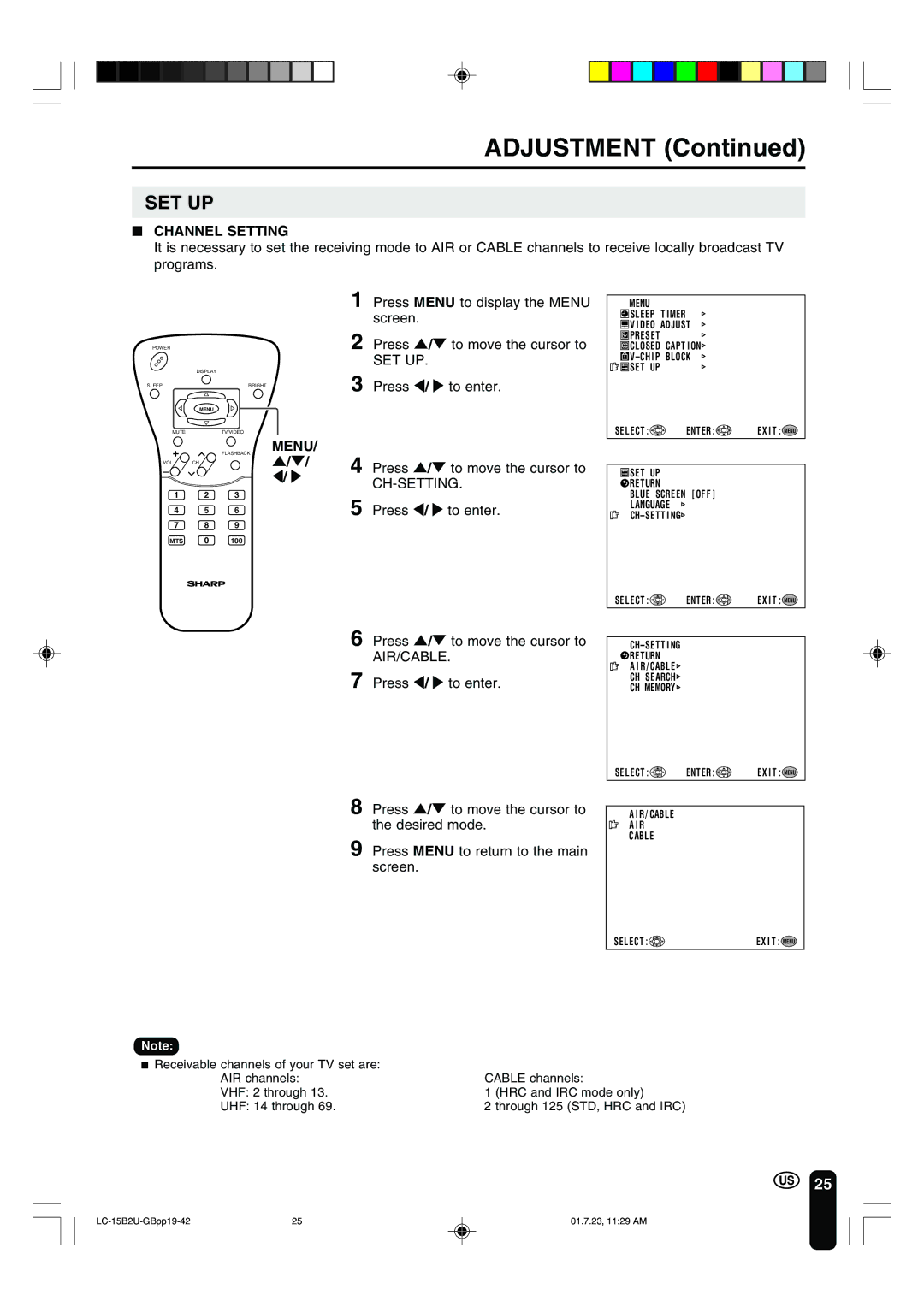
1 Press MENU to display the MENU screen.
2 Press ]/[ to move the cursor to
SET UP.
3 Press </ > to enter.
4 Press ]/[ to move the cursor to
CH-SETTING.
5 Press </ > to enter.
6 Press ]/[ to move the cursor to AIR/CABLE.
7 Press </ > to enter.
8 Press ]/[ to move the cursor to the desired mode.
9 Press MENU to return to the main screen.
MENU
 SLEEP T IMER
 V I DEO ADJUST
 PRESET
 CLOSED CAPT I ON
 V–CH
V–CH
 SET UP
SELECT :

 ENTER :

 EX I T : MENU
 SET UP
 RETURN
BLUE SCREEN [ OFF ]
LANGUAGE
SELECT : | ENTER : | EX I T : MENU |
 RETURN
A I R/ CABLE
CH SEARCH
CH MEMORY
SELECT : | ENTER : | EX I T : MENU |
A I R / CABLE
A I R
CABLE
SELECT : | EX I T : MENU |
Note:
■Receivable channels of your TV set are:
AIR channels: | CABLE channels: |
VHF: 2 through 13. | 1 (HRC and IRC mode only) |
UHF: 14 through 69. | 2 through 125 (STD, HRC and IRC) |
25
25 | 01.7.23, 11:29 AM |