Contents
Model ’ KX-TVS751KX-TVS100
Model no Serial no
Important Safety Instructions
To restore
That
Covered by the operating Instructions Because Improper
Extensive work Qualified
Incidence of Harm to the Telephone Lines
Notify the Tekphone Company
Connection to Telephone Line
Ringer Equivalence No. REN
How To Use This Manual
Terms to Know
System Installation
Detailed Feature and Service Descriptions
Overview
Chapter
Contents
Contents
SystemManager’s Guide
Maintenance
Message Manager’s
Template for K%TVS75 Specifications Index Worksheets
Chapter Overview
Ikroduction
Welcome to the P&sonic Voice Processing System
Introduction
12lCall Services
Automated Attendant Service
Service and Voice Mail
Chapter
12lCall Services
Voice Mail Service
Service, by scheduling messages to yourself
Interview Service
Custom Service
13l&her Features
Message Waiting Notification
External Message Delivery
Auto Forwarding
13lOther Features
Direct Mailbox Access
Describes these features in detail Overview
Two-Way Recording
14lOutside Caller Handling
15lConfiguration
VPS Connections to the PBX
TVS100
RS-232C Interface Message Manager
Programming System Administrator
16lGuidelines for Preparation
Guidelines for Preparation
Telephone Programming
Messape Manaper
When you program, refer to Chapter
Svstem Manager
16lGuidelines for Preparation
17lMailbox Management
17lMailbox Management
System Reports
Utility Command
18lSystem Diagnosis
You can display the programming of Custom service
You can clear the access count of each Custom service
You can display the available Utility Commands
You can start the Quick Setup Overview
System
Installation
Power Cable Connection
21lSystem Components
Main Cabinet
Rotary Switch
EIA RS-232C Connector
Installation
Inside View of the Main Cabinet
21a System Components
Main Cabinet Components
CPU Card
System Components
Port Card
Hard Disk Drive
220 I&tallation
Preparation
System Expansion TVS100 only
Installing an optional Port Card
22a Iktallation
Wiring Precautions
22lInstallation .-s
Installation Precautions
Hook the unit on the screw heads TVS Installation
Ifistallation
Mounting theVPS on the Wall
To Mount on a WoodenWall
To Mount on Concrete or Mortar Walls TVS100 only
TVS100
Installation
Extension Connection
To connect telephone lines
To extension port of the PBX
Assignedto the VPS Installation
22lIrktallation
KX-TD Series Telephone System
Assignedto theVPS
Exampie Your PBX
Connecting RS-232Ccable
22lI&tallation
Data Terminal or Printer Connection
RS-232C parameters
Connection Chart
Hstallation
EIA RS-232C port on
Data
EIA RS-232C Signals
22lGstallation
Power Cable Connection
22lhstallation
Chapter Detailed Feature and Service Descriptions
Before -Reading-This Chapter
Subscriber
Auto Configuration D-PITS Only
Group
Alternate Extension
Auto Forwarding
Automated attendant Service
Features and Services
Automated Attendant Service
~.....*****m*****o**o**o*a
Busy Coverage Mode
Notification-Device Description When the caller
Subscriber Accesses his mailbox. If the Subscriber receives
Broadcasting Messages
When the message is specified as urgent Before
Nate Callback number is the number Which
You
Without Callback Number Display
Call s ervices
Call Blocking
Call s creening
Sorry, no one is available to answer the call
Call TransfeLr Status
Record your name at the tone
Then the VPS pages the Subscriber
Conditions Subscriber If not, the caller hears
Description Conditions
Cl ass of Service
Ompany Greetings
Ex. Menu Message
Custom Service
Covering Extension
Programming Example
Features
System Administration Top Menu + 1 + 4 +
Worksheets OLSample
Custom .Service Settings Screen for Sample Program
Custom
Features and Services
Department Dialing
Dav Service
Time Assignment
Dialing by Name
Cl6
Direct Mailbox Access D-PITS Only
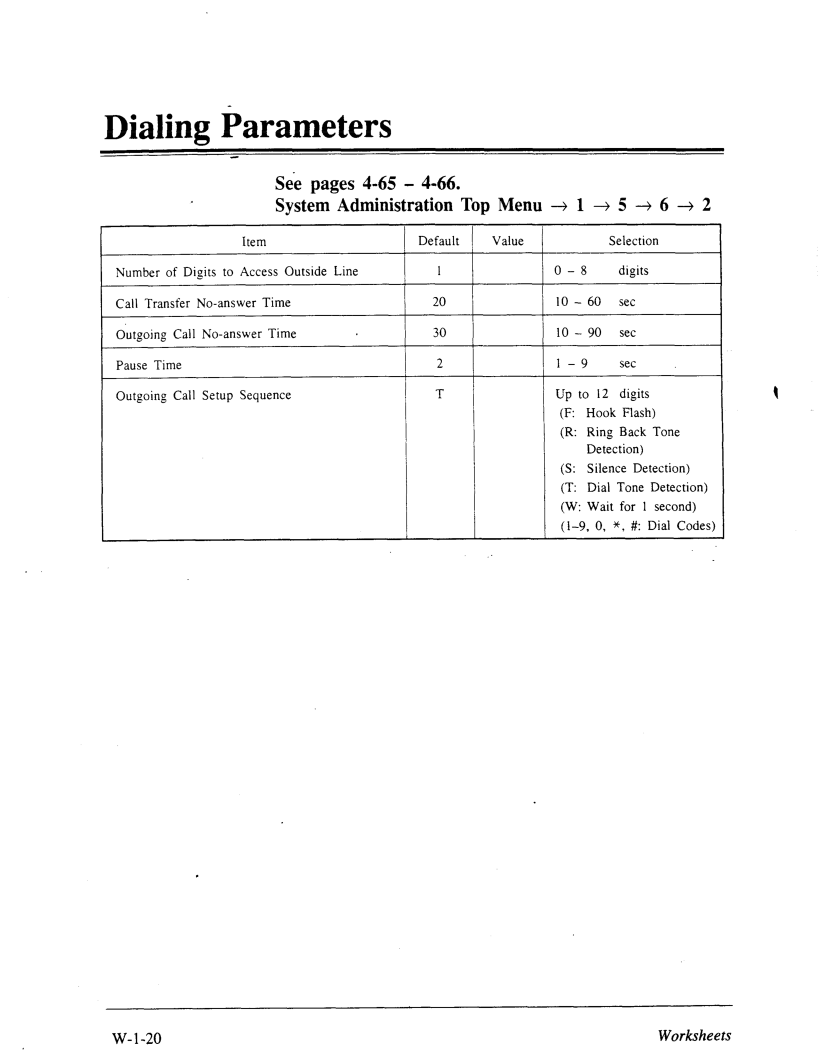
Dialing Parameters
External Message Delivery Service
Extension Group
Extension Numbering Plan
External Message Delivery List
More Information
Fax M anagement
Defiqed by the Fax No-answer Coverage Mode
External Message Delivery Status
Groti~ Distiibution List. Personal
Group Distribution List, System
Holiday Service
Inband
Features and Services
Example of Inband Integration
Incomplete Call Handling Service
Hercorn Paging ‘D-PITS Only
Will always hear Following
Callers
Calling
Service
Or to receive repair service orders
How to Assign the Interview Service
Erview
Flik
Live Call Screenitig D-PITS Only
Logical Extension All Calls Transfer to Mailbox
Mailbox
Creatiw a Mailbox
Mailbox Number
Message Manager’s
9999 99999
MessagesCoinbined
See Group Distribution List, System Features
Mailbox CaDacitv
Message
Ddivery, Internal
Message Delivery Status
Description’
Essage Scan
Message Reception Mode
Or the Interview mailbox when he is unable to take calls
Feature Ref Description
Essage Transfer
Message Waiting Notification Device
Subscriber . l Message Playback Options Subscriber’s Guide
12AM 1012PM2
VPS skips the device and calls the third one
VPS calls Device 1 through Device 3 in this order
Essage Waiting Notification Lamp
Subscriber that there
Multi-Lingual Service
= Valid setting Features
Cos
Available Prompt Options
= an available option
Ex. Custom 1 Menu Message for Bilingual Service
Then create the tree as below Custom
No-Answer Coverage Mode
Operator Service
PBX Integration’
Bperator Call Coverage
Personal Greetings
Business hours
Port Service
Play System-Prompt After Personal Greeting
L Port Assignment
Private .Message
Receive Message
Feature Receive Message Description
Record Message
Reply To Message Sender
Send a message to the sender’s mailbox
Selection Menu
Rotary Telephone Service
See Multi-Lingual Service Features
Ervice Access Commands
Special Feature Authorization
Description 1 Entering
Following
System Cloc1
System Reports
Feature Ref Description Conditions Subscriber
Recording D-PITS Only
Utility Commands
Voice Mail Service
Setting the System Clock l Receiving Messages
Service Access Command
Voice Prompts
31.7 Good morning
316
Turning off a Prompt
Prompt 538 Message recorded on date prompt 248 at time
Class of Service Setting Special Feature Authorization
Automated Attendant Parameters Custom Service
System Group Assignment Day Service 5.3’Holiday
Prompt Setting Other Parameters Hardware Settings
41a System Administrator’s Function
41l System Administrator’s Function
42lUsing the Interface
Keyboard Operation
Ill
Key
42lU&g the Interface
Programming Guidance
Status Power Indicator
Startup System
Mm=M=l2
Active COs in the above screens means Active Ports
Ascii Terminal mode
43lStartup System
Press Return
Press l or 2 to specify the RS-232C terminal type
Quick Setup
Starting the Quick Setup
8System Administrator
+4+5-+6-+7 1KX-TD816/1232
Quick Setup
PBX type
Extension numbers of VPS ports
After pressing Return Enter, the screen shows
Extension numbers for mailboxes
Creating mailboxes
To create or discard the mailboxes Make Make/Delete field
Port service setting
Password setting
Quick S&up
Date and time‘ setting
Activating the Quick Setup
Integration Date Time are synchronized Between the PBX
With
When the Quick Setup is finished, the screen shows
VPS begins to change system programming data
Programming Menu Structure Diagram
44lProgramming Menu Structure Diagram
Before starting the system parameterssetup
45lProgramming the System Ptirameters
Setting up Mailboxes
System Administration Top Menu + 1 +
System Administration Top Menu + 1 + 1 +
Creating and Editing. Mailboxes
Value Range Parameter Default Mailbox Number 2-5 digits
System Administration Top Menu -+ 1 + 1 + 1 + Mailbox No
System Administrator
Editing Mailboxes
Set Services
Before assigning a Class of Service COS
Or deactivated using telephone by the Subscriber
Using
Notification Setting
Dekription/Function
Device
Parameter Number to Dial
Device 2
Resetting a Mailbox Password
System Administration Top Menu -+ 1 + 1 + 2 + Mailbox No
System Administration Top Menu + 1 -+ 1 + 3 + Mailbox No
Deleting a Mailbox
Sitting up Mailboxes
Listing Mailboxes
Setting COS Class of Service Parameters
Class of. Service Setting
System Administration Top Menu + 1 + 2 + COS No. l-64
System Administration Top Menu + 1 -+ 2 + COS No. l-62 +
Setting COS Class of Service Parameters
Cancel Yes For
Access
VPS signals Busy
Live Call Screening feature is available if D-PITS
Prompt Mode
By default, both User 1 and User 2 prompts are
System Administration Top Menu + 1 + 2 + COS No ,64 +
Specifies Language
Message during messagescan
New Message
Sender’sname and the recording date and time to
Special Feature Authorization
System Administration Top Menu -+ 1 + 2 + COS No. l-62 +
If you took the Quick Setup step to create
Access Type System Administrator
Yes NoI Select Without Before After
Mailboxes, this parameter in COS No has been Already
Delay Time
Forwarding Copy Mode Move
Parameter Ialue
4uthorization
2 ,Setting COS Class of Service Parameters
Authorization Yes Message Notification
Disable Number
Beeper Select Allows
Value Range Parameterdefault
Disable
When Disable
Mailbox after the Message Manager’s access Lets
Port Service
Port 1 Day Mode
System Administration Top Menu 4 1 + 3 +
Port Assignment
PDrt Service
Pbrt Service
Port 1 Night Mode
Port 2, 4, i Day Mode
Port 1, 2, 5, i Night Mode
Sixvice Settings
System Administration Top Menu + 1 + 4 -+
System Administration Top Menu + 1 + 4 + 1 +
Automated Attendant Parameters
Service Settings
Operator’s Parameters
Specifies any valid extension number
Dialing No
Service Settings
ODerator 1 Day Mode
Operator Service 1. Disable
System Administration Top Menu -+ 1 --+ 4 + 1 + 2 + 1 -+
Busy Coverage Hold Mode
Treat calls when Operator 1 is
Treat Calls when Operator
Value Range
Parameter Yf&!zge Description/Function
Operator 2 Day Mode
System Administration Top Menu + 1 + 4 -+ 1 + 2 -+ 1 +
Parametqr Value
Iperator’s Digits Zxtension None
Pvlailbox No None I3usy Coverage Hold Rdiode
Overage
ODerator 3 Day Mode
Operator 3 Night Mode
Operator 1 Night Mode
Operator 2 Night Mode
System Administration Top Menu + 1 + 4 -+ 1 -+
System Administration Top Menu + 1 + 4 + 1 + 3 +
Alternate Extension Assignment
Alternate Extension Group Enter
Alternate Extension- Listing
System Administration Top Menu + 1 4 4 + 1 + 3 +
Alternate Extension- Delete
Characters
Settings
Department Dialing
Service System Administrator
Assignment
Mailbox Group
System Parameter Settings
System Group Assignment
54System Administrator
Mailbox Grow Enter
Mailbox Group Delete
Specifies mailbox numbers belonging to this group
System Parameter Settings
System Administration Top Menu + 1 + 5 + 1 + 1 -+
Mailbox Group Listing
Extension Group
Extension Group Enter
Day Service
Extension Group Delete
Extension Group Listing
You can specify extensions to be deleted from the list
5 Sj&m Parameter Settings
Holiday Setting
System Administration Top Menu -+ 1 -+ 5 +
Parameter Description/Function Specifies Start
Holiday Setting Enter
System Administration
Menu + + 5 +
Name Holiday
Holiday Setting Delete
Holiday Setting Listing
Daylight Saving Time
5.5 Pmn~t Setting
Other Parameters
Extension Numbering Plan
System Administration Top Menu + 1 + 5 + 6 +
64System Administrator
Dialing Parameters
Default Outgoing Call Ip to
66System Administrator
X, #
Seiup Sequence
100 Port
Parameter Outgoing Call Ports
Port1,2
System Callback No
68System Administrator
‘ 4.5.5.6.4 External Message Delivery Parameters
System External Message Delivery Duration Time
Used For External Message Delivery
100 Port Min Specifies
Up to This telephone number
Call Gold Parameters
30 set 15 set 45 set
Rotary Telephone Service
System Administration Top Menu + 1 -+ 5 + 6 -+
IValue Range Parameter Default
Intercom Paging Parameter
System Administration Top Menu -+ 1 + 5 + 6 +
Fax Management
Repeat Cycle Description/FunctionReference
Example There is a call for mailbox owner’s name
Paging Retry Code For Group
Transfer Enable
Fax Management Service
Fax
Fax Digits
Disconnect Parameter
Silence Time Description/Function
Hardware Settings
6.1 RS-232C Parameters
Ikrdware Settings
Port Setting
Setting Menu
ReferenceData
Hardware Settings
PBX Interface Parameters
System Administration Top Menu + 1 -+ 6 + 3 +
PBX Type
Manu
Factures
Pits
Integration None Mode Inband
Parameter Value Range Desc,ription/Function
Sequence
Used Transfer Calls Any Extension
Operator’s Used Transfer Calls Extension
Hkdware Settings
Inband Signaling Parameters
Disturb feature
System Administration Top Menu + 1 + 6 -+ 3 +
Parameter Answer Forward to VM Ringing Forward to VM Busy
Forward to Other Extension Confirmation Disconnect
VM Ringing
Forward to
Inter Digit Timeout
Inter-digit Set Timeout
System Administration Top Menu + 1 + 6 + 3 + 3 +
Digit Translation Table Parameters
Parameter Value Range default Input Up to Digit
86System Administrator
Digit Translatio Table
Menu
System Manager’s Guide
System Usage System Reports
System Manager’s Function
Before starting systemmanagement
52lAccessing the System Manager’s Mailbox
To Access the System Manager’s Mailbox
53lSetting up Mailboxes
Creating and Editing a Mailbox
Subscriber’s VoicedName
All you need to carry out such a job is the mailbox number
Class of Service No
Exteusion Number
Initial 3 or 4 Letters of Subscriber’s Last Name
Interview Mailbox No
53a Setting up Mailboxes
Deleting a Mailbox Password
Deleting a Mailbox
Xxxx
54lSetting COS Class of Service Parameters
Personal Greeting Length
New Message Retention Time
Saved Message Retention Time
Message Length
Number of Messages
Total Message Time
Message Retrieval Order
54lSetting COS Class of Service Phameters
External MessageDelivery Status
Auto Forwarding Status
55a Setting the System Clock
Step If you press 0 for help with this setting
56lChecking System Usage System Reports
Obtaining System Reports
Clearing the Reports
Delivering Messages
Delivering
Messages to All Mailboxes Broadcasting Messages
Delivering ‘MeSsagesto Specified Mailboxes
Delivering Messages
Checking Mailbox
Distribution
You Can listen to the messageby pressing l
58lCustomizing the System Manager’s Mailbox
TipStep 4
Listening to Messages
You can end your call by pressing #
Repeat This message Play Previous message Next message
Rewind Fast Forward
Message Manager’s Guide
List of Modifiable Prompts
Before starting messagemanagement
Message Manager’s Function
610
62lAccessing the Message Manager’s Mailbox
To accessthe messagemanager’smailbox
Ca,,v Mail service
Dial an extension .number which is connected to the Voice
Accessing the Message Manager’s Mailbox
63a Managing the General Delivery Mailbox
Listening to Messages
63lManaging the General Delivery Mailbox
Transferring Messages
64a Setting up Message Waiting Notification
Setting Message Waiting Lamp Status
Setting Notification by Calling Status
Setting Device Status
64lSetting up Message Waiting Ndification
Assigning Notification Numbers
Setting up Message Waiting Notification
Tip
Message Manager’s Password
65lCustomizing the Message Manager’s Mailbox
Operator’s Extensions
Pressing
66a Setting the System Clock
Recording Company Name
67lRecording Company Messages
Recording Company Greetings
Hto
Recording Company Messages
6i7.3 Recording Department Dialing Menu Messages
Recording Custom Service Menu Messages
If you have not recorded a menu
Recording Voice Labels for Mailbox Lists
Recording User Prompts
You can erase the label by pressing
At the end of this chapter
67a Recording Company Messages
Recording Selection Menus
67lRecording Company Messages
List of Modifiable Prompts
Five
11 TEN Eleven
FoURTEEN
List of IkIodifiable
Prompts
Modifiable Prompt
139
~. .~~
140
Prompt Modifiable Linked to Pk~pt
213 1 Sixth 214 1 Seventh 21s Eighth
List of Modifiable Prompts
2811, 2871, 2831 Message Manager
List of lkodifiable Prompts
W81, 12821,4421,5811,X9, 5831,5841,5851
List of RiIodifiable Prompts
Prompt 308 309 Modifiable
For help, press
To make this message private
Will Delivered
T3281,WUI
List of l%iodifiable Prompts
3281,P821
Modifiable
List
363
&Iodifiable
Prompt Linked to Prompt Nos 388
389
Is not
Signed 390
Modifiable Prompts
Delete
Delete, press 435
Play the next, press
4601
Set the answer length using the following options
Message To name
Being
Now
To change the personal greeting
Mess
List of Ihodifiable Prompts
Greeting erased
Group name, press
Add group Members, press
C2.481
You can add up to number Sjj
More Members
Message sender is unknown
To call message sender, press 1 To record a message, press
X21
Ls=l
‘WI
328 , 4421, 15811, 5821, t5831, 5841, SW
598 Cancel
599
600
Exceeded 603 Record a message, press
Linked Prompts List
Distribution
Message for name 417
Received On date 248 At time
Messages Times MessageManager
List of Modifiable Trompts
Answer length is number
Error Log Display Elog Saving the System Data to
Print All of the VPS Parameters Gprn
Prompt List Mplt Utility
Initializing the System
Off-line Set Ofln
71lUtility Commands
System Administration Top
J Set Password Pass
On-line Set Onln
Utility Commands
Changing a Password Select l or
Enter the new password
Set Time Time
Error Log Display Elog
Press 1 to enable this function. or Press 2 to disable it
Print Reports at Specified Time Pset
Enter the time to print the report
71a Utility Commands
Device Error log indications
Type ELOG, then press Return
Follows
Saving the System Data to the Backup Device Save
Error indications at system startup
Error and warning indications during system operation
Example terminal display when errors are generated
Select item to be backed up, then press Return
Save
Loading the Saved Data to the VPS Load
Load
Is only valid in the Ascii terminal mode
Command
Print All of tlie VPS Parameters Gprn
Program Version Display Vers
Custom Service Report Crep
Custom Service Menu Access Count Clear Cclr
Message Waiting Lamp Retry Times MWL
71lUtilitymCommands
Setting Minimum Recording Length MRL
Modified Prompt List Mplt
Utility Command List Help
Quick Setup Qset
Mailbox Assignments
System Administration Top Menu + 2 +
72lSystem Reports
COS Class of Service Assignments
System Administration Top Menu + 2 + 1 +
72l System Reports
+ 1 +
SystemService Report
CustomService
‘X’ Screen indicates That Feature marked with X is Used
72l
LOO Port Maintenance
72lSystem Reports
Call Account Report
Port Usage Report
Clear command Maintenance
Port UsageStatistics Clear
Disk UsageReport
On the report
System Administration Top Menu + 2 + 2 +
System Administration Top Menu + 2 + 1 -+
Disk UsageStatisticsClear
Mailbox UsageReport
Mailbox UsageStatisticsClear
System Administration Top Menu -+ 2 -+ 1 +
System Administration Top Menu + 2 3 2 +
Fax Call Report
Fax Call StatisticsClear
Setup in the above screen does not appear in the Ascii
Press Y this moves the VPS to the off-line mode
73lInitializing the System
Press 4 for System Initialization
Press r\ to start the system resetting
73lItiitializing the System
Troubleshooting Guide
Problem
Template for KX-TVS75
Copy the template and place it on the wall
Specifi,irations*I
Extensions
SLT extensions
Connections Telephone Line
34,s
Delivering
Card
Time Set
Initialization
Intercom
31,3-44
Live
Version
For Incoming
Special
53, 4-32
Worksheets
HOW to Use.theWorksheets
Worksheetsfor MessageManager
Worksheetsfor SystemManager
Example for System Manager
How to Use the Worksheets
Example for System Administrator
How to Use the Worksheets
Example for Reference
Planning the Application
Switch Capabilities
Information
YES I no YES I no YES / no YES / no YES /. no
Can Switch provide Message Waiting
Indicator?
What is the on sequence?
What is the OFF sequence? Type
Can Switch Support Any Following types of Hunt groups?
Special Voice Mail
Groups
Pilot Hunt Groups
Customer’s call Handling Survey
Backup Receptionist
Does the Customer require the VPS for
Receptionist
Call Routing
Worksheets for System Manager
Setting System Manager’s Password
See System Manager Top Menu +
Mailbox-Settings
See pages
Class of Service Setting
See pages
System Manager Top Menu + 16 +
Worksheets for System Administrator
Inband Signaling
Holiday
Call Hold Rotary
Mailbox Settings
MON SUN
System Administration Top Menu + + 2 -+ COS No. -+
No. -+
Cos
Top Menu + 2 +
Port Assignment
See pages 4-40 SystemAdministration Top Menu + 1 + 4 3 1 --+
Department Dialing
Day Mode Operator
OperatoYs Parameters
See pages 4-41
Top Menu + + 1 + + 1 -+
Operator’s Parameters
Day Mode Operator
Night Mode Operator
Nigh1 Mode Operator
Operator’s Parameters
Alternate Extension Assignment
Custom Service
Mailbox Group
Extension Group
Extension No Worksheets
Day Service
See System Administration Top Menu + 1 -+ 5 -+
Day Service Start Time End time
Day Service Start Time End
Holiday Setting
See SystemAdministration Top Menu -+ 1 -+ 5 +
Daylight Saving Time
Prompt Setting
See pages 4-62 SystemAdministration Top Menu + 1 -+ 5 -+
See SystemAdministration Top Menu + 1 + 5 -+ 6 -+
Extension Numbering Plan
Dialing Parameters
Message Waiting Notification Parameters
+ 6 +
Top Menu +
See pages System Administration
External Message Delivery Parameters
Call Hold
See
+ 1 + 5 -+
Rotary Tdephone Service
See System Administration
Intercom Paging Parameter
Fax
Top Menu --+ 1 + + 6 -+
See System Administration Top Menu + 1 + 5 + 6 +
Disconnect Parameter
RS-232C -Parameters
System Admhistration Top Menu --+ 1 -+ 6 +
Port Setting
CPC
Dialing Parameters
Inband Signaling Parameters
See page A-86
Digit Translation Table Parameters
Top Menu -+ 1 + + 3 +
Mailbos
Selection
Message Manager’s Password
See MessageManager Top Menu +
Mailbox- Owner’s Address
Company Greetings
See 1IessageManager Top Menu -+ 5 -+ l
Company hame
Company Name
See pages 6-E MessageManager Top Menu -+ 5 3
Didin hlcnu
Department Dialing
See pages 6-13 MessageManager Top Menu + 5 +
Custom Service Menus
Custom Service No. Llenu \lessage
See Message ‘Manager Top Menu -+ S +
Assignment Esit Operator
Mailbox Distribution Group Name
See MessageManager Top Menu + S --+
Prompt No
Modifying Voice Prompt
See pages 6- 15 Message Manager Top Menu -+ 5 +
Selection- Menu
See pages 6-16 Message Manager Top Menu + 5 +
Additional Features
Describes the programming and operation of thesefeatures
Table of Contents
Feature References
Conditions
Programming References
Voice Mail Number Assignment
Feature References Operation References
Live Call Screening LCS
Programming References
Description
Sent
LCS
Conditions
Feature-References Operation References
Two-Way Reqwding into Voice Mailbox
Manager Programming Address Flexible CO Button Assignment
System Programming Address Flexible Numbering
Default
Voice Mail Number Assinment
Selection
Programming
Conditions Feature References
Voice Mail Number Assignment
Selection Default Programming
Voice Mail Extension Number Assignment
Display EXT No. Set
Display NO?+
Feature References None
118
Voice Mail Extension Group Assignment
Description Selection
Enter Display
Group Asn
VoiceMail Extension Group Assignment
At sep
Live Call Screening Recording Mode Assignment
Feature References , Features Live Call Screening LCS
ConditionsNone
All Jacks = Stop Ret Stop recording
Flexible CO Wltton Assignment
Selectiw of Value
Flexible Numbering
1181 1191
Programming Tables
6101
Keep Ret
Live Call kreening Cancel Button Assignment
Indicator Light Turns on Display
Live Call ,%reening Button Assignment
Button
Two-Way Record Button Assignment
Conditions
Two-Way Transfer Button Assignment
Live Gail S&&g Password Control
Enter the extension number or 3~key
Station Programming
To stop the tone
To monitor Pizq To cancel monitoring To intercept call
To set LCS on
To set LCS on Press LCS button To cancel LCS
When using the handset in the Private Mode
Enter the password
IPress
Setting the password
Cancelling the password
Hands-free mode
Sem’ng Live Call $reening
Having a conversation with the party
Stopping monitoring
Private mode
Stopping the alert tone
Monitoring the recording message
Lift the hand+ or press the SP-PHONE/MONITOR button,
While having a conversation with another party
Monitoring
Program References
Recording into another mailbox
Recording into your
Stopping recording