21
Operating Your Oven
Cooking Tips
Food Placement
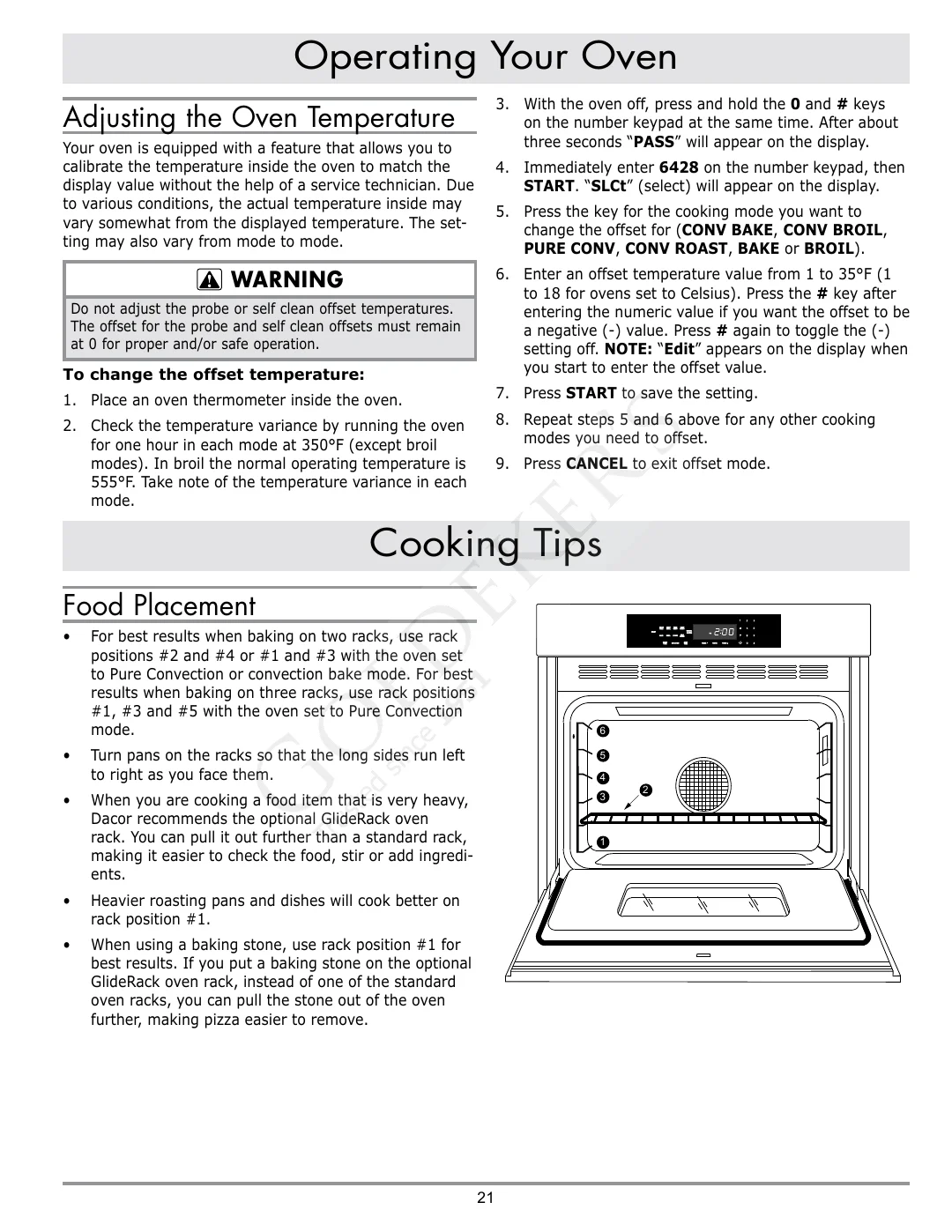
for best results when baking on two racks, use rack
•
positions #2 and #4 or #1 and #3 with the oven set
to pure convection or convection bake mode. for best
results when baking on three racks, use rack positions
#1, #3 and #5 with the oven set to pure convection
mode.
turn pans on the racks so that the long sides run left
•
to right as you face them.
when you are cooking a food item that is very heavy,
•
Dacor recommends the optional gliderack oven
rack. you can pull it out further than a standard rack,
making it easier to check the food, stir or add ingredi-
ents.
heavier roasting pans and dishes will cook better on
•
rack position #1.
when using a baking stone, use rack position #1 for
•
best results. if you put a baking stone on the optional
gliderack oven rack, instead of one of the standard
oven racks, you can pull the stone out of the oven
further, making pizza easier to remove.
Adjusting the Oven Temperature
your oven is equipped with a feature that allows you to
calibrate the temperature inside the oven to match the
display value without the help of a service technician. Due
to various conditions, the actual temperature inside may
vary somewhat from the displayed temperature. the set-
ting may also vary from mode to mode.
warning
Do not adjust the probe or self clean offset temperatures.
the offset for the probe and self clean offsets must remain
at 0 for proper and/or safe operation.
to change the offset temperature:
place an oven thermometer inside the oven.
1.
check the temperature variance by running the oven
2.
for one hour in each mode at 350°f (except broil
modes). in broil the normal operating temperature is
555°f. take note of the temperature variance in each
mode.
with the oven off, press and hold the
3.
0
and
#
keys
on the number keypad at the same time. after about
three seconds “
Pass
” will appear on the display.
immediately enter
4.
6428
on the number keypad, then
start
. “
slCt
” (select) will appear on the display.
press the key for the cooking mode you want to
5.
change the offset for (
ConV BaKe
,
ConV BroIl
,
Pure ConV
,
ConV roast
,
BaKe
or
BroIl
).
enter an offset temperature value from 1 to 35°f (1
6.
to 18 for ovens set to celsius). press the
#
key after
entering the numeric value if you want the offset to be
a negative (-) value. press
#
again to toggle the (-)
setting off.
note:
“
edit
” appears on the display when
you start to enter the offset value.
press
7.
start
to save the setting.
repeat steps 5 and 6 above for any other cooking
8.
modes you need to offset.
press
9.
CanCel
to exit offset mode.
1
2
3
4
5
6