Back to Contents Page
Optical Drive
Dell™ Inspiron™ 1501 Service Manual
Removing an Optical Drive
Your computer ships with a fixed optical drive installed.
CAUTION: Before you begin any of the procedures in this section, follow the safety instructions in the Product Information Guide.
NOTICE: To help prevent damage to drives, store them in a safe, dry place when they are not installed in the computer. Avoid pressing down on them or placing heavy objects on top of them.
NOTICE: To help prevent damage to the system board, you must remove the main battery (see Before Working Inside Your Computer) before you begin working inside the computer.
Removing an Optical Drive
1.Follow the instructions in Before You Begin.
2.On the bottom of the computer, remove the M2.5 x  ).
).
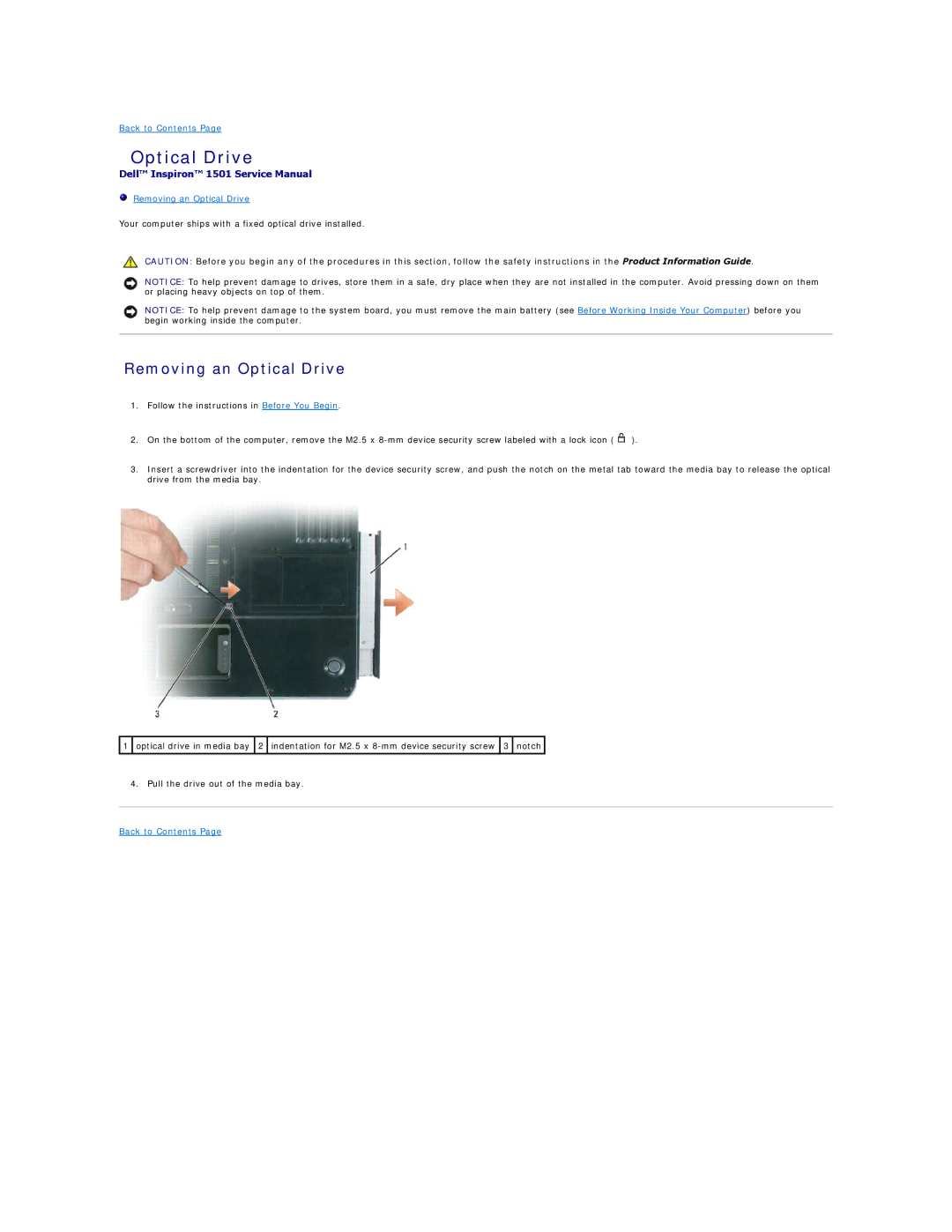
3.Insert a screwdriver into the indentation for the device security screw, and push the notch on the metal tab toward the media bay to release the optical drive from the media bay.
 1
1  optical drive in media bay
  2
2  indentation for M2.5 x
  3
3  notch
notch 
4.Pull the drive out of the media bay.