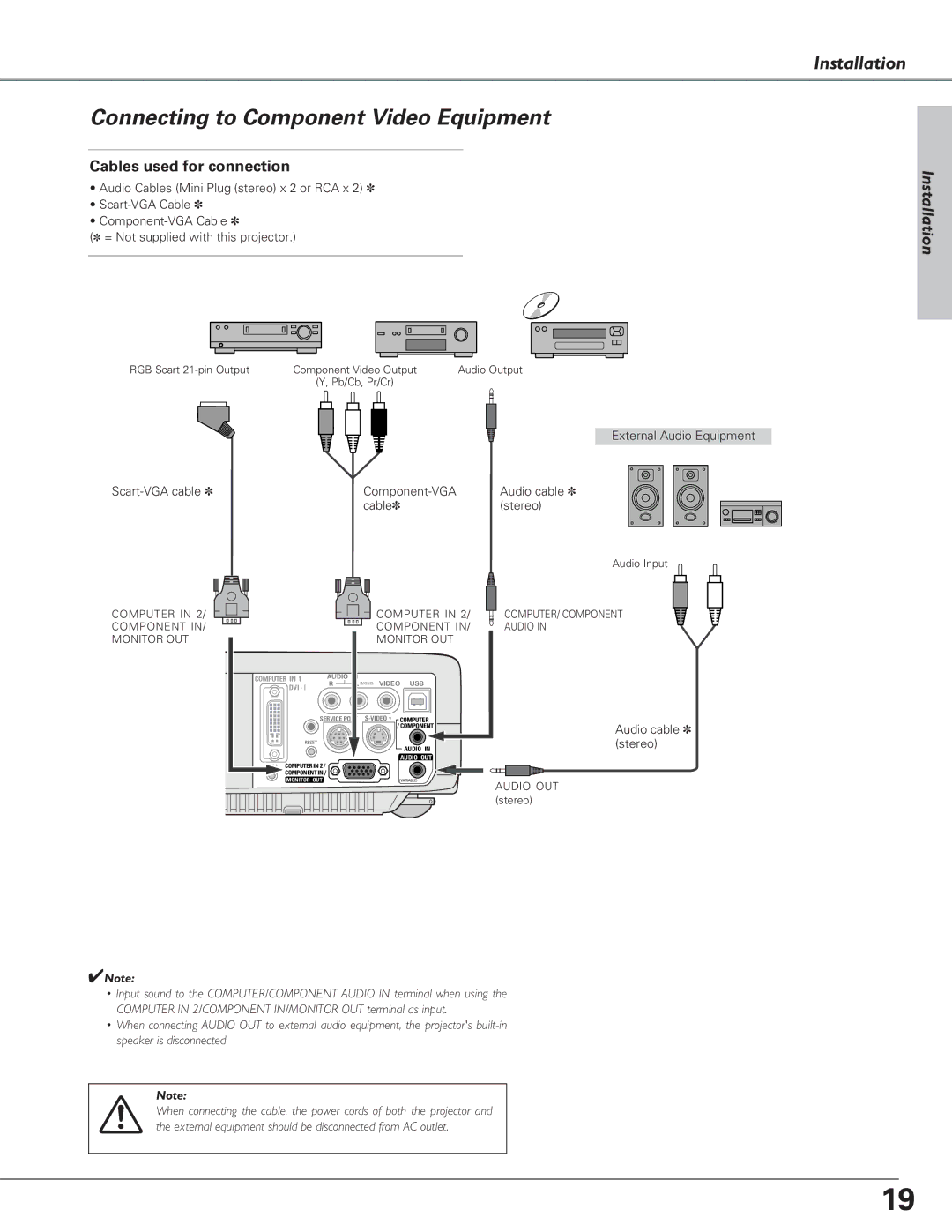
Connecting to Component Video Equipment
Cables used for connection
•Audio Cables (Mini Plug (stereo) x 2 or RCA x 2) ✽
•
•
(✽ = Not supplied with this projector.)
RGB Scart | Component Video Output | Audio Output | |||||||
| (Y, Pb/Cb, Pr/Cr) |
|
| ||||||
|
|
|
|
|
|
|
|
|
|
|
|
|
|
|
|
|
|
|
|
|
|
|
|
|
|
|
|
|
|
|
|
|
|
|
|
|
|
|
|
|
|
|
|
|
|
|
|
|
|
External Audio Equipment
Audio cable ✽ | ||
| cable✽ | (stereo) |
Installation
Installation
COMPUTER IN 2/ COMPONENT IN/ MONITOR OUT
|
|
| COMPUTER IN 2/ | |
|
|
| COMPONENT IN/ | |
|
|
| MONITOR OUT | |
COMPUTERCOMPUTER ININ 11 | AUDIO IN |
|
| |
R | L (MONO) VIDEO USB | |||
|
|
|
| |
| SERVICE PORT | COMPUTER / | ||
|
|
|
| /COMPONENTT |
RESETRESET |
|
|
| AUDIO IN |
|
|
|
| |
COMPUTERININ22// |
|
| AUDIO OUT | |
|
|
| ||
COMPONENTININ// |
|
|
| |
MONITOR OUTOUT | (VARIABLE) |
Audio Input
COMPUTER/ COMPONENT
AUDIO IN
Audio cable ✽ (stereo)
AUDIO OUT (stereo)
✔Note:
•Input sound to the COMPUTER/COMPONENT AUDIO IN terminal when using the COMPUTER IN 2/COMPONENT IN/MONITOR OUT terminal as input.
•When connecting AUDIO OUT to external audio equipment, the projector's
Note:
When connecting the cable, the power cords of both the projector and the external equipment should be disconnected from AC outlet.
19