L i f e B o o k E S e r i e s B I O S
Serial/Parallel Port Configuration Submenu of the Advanced Menu
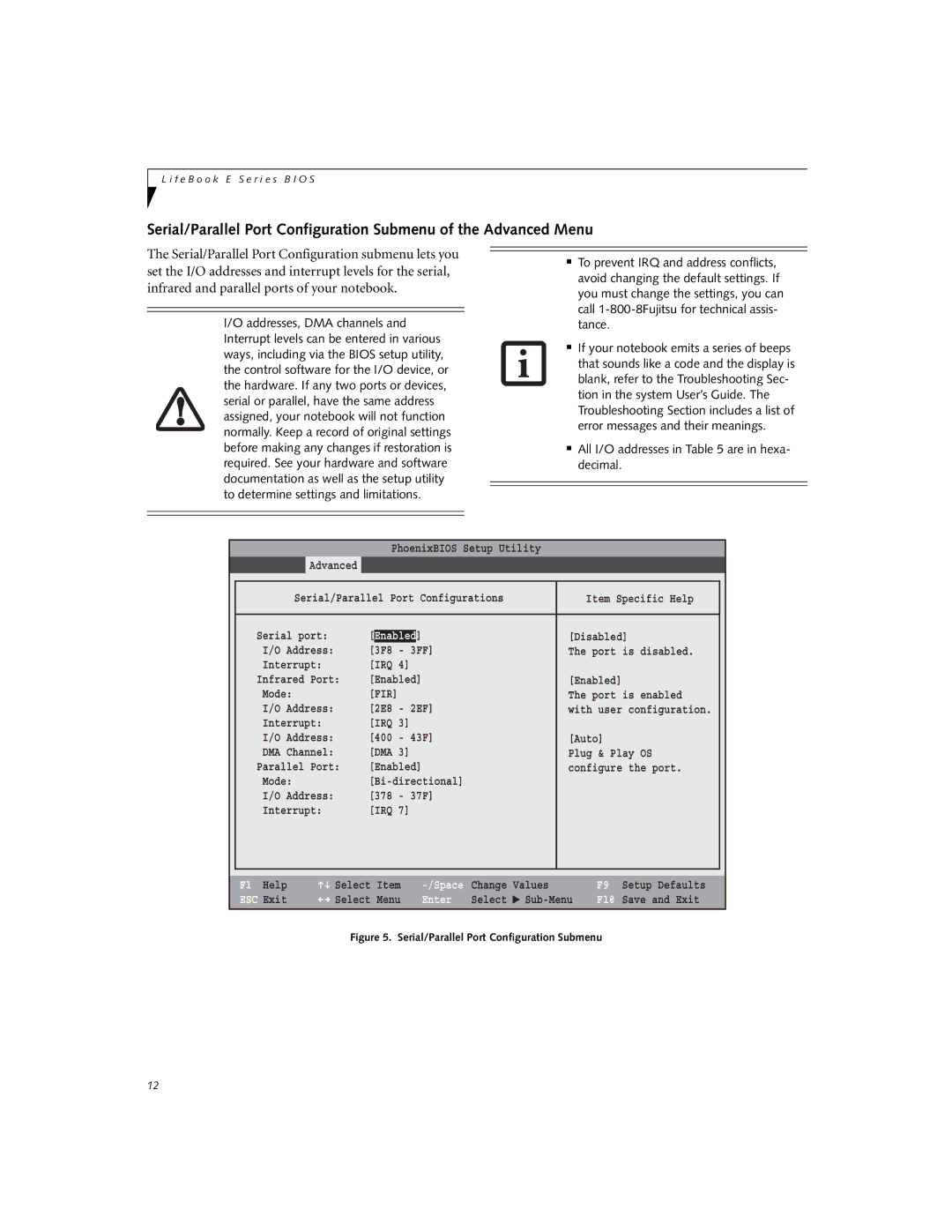
The Serial/Parallel Port Configuration submenu lets you set the I/O addresses and interrupt levels for the serial, infrared and parallel ports of your notebook.
I/O addresses, DMA channels and Interrupt levels can be entered in various ways, including via the BIOS setup utility, the control software for the I/O device, or the hardware. If any two ports or devices, serial or parallel, have the same address assigned, your notebook will not function normally. Keep a record of original settings before making any changes if restoration is required. See your hardware and software documentation as well as the setup utility to determine settings and limitations.
■To prevent IRQ and address conflicts, avoid changing the default settings. If you must change the settings, you can call
■If your notebook emits a series of beeps that sounds like a code and the display is blank, refer to the Troubleshooting Sec- tion in the system User’s Guide. The Troubleshooting Section includes a list of error messages and their meanings.
■All I/O addresses in Table 5 are in hexa- decimal.
PhoenixBIOS Setup Utility
Advanced
|
|
|
|
|
|
| Serial/Parallel Port Configurations | Item Specific Help |
| ||
|
|
|
|
| |
| Serial port: | [Enabled] | [Disabled] |
| |
| I/O Address: | [3F8 | - 3FF] | The port is disabled. |
|
| Interrupt: | [IRQ 4] |
|
| |
| Infrared Port: | [Enabled] | [Enabled] |
| |
| Mode: | [FIR] |
| The port is enabled |
|
| I/O Address: | [2E8 | - 2EF] | with user configuration. |
|
| Interrupt: | [IRQ 3] |
|
| |
| I/O Address: | [400 | - 43F] | [Auto] |
|
| DMA Channel: | [DMA 3] | Plug & Play OS |
| |
| Parallel Port: | [Enabled] | configure the port. |
| |
| Mode: |
|
| ||
| I/O Address: | [378 | - 37F] |
|
|
| Interrupt: | [IRQ 7] |
|
| |
|
|
|
|
|
|
|
|
|
|
|
|
F1 Help | Select | Item |
ESC Exit | Select | Menu |
Change | Values | |
Enter | Select | ▲ |
F9 Setup Defaults
F10 Save and Exit
Figure 5. Serial/Parallel Port Configuration Submenu
12