PREPARATORY OPERATION
To set the current day and time
1
 CLOCK ADJUST
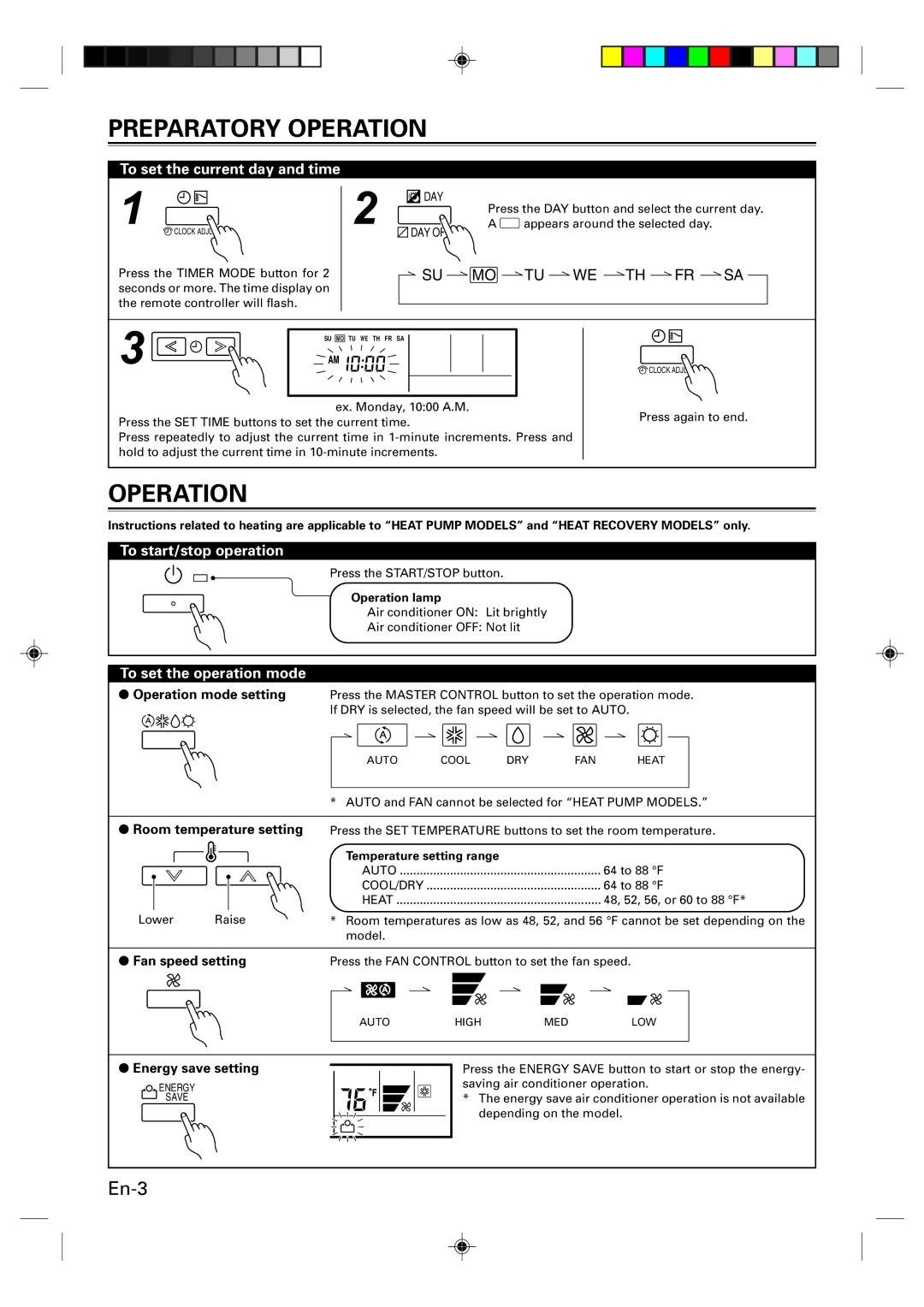
Press the TIMER MODE button for 2 seconds or more. The time display on the remote controller will flash.
2  DAY
DAY
Press the DAY button and select the current day.
A appears around the selected day.
DAY OFF
 SU MO TU WE TH FR SA
3 | SU MO TU WE TH FR SA |
|
ex. Monday, 10:00 A.M.
Press the SET TIME buttons to set the current time.
Press repeatedly to adjust the current time in
 CLOCK ADJUST
Press again to end.
OPERATION
Instructions related to heating are applicable to “HEAT PUMP MODELS” and “HEAT RECOVERY MODELS” only.
To start/stop operation
Press the START/STOP button.
Operation lamp
Air conditioner ON: Lit brightly
Air conditioner OFF: Not lit
To set the operation mode
●Operation mode setting Press the MASTER CONTROL button to set the operation mode. If DRY is selected, the fan speed will be set to AUTO.
AUTO | COOL | DRY | FAN | HEAT |
* AUTO and FAN cannot be selected for “HEAT PUMP MODELS.”
●Room temperature setting
Lower Raise
Press the SET TEMPERATURE buttons to set the room temperature.
Temperature setting range |
|
AUTO | 64 to 88 °F |
COOL/DRY | 64 to 88 °F |
HEAT | 48, 52, 56, or 60 to 88 °F* |
*Room temperatures as low as 48, 52, and 56 °F cannot be set depending on the model.
● Fan speed setting | Press the FAN CONTROL button to set the fan speed. |
| ||
| AUTO | HIGH | MED | LOW |
●Energy save setting
ENERGY
SAVE
Press the ENERGY SAVE button to start or stop the energy- saving air conditioner operation.
*The energy save air conditioner operation is not available depending on the model.