Kodak EasyShare C613 Zoom digital camera
Eastman Kodak Company Rochester, NY
On/Off button Microphone Flash
Mode dial
Front view
Shutter button Lens Flash button
Back view
Table of contents
Table of contents
To replace batteries and extend battery life, see
Attaching the strap Loading the battery
Turning on the camera Setting the language, date/time
See page 50 for storage capacities
Storing pictures on an SD or MMC card
To review pictures/videos anytime, see
Taking a picture
Reviewing the picture just taken
Press the Shutter button halfway
Using the framing marks to take pictures
Taking a video
To zoom out
Using optical zoom
Using the digital zoom
Use the LCD to frame your subject
Using the flash
Using different picture-taking modes
Use this For
Press OK to choose a Scene mode
Scene modes
Self
Using camera Help
SCN mode Flower
Then press the button
Capture mode-shutter pressed halfway
Understanding the picture-taking icons
Magnifying pictures
Reviewing pictures/videos
Viewing picture/video information
Playing a video
Viewing thumbnails multi-up
Press the Menu button to exit the menu
Deleting pictures/videos
Protecting pictures/videos from deletion
Highlight Edit Picture, then press OK
Using Kodak Perfect Touch technology
Cropping pictures
Press to highlight Perfect Touch tech., then press OK
Press the Review button, then to find a video
Editing videos
Making a picture from a video
Trimming a video
Starting the slide show
Use Slide Show to display your pictures/videos on the LCD
Running a slide show
Making a video action print
Running a continuous slide show loop
Changing the slide show display interval
Copy pictures/videos
Copying pictures/videos
Before you copy, make sure that
Videos
Understanding the review icons
Pictures
Understanding blur warning icons
Exposure Compensation
Changing picture-taking settings
Self-timer
Options
White Balance
SCN mode
Picture Size
MP 169-HDTV format
Black-and-white or sepia
Landscape mode
Video mode
Options
Customizing your camera
Playback Blur Warning On default
Settings Auto Power Off Minutes
Minutes default
Imprint the date on pictures Default is off
Press the Info/Display button until the grid appears
Using exposure compensation to adjust picture brightness
Using the framing grid to compose a picture
Sharing your pictures
Printing tagged pictures
Tagging pictures for printing
Press the Share button to exit the menu
Third-transfer and email
Tagging pictures and videos for emailing
First-on your computer
Second-tag pictures/videos on your camera
Computer
Tagging pictures as favorites
Transfer
Pictures to your
Removing favorites from your camera
Optional settings
Slide Show Remove favorites Multi-up Setup Menu
Printing and emailing favorites
Tagging pictures/videos for albums
Third-transfer to your computer
Pre-tagging for album names
Second-on your camera
Selected albums are noted with a check mark
Follow the on-screen instructions to install the software
Installing the software
Also available for transferring
Transferring pictures with the USB cable
Turn off the camera and printer
Connecting the camera to a PictBridge enabled printer
Printing pictures
Turn on the printer. Turn on the camera
Using a printer that is not PictBridge enabled
Printing from a PictBridge enabled printer
Disconnecting the camera from a PictBridge enabled printer
Printing from an optional SD/MMC card
Dock compatibility for your camera
Ordering prints online
Including protected files
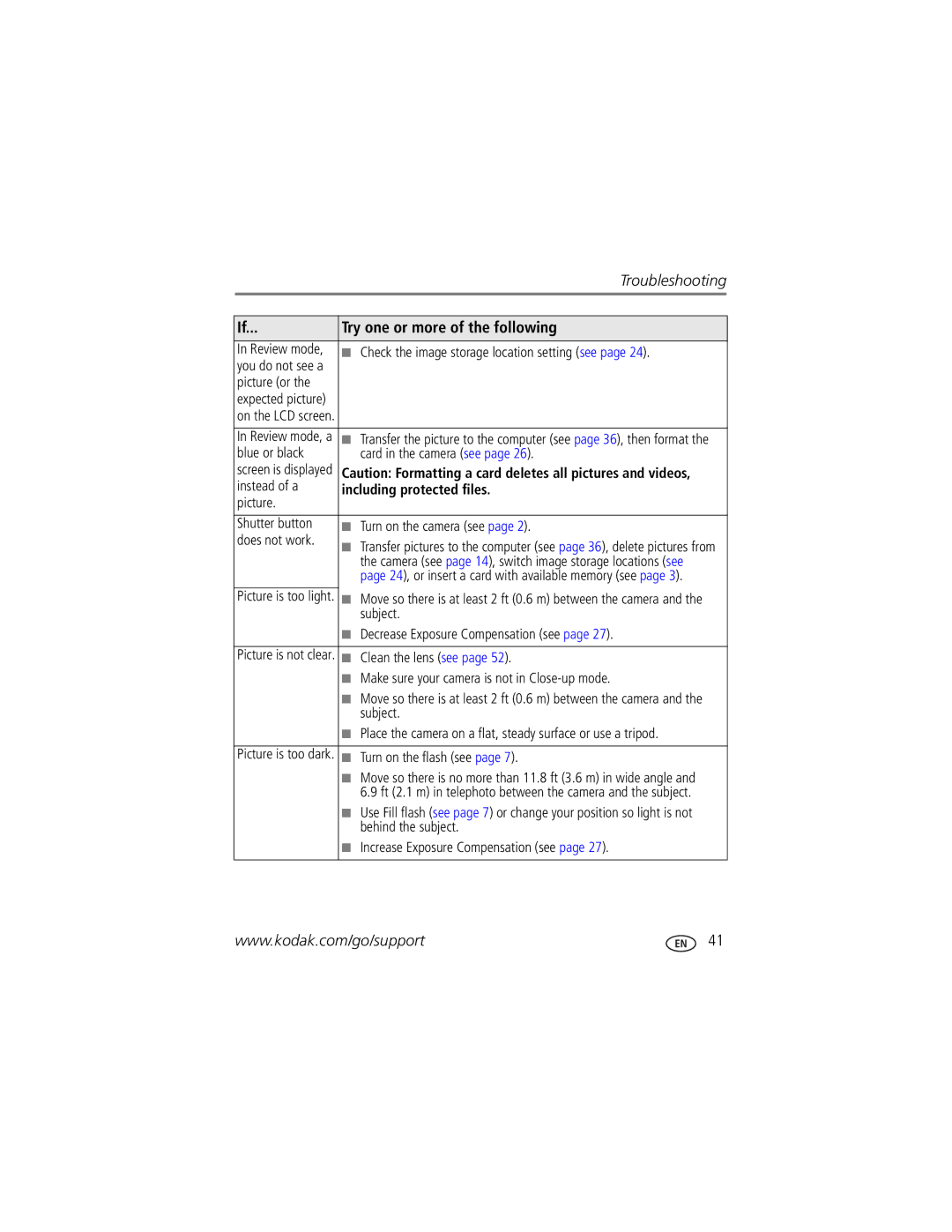
Camera problems
Try one or more of the following
Picture or
Check the image storage location setting see
Clean the lens see
Make sure your camera is not in Close-up mode
Camera/computer communications
LCD screen messages
Kodak EasyShare software Help
Turned off
Select Interactive Troubleshooting & Repairs
Format Camera error
Guide Troubleshooting & Repairs
Other
Helpful links
Camera
Software
Italy 02 696 Japan 03 5540 Korea 080 708 Netherlands
Australia
800 901
India 91 80
Output image size
Camera specifications
CCD-1/2.5 in. CCD, 43 aspect ratio
Color modes-Color, Black & White, Sepia
Self Timer-2 seconds, 10 seconds, or 2-shot
Flash modes-Auto, Fill, Red-eye, Off
PictBridge support-Yes
Upgrading your software and firmware Storage capacities
Care and maintenance
Operating temperature-32-104F0-40C
Weight-137 g 4.8 oz without battery or card
Important safety instructions
Do not charge non-rechargeable batteries
Battery life
Extending battery life
Battery Pictures
Limitations
Limited Warranty
Limited warranty coverage
Outside the United States and Canada
Your rights
FCC compliance and advisory
Regulatory compliance
Observation des normes-Classe B
Australian C-Tick
Canadian DOC statement
N137
Eastman Kodak Company Rochester, NY AIO-40
Vcci Class B ITE Russian GOST-R
Deleting
Backlight, 9 battery
Focus framing marks
Blur warning, 26 button
LCD/info button
Compatibility, 39 connector, 2 printer
About pictures, videos, 13 installing
Help
SCN
Lens Cleaning lens, 50 loading
Full, 24 inserting card, 3 storage capacities
Scene modes, 9 SCN, 8 SD/MMC card
Protecting pictures, videos Quickview, using
Return
Sharing pictures, videos, 27 shutter
White balance, 23 settings
Sounds, 25 specifications, camera, 48 sports
Switching, 24 strap post, 2 sunset
Viewing picture after taking, 4
Emailing tagged, 29 transfer
Wrist strap