CUSTOMIZING SETTINGS 13
Customizing Settings
Menu Settings
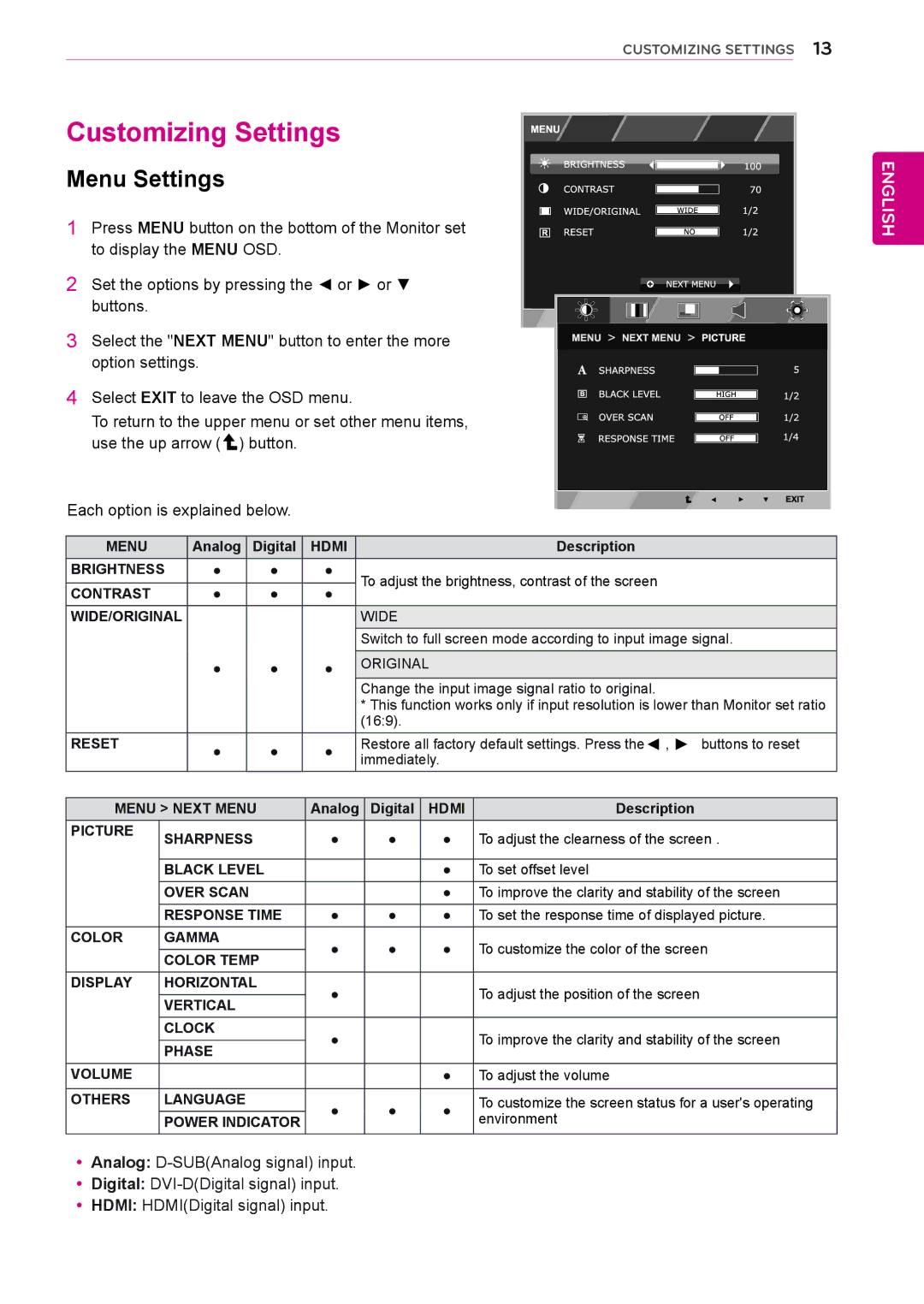
1 Press MENU button on the bottom of the Monitor set to display the MENU OSD.
2 Set the options by pressing the ◄ or ► or ▼ buttons.
3 Select the "NEXT MENU" button to enter the more option settings.
4 Select EXIT to leave the OSD menu.
To return to the upper menu or set other menu items, use the up arrow (  ) button.
Each option is explained below.
MENU | Analog | Digital | HDMI | Description | |
BRIGHTNESS | ● | ● | ● | To adjust the brightness, contrast of the screen | |
|
|
|
| ||
CONTRAST | ● | ● | ● | ||
| |||||
WIDE/ORIGINAL |
|
|
| WIDE | |
|
|
|
| Switch to full screen mode according to input image signal. | |
| ● | ● | ● | ORIGINAL |
Change the input image signal ratio to original.
*This function works only if input resolution is lower than Monitor set ratio (16:9).
RESET | ● | ● | ● | Restore all factory default settings. Press the◄ , ► buttons to reset | |||
| immediately. |
| |||||
|
|
|
|
| |||
|
|
|
|
|
|
|
|
MENU > NEXT MENU |
| Analog |
| Digital | HDMI | Description | |
PICTURE | SHARPNESS |
| ● |
| ● | ● | To adjust the clearness of the screen . |
|
|
| |||||
|
|
|
|
|
|
|
|
| BLACK LEVEL |
|
|
|
| ● | To set offset level |
| OVER SCAN |
|
|
|
| ● | To improve the clarity and stability of the screen |
| RESPONSE TIME | ● |
| ● | ● | To set the response time of displayed picture. | |
COLOR | GAMMA |
| ● |
| ● | ● | To customize the color of the screen |
| COLOR TEMP |
|
| ||||
|
|
|
|
|
|
| |
DISPLAY | HORIZONTAL |
| ● |
|
|
| To adjust the position of the screen |
| VERTICAL |
|
|
|
| ||
|
|
|
|
|
|
| |
| CLOCK |
| ● |
|
|
| To improve the clarity and stability of the screen |
| PHASE |
|
|
|
| ||
|
|
|
|
|
|
| |
VOLUME |
|
|
|
|
| ● | To adjust the volume |
|
|
|
|
|
|
|
|
OTHERS | LANGUAGE |
| ● |
| ● | ● | To customize the screen status for a user's operating |
| POWER INDICATOR |
| environment | ||||
|
|
|
|
| |||
ENGLISH
yyAnalog:
yyDigital:
yyHDMI: HDMI(Digital signal) input.