Basic instructions
Surround
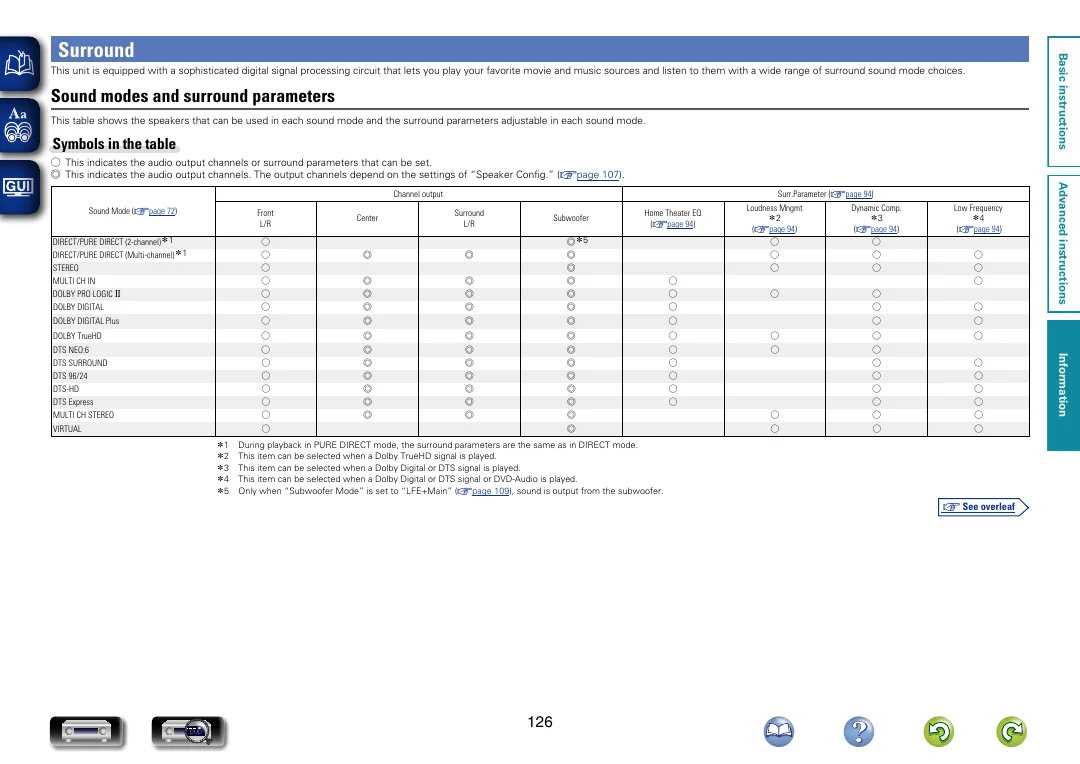
This unit is equipped with a sophisticated digital signal processing circuit that lets you play your favorite movie and music sources and listen to them with a wide range of surround sound mode choices.
Sound modes and surround parameters
This table shows the speakers that can be used in each sound mode and the surround parameters adjustable in each sound mode.
Symbols in the table
S This indicates the audio output channels or surround parameters that can be set.
D This indicates the audio output channels. The output channels depend on the settings of “Speaker Config.” (vpage 107).
Front
L/R
Surr.Parameter (vpage 94)
Center
Surround
L/R
D
D
D
D
D
Subwoofer
Home Theater EQ
(vpage 94)
Loudness Mngmt
z2
(vpage 94)
Dynamic Comp.
z3
(vpage 94)
Low Frequency
z4
(vpage 94)
S
S
S
S
S
S
S
S
S
S
S
S
S
S
S
S
D
D
D
S
S
D
D
D
S
S
S
DTS NEO:6
S
D
D
D
S
S
S
DTS SURROUND
DTS 96/24
DTS-HD
DTS Express
MULTI CH STEREO
S
S
S
S
S
D
D
D
D
D
D
D
D
D
D
D
D
D
D
D
S
S
S
S
S
S
S
S
S
S
S
S
S
S
S
VIRTUAL
S
S
S
S
S
S
S
S
S
S
DOLBY DIGITAL Plus
S
DOLBY TrueHD
z1
z2
z3
z4
z5
D
S
S
S
During playback in PURE DIRECT mode, the surround parameters are the same as in DIRECT mode.
This item can be selected when a Dolby TrueHD signal is played.
This item can be selected when a Dolby Digital or DTS signal is played.
This item can be selected when a Dolby Digital or DTS signal or DVD-Audio is played.
Only when “Subwoofer Mode” is set to “LFE+Main” (vpage 109), sound is output from the subwoofer.
v See overleaf
DVD
126
Information
D
D
D
Dz5
D
D
D
D
D
DIRECT/PURE DIRECT (2-channel) z1
DIRECT/PURE DIRECT (Multi-channel) z1
STEREO
MULTI CH IN
DOLBY PRO LOGIC g
DOLBY DIGITAL
Advanced instructions
Channel output
Sound Mode (vpage 72)