Connecting other devices
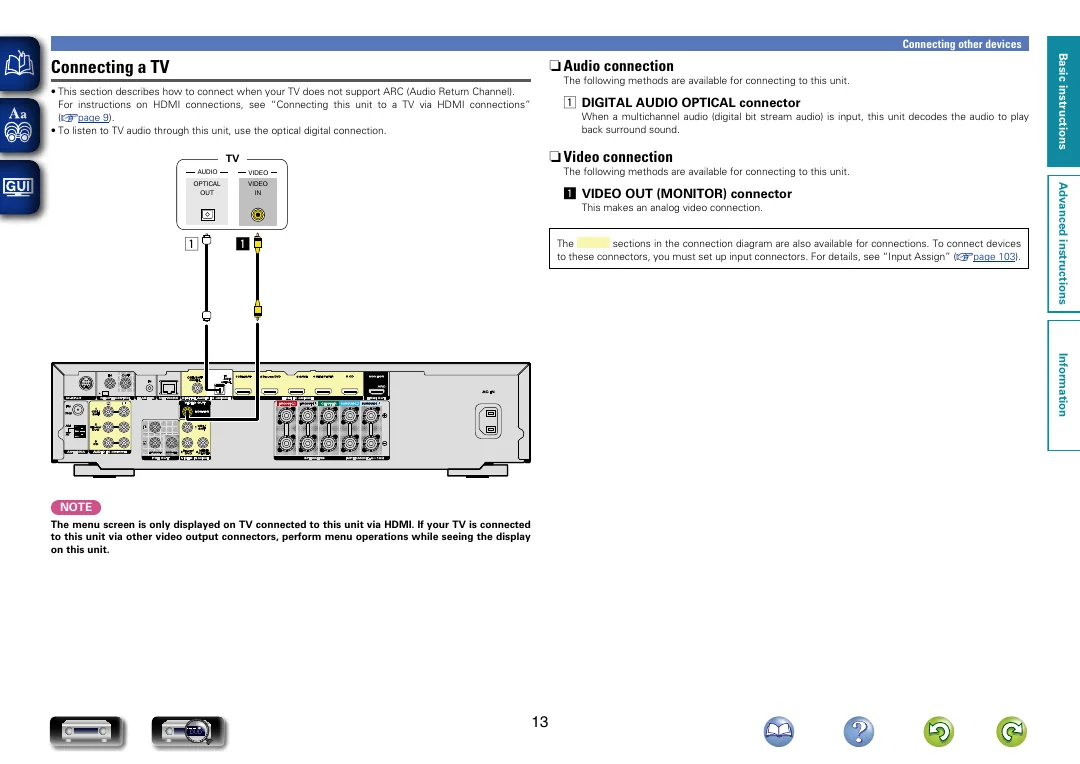
n n Audio connection
The following methods are available for connecting to this unit.
• This section describes how to connect when your TV does not support ARC (Audio Return Channel).
For instructions on HDMI connections, see “Connecting this unit to a TV via HDMI connections”
(vpage 9).
• To listen to TV audio through this unit, use the optical digital connection.
a DIGITAL AUDIO OPTICAL connector
When a multichannel audio (digital bit stream audio) is input, this unit decodes the audio to play
back surround sound.
n n Video connection
TV
VIDEO
OPTICAL
OUT
VIDEO
IN
The following methods are available for connecting to this unit.
a VIDEO OUT (MONITOR) connector
This makes an analog video connection.
a
a
The
sections in the connection diagram are also available for connections. To connect devices
to these connectors, you must set up input connectors. For details, see “Input Assign” (vpage 103).
Advanced instructions
AUDIO
Basic instructions
Connecting a TV
Information
NOTE
The menu screen is only displayed on TV connected to this unit via HDMI. If your TV is connected
to this unit via other video output connectors, perform menu operations while seeing the display
on this unit.
DVD
13