20
Connecting other devices
Connecting a wireless receiver (RX101)
•
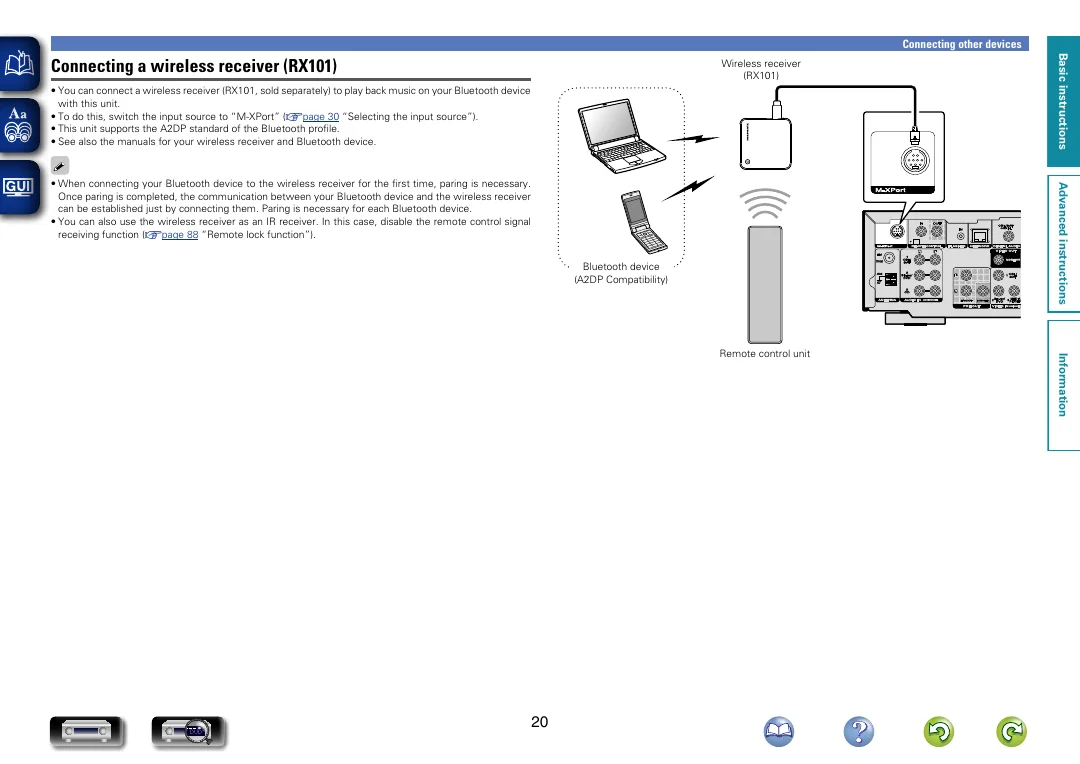
You can connect a wireless receiver (RX101, sold separately) to play back music on your Bluetooth device
with this unit.
•
To do this, switch the input source to “M-XPort” (
v
page 30
“Selecting the input source”).
•
This unit supports the A2DP standard of the Bluetooth profile.
•
See also the manuals for your wireless receiver and Bluetooth device.
•
When connecting your Bluetooth device to the wireless receiver for the first time, paring is necessary.
Once paring is completed, the communication between your Bluetooth device and the wireless receiver
can be established just by connecting them. Paring is necessary for each Bluetooth device.
•
You can also use the wireless receiver as an IR receiver. In this case, disable the remote control signal
receiving function (
v
page 88
“Remote lock function”).
Wireless receiver
(RX101)
Bluetooth device
(A2DP Compatibility)
Remote control unit
Basic instructions
Advanced instructions
Information
Basic instructions
DVD